

ClickUp is a productivity app that helps teams work together. It combines tasks, communication, and projects into one platform.
ClickUp offers features powered by AI for better efficiency. Imagine managing your tasks, chats, and projects all in one place. ClickUp does just that, making teamwork simpler and more organized. Its AI features help streamline workflows, connect teams, and save time.
With tools like sprints, time tracking, and dashboards, you can keep an eye on project progress easily. ClickUp’s customizable workspace means you can tailor it to fit your team’s needs perfectly. You can integrate it with apps like Google Drive and Salesforce, ensuring smooth operation across platforms. Whether you’re setting goals or automating tasks, ClickUp aims to boost productivity, offering a free plan and 24/7 support for users worldwide.
Credit: mapplinks.com
Introduction To Clickup: Unleashing Productivity Potential
In today’s fast-paced work environment, productivity tools are essential. ClickUp stands out as a comprehensive platform to streamline work. It integrates projects, conversations, and knowledge, enhancing collaboration and efficiency.
Overview Of Clickup As A Productivity Tool
ClickUp is an all-in-one app designed to bring everything under one roof. It offers features like Tasks & Chat for seamless task management and communication. The app boasts AI Integration, providing smarter workflows. Key features include:
- Sprints & Time Tracking: Efficiently track progress and manage time.
- Calendar & Docs: Organize schedules and documents.
- Goals & Dashboards: Set objectives and visualize metrics.
- Whiteboards & Forms: Collaborate and gather information.
- Automations: Automate tasks to save time.
- Integrations: Connect with apps like Google Drive and Salesforce.
- Customizable Workspace: Tailor the app to team needs.
Purpose And Significance In Today’s Work Environment
The purpose of ClickUp is to enhance productivity by reducing app-switching. Its flexibility allows configuration for any industry. Collaboration is streamlined, connecting teams effortlessly. AI tools such as AI Notetaker and AI Writer boost productivity significantly.
ClickUp offers a Free Forever Plan for unlimited use without a credit card. Advanced features are available in additional plans. Recognized by G2 and Trust Radius, ClickUp is praised for its flexibility and ease of use. Customers benefit from 24/7 support and regular updates, ensuring smooth operation.
Key Features Of Clickup
ClickUp is a comprehensive productivity tool that brings all your work into one place. It offers a variety of features to boost collaboration and efficiency. Let’s explore the key features that make ClickUp an essential tool for any team.
Task Management: Streamlining Workflow And Collaboration
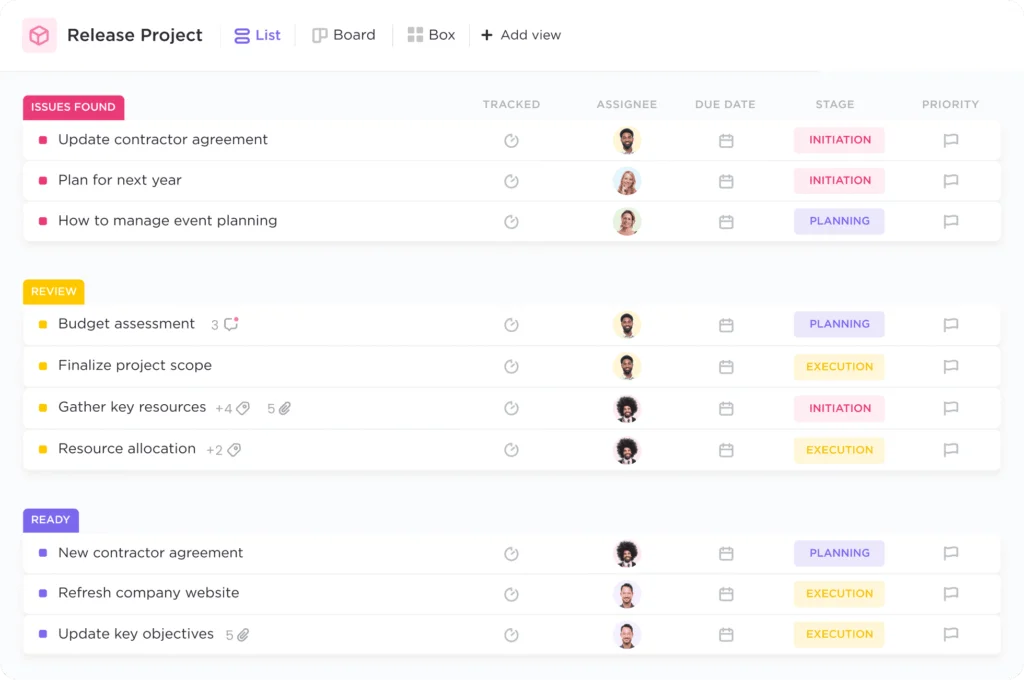
ClickUp excels in task management, helping teams streamline their workflow. You can manage tasks and communicate seamlessly within the platform. The Tasks & Chat feature ensures that all discussions stay connected to relevant tasks. This integration promotes effective collaboration.
Customization: Tailoring The Platform To Fit Individual And Team Needs
The customizable workspace allows you to tailor ClickUp to your specific needs. Use custom fields and templates to organize your work environment. This flexibility ensures that ClickUp fits any type of work or industry. Such customization enhances both individual and team productivity.
Time Tracking: Enhancing Efficiency Through Time Management
With ClickUp’s time tracking capabilities, manage time efficiently. Track project progress with ease. The integration of sprints and time management tools provides a clear overview of how time is spent. This feature is vital for meeting deadlines and improving efficiency.
Integrations: Seamless Connectivity With Other Tools
ClickUp offers seamless integrations with various apps like Google Drive and Salesforce. This connectivity reduces the need for constant app-switching. It allows teams to keep everything in one place, enhancing workflow efficiency.
Goal Setting: Aligning Tasks With Overarching Objectives
Setting goals within ClickUp helps align tasks with larger objectives. Use Goals & Dashboards to set objectives and visualize performance metrics. This feature ensures every task contributes to your overarching goals, promoting strategic planning.
Pricing And Affordability Of Clickup
Understanding the pricing and affordability of ClickUp is crucial for teams seeking a cost-effective productivity solution. ClickUp offers a range of pricing tiers designed to meet diverse needs, ensuring that businesses of all sizes can benefit from its comprehensive features without breaking the bank.
Overview Of Pricing Tiers
ClickUp provides several pricing tiers, catering to different requirements and budgets. Here’s a breakdown:
| Plan | Features | Cost |
|---|---|---|
| Free Forever Plan | Essential features for unlimited use | Free |
| Additional Plans | Advanced features and enterprise needs | Contact sales for pricing |
The Free Forever Plan is accessible without a credit card, offering basic functionalities to get started. For more robust features, additional plans are available. These plans are tailored to provide enhanced capabilities like AI integration and advanced automations.
Cost-effectiveness For Teams And Businesses
ClickUp’s pricing structure is designed to be cost-effective for teams and businesses. It reduces the need for multiple apps by integrating projects, tasks, and communication into a single platform. This consolidation leads to enhanced productivity and significant cost savings.
- Unlimited Users: Manage teams without extra costs per user.
- Flexible Plans: Choose plans based on specific needs and budget.
- Customizable Workspaces: Tailor the platform, maximizing value for money.
Businesses can benefit from ClickUp’s flexible and customizable features, ensuring that every dollar spent contributes to improving workflow efficiency. With continuous support and regular updates, ClickUp offers reliability and value, making it a smart investment for any organization.
Pros And Cons Of Using Clickup
Understanding the pros and cons of ClickUp can help in choosing the right tools for productivity. ClickUp is a comprehensive productivity app that integrates work processes into a single platform. It offers numerous features to enhance team collaboration and efficiency. However, like any tool, it has its strengths and areas for improvement. Let’s dive into these aspects to better understand its utility.
Advantages: Comprehensive Features And User-friendly Interface
ClickUp stands out with its comprehensive features. Users can manage tasks, communicate through chats, and integrate AI for smarter workflows. The app provides tools like sprints, time tracking, and a calendar to organize schedules. It also includes whiteboards and forms to support creative collaboration. Automation of repetitive tasks helps in saving time and effort.
The interface is user-friendly and customizable. Teams can tailor the workspace with custom fields and templates to fit their specific needs. The platform supports integration with various apps like Google Drive and Salesforce, enhancing its utility across different industries.
| Feature | Benefit |
|---|---|
| Tasks & Chat | Seamless task management and communication |
| AI Integration | Smarter workflows and connectivity |
| Automations | Time-saving through task automation |
| Customizable Workspace | Tailored to specific team needs |
Limitations: Potential Challenges And Areas For Improvement
Despite its many advantages, ClickUp has some limitations. Users may experience a learning curve due to the extensive features available. It can be overwhelming for new users to navigate the platform effectively.
Although ClickUp offers customization, certain advanced features might require more technical knowledge. Some users have reported occasional performance issues, particularly with larger projects or data-intensive tasks. This can affect efficiency and workflow.
The mobile app, while functional, lacks some features present in the desktop version. It can limit productivity when working on the go. Continuous improvements are expected, but these areas remain a challenge for now.
- Learning Curve: Extensive features can be overwhelming for beginners.
- Performance Issues: Slows down with large data sets.
- Mobile Limitations: Fewer features compared to the desktop version.
Recommendations For Ideal Clickup Users
ClickUp is an all-in-one productivity app, perfect for streamlining work processes. It integrates projects, knowledge, and conversations into a single platform. ClickUp offers AI-powered features to enhance collaboration and efficiency. But who benefits most from using this versatile tool? Below, we explore recommendations for ideal ClickUp users.
Who Benefits Most From Clickup
ClickUp is designed for diverse industries and work styles. Project managers find it invaluable for overseeing tasks and tracking progress. Remote teams benefit from seamless communication and collaboration. Startups appreciate its flexibility and customizable features. Creative teams thrive with tools like Whiteboards and Forms. Tech companies utilize AI integration for smarter workflows. ClickUp suits anyone aiming to reduce app-switching and improve workflow efficiency.
Specific Scenarios Where Clickup Excels
ClickUp shines in various scenarios. For team collaboration, its chat and tasks features streamline communication. Time management is enhanced with Sprints & Time Tracking. Scheduling becomes easier with Calendar integration. Documentation is organized with Docs. Goal setting is simplified with Goals & Dashboards. Automations save time on repetitive tasks. It excels in scenarios demanding connectivity, customization, and productivity.
| Feature | Benefit |
|---|---|
| Tasks & Chat | Seamless communication and task management |
| AI Integration | Smarter workflows and connectivity |
| Sprints & Time Tracking | Efficient project progress tracking |
| Calendar & Docs | Organized schedules and documents |
| Goals & Dashboards | Objective setting and performance visualization |
| Whiteboards & Forms | Creative collaboration and information gathering |
| Automations | Time-saving task automation |
ClickUp is praised for its flexibility and ease of use. Testimonials highlight its impact on productivity and collaboration. Recognized as a leader on G2 and most loved on Trust Radius, ClickUp showcases its credibility and customer satisfaction.

Credit: www.slammedialab.com

Credit: clickup.com
Frequently Asked Questions
What Is Clickup Used For?
ClickUp is a versatile project management tool for task organization, team collaboration, and productivity enhancement. It offers features like task tracking, goal setting, and integrations with other apps. Teams use ClickUp for streamlined workflows, time management, and communication. It simplifies project planning, execution, and monitoring effectively.
What Is Clickup Best For?
ClickUp is ideal for task management, project collaboration, and productivity enhancement. It offers customizable workflows, time tracking, and integrations. Teams use ClickUp for managing tasks, deadlines, and communication in one platform. It’s suitable for businesses of all sizes looking for a comprehensive project management tool.
Is Clickup Actually Free?
ClickUp offers a free plan with basic features. Upgrade for more advanced functionalities. It’s suitable for personal use and small teams. Check their website for detailed plan differences and features.
What Is Clickup Vs Jira?
ClickUp and Jira are project management tools. ClickUp offers task management, docs, and goals. Jira focuses on software development, agile, and bug tracking. Both enhance team collaboration and productivity. Choose based on your project needs and team size.
Conclusion
ClickUp brings teams together in one efficient platform. It simplifies work management with tasks, chats, and AI features. Perfect for tracking progress and organizing documents. Customizable to fit any industry. It makes collaboration easy with integrations like Google Drive and Salesforce.
Users love its flexibility and support. ClickUp ensures smooth workflows with automation. Its free plan offers essential tools, making it accessible to all. Try ClickUp to see how it enhances productivity.
