

Creating high-quality PDFs and images from HTML can be challenging. That’s where MarkupGo comes in.
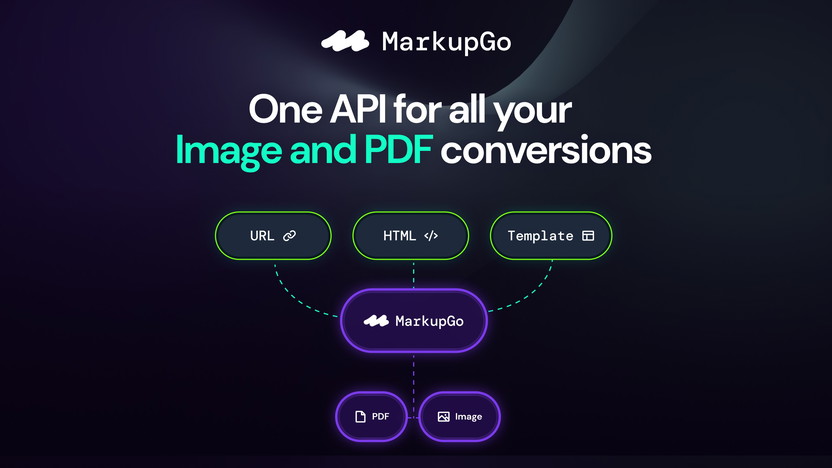
MarkupGo is an API platform that simplifies and automates PDF and image generation from HTML, CSS, and JavaScript templates. It offers dynamic templates, real-time previews, and extensive customization options. With its powerful conversion features, you can turn web pages into pixel-perfect PDFs or images, ensuring consistent quality.
MarkupGo also provides robust image transformation capabilities, including resizing, cropping, and applying filters. By automating these processes, it saves time and streamlines your workflow. Whether you need to generate professional documents or optimize images for web and print, MarkupGo has you covered. Explore more about MarkupGo here.

Credit: appsumo.com
Introduction To Markupgo
In the dynamic world of web design, tools that streamline workflows are invaluable. MarkupGo stands out as a powerful API platform that automates image and PDF conversions. This blog post will delve into the core aspects of MarkupGo, its purpose, and its significance in web design.
What Is Markupgo?
MarkupGo is an all-in-one API platform designed to generate high-quality PDFs and images. It converts content from URLs, HTML, CSS, and JavaScript templates. This tool simplifies the creation of professional documents and images, ensuring consistent quality and saving time.
Purpose And Importance In Web Design
MarkupGo serves multiple purposes in web design:
- Dynamic Templates: Create and manage reusable templates with HTML, CSS, and JavaScript. Preview and customize templates in real time.
- PDF and Image Generation: Convert web pages to pixel-perfect PDFs or images, supporting SVGs, emojis, embedded fonts, and custom headers and footers.
- HTML to PDF/Image Conversion: Generate high-quality PDFs and images directly from HTML content, with full control over appearance and functionality.
- Image Transformation API: Resize, crop, rotate, and apply filters to images for optimization across web applications and print media.
- Usage Monitoring: Track downloads and bandwidth usage, analyze performance metrics, and optimize resource allocation.
The importance of MarkupGo in web design cannot be overstated. It streamlines workflows, ensuring designers can focus on creativity rather than repetitive tasks. By automating document and image generation, MarkupGo saves time and guarantees high-quality output. Detailed tracking and performance insights further enhance its value, making it a must-have tool for web designers.
Pricing Details
| Plan | Cost | Credits per Month | Templates | Features |
|---|---|---|---|---|
| Plan 1 | $49 (originally $348) | 1,000 | 10 | Full API Access |
| Plan 2 | $98 (originally $696) | 3,000 | 30 | Full API access, Image Transformation API |
| Plan 3 | $147 (originally $1,044) | 5,000 | Unlimited | Full API access, Image Transformation API |
Refund Or Return Policies
MarkupGo offers a 60-day money-back guarantee. Try the product for 2 months to ensure it meets your needs.

Credit: www.linkedin.com
Key Features Of Markupgo
MarkupGo offers a robust set of features to automate your image and PDF conversions. This all-in-one API platform ensures high-quality output and streamlines your workflow. Let’s dive into the key features that make MarkupGo a powerful tool.
MarkupGo boasts an intuitive interface that is easy to navigate. Users can quickly get started with a minimal learning curve. The platform is designed for ease of use, ensuring that even non-technical users can create professional documents and images.
MarkupGo includes advanced collaboration tools that facilitate teamwork. Multiple users can work on the same project, ensuring a seamless and efficient workflow. These tools help in managing tasks and keeping track of progress.
One of the standout features of MarkupGo is its real-time editing and preview capabilities. Users can see changes instantly as they make them. This feature allows for quick adjustments and fine-tuning, ensuring the final output meets all requirements.
MarkupGo provides an extensive template library that users can leverage to create documents and images. These templates are customizable, allowing users to tailor them to their specific needs. The library includes a wide range of templates for different use cases.
MarkupGo comes with SEO optimization tools that help improve the visibility of your documents and images. These tools ensure that your content is optimized for search engines, enhancing discoverability and reach.

Below is a table summarizing the main features and benefits of MarkupGo:
| Feature | Benefit |
|---|---|
| Dynamic Templates | Create and manage reusable templates with HTML, CSS, and JavaScript. |
| PDF and Image Generation | Convert web pages to pixel-perfect PDFs or images. |
| HTML to PDF/Image Conversion | Generate high-quality PDFs and images directly from HTML content. |
| Image Transformation API | Resize, crop, rotate, and apply filters to images. |
| Usage Monitoring | Track downloads and bandwidth usage, and analyze performance metrics. |
MarkupGo is available in three pricing plans, each offering different levels of access and credits. Users can choose the plan that best suits their needs.
- Plan 1: $49, 1,000 credits per month, 10 templates, full API access.
- Plan 2: $98, 3,000 credits per month, 30 templates, full API access, Image Transformation API.
- Plan 3: $147, 5,000 credits per month, unlimited templates, full API access, Image Transformation API.
All plans come with a 60-day money-back guarantee. This allows users to try the product for two months to ensure it meets their needs.

Credit: appsumo.com
Intuitive Interface And Usability
MarkupGo offers an intuitive interface designed to make your workflow smoother and more efficient. This section delves into the user-friendly design, ease of navigation, and customizable workspaces that make MarkupGo stand out.
User-friendly Design
The user-friendly design of MarkupGo ensures that even beginners can navigate the platform with ease. The layout is clean, with clearly labeled menus and options that guide users through the process of generating PDFs and images.
A streamlined interface reduces clutter and focuses on essential functionalities. This design choice minimizes confusion and enhances productivity.
Ease Of Navigation
MarkupGo excels in ease of navigation. Users can quickly find the tools they need, thanks to an intuitive menu structure. The platform’s navigation is straightforward, with logical categorization of features.
Switching between different tasks, like creating templates or converting HTML to PDFs, is seamless. This fluid navigation significantly reduces the learning curve.
Customizable Workspaces
One of the standout features of MarkupGo is its customizable workspaces. Users can tailor their work environment to suit their specific needs. This flexibility allows for a more personalized and efficient workflow.
Customizable elements include template previews, editing panels, and toolbars. These can be adjusted to match individual preferences, making the platform adaptable to various user requirements.
| Feature | Description |
|---|---|
| User-Friendly Design | Clean layout with clearly labeled menus |
| Ease of Navigation | Logical categorization and intuitive menu structure |
| Customizable Workspaces | Adjustable elements for a personalized workflow |
MarkupGo’s interface and usability features make it an ideal choice for automating image and PDF conversions. The platform’s thoughtful design ensures that users can focus on their tasks without unnecessary distractions.
Credit: appsumo.com
Advanced Collaboration Tools
MarkupGo is not just about creating high-quality PDFs and images; it also excels in facilitating effective teamwork. Its advanced collaboration tools are designed to streamline the workflow and improve communication among team members.
Team Collaboration Features
MarkupGo offers a suite of team collaboration features that make it easier for teams to work together. This includes shared access to templates and resources, ensuring everyone is on the same page.
- Shared templates for consistent output
- Real-time preview and customization
- Role-based access control
Version Control
One of the standout features is version control. It allows teams to track changes and revert to previous versions if needed. This ensures that no work is lost and all changes can be easily managed.
| Feature | Benefit |
|---|---|
| Track Changes | Monitor all modifications |
| Revert to Previous Versions | Restore any past version |
Commenting And Feedback Mechanisms
Feedback is crucial in any collaborative effort. MarkupGo includes robust commenting and feedback mechanisms that allow team members to leave comments and suggestions directly on the templates. This enhances communication and ensures that all feedback is captured in one place.
- Direct commenting on templates
- Centralized feedback collection
- Notifications for new comments

These advanced collaboration tools make MarkupGo an excellent choice for teams looking to streamline their document and image generation processes.
Real-time Editing And Preview
MarkupGo offers a powerful feature: Real-time Editing and Preview. This feature enhances user experience by providing instant feedback and visual confirmation of changes.
Instant Changes Reflection
With MarkupGo, any edits you make are reflected instantly. This ensures that you can see the impact of your modifications without any delay. No more waiting for rendering or refreshing the page.
Key benefits include:
- Immediate visual feedback
- Faster workflow
- Improved accuracy
Below is a table summarizing the advantages:
| Feature | Benefit |
|---|---|
| Instant Changes Reflection | Quick visual confirmation |
| Real-time Feedback | Enhanced accuracy |
Cross-device Preview
Another standout feature is the Cross-Device Preview. This allows you to see how your content looks on different devices. Whether it’s a desktop, tablet, or smartphone, you can ensure that your PDFs and images are optimized for all screen sizes.
Benefits of cross-device preview include:
- Consistency across devices
- Improved user experience
- Reduced errors in the final output
Error Detection And Correction
MarkupGo also boasts an advanced Error Detection and Correction system. This feature identifies potential issues in your templates and content, allowing you to correct them before finalizing your documents.
Key benefits:
- Prevents costly mistakes
- Ensures high-quality output
- Saves time in the review process
By integrating these features, MarkupGo streamlines the document and image creation process. This ensures that your end products are always of the highest quality.
Extensive Template Library
The Extensive Template Library in MarkupGo is a standout feature. It offers a broad range of templates designed to simplify the creation of professional documents and images. These templates save time and ensure consistent quality in every output. Below, we explore the key aspects of this feature.

Credit: appsumo.com
Variety Of Templates
MarkupGo provides a wide variety of templates, catering to different needs and preferences. Users can select from a range of templates that include:
- Business Reports
- Invoices
- Marketing Materials
- Presentations
- And more…
Each template is crafted with attention to detail, ensuring that users have a professional starting point for their documents and images.
Template Customization
Each template in MarkupGo is fully customizable. Users can modify HTML, CSS, and JavaScript to match their specific needs. This level of customization allows for:
- Real-time previews
- Personalized branding
- Integration of custom headers and footers
These customization options ensure that every document or image aligns perfectly with the user’s requirements and branding guidelines.
Time-saving Benefits
The extensive template library in MarkupGo offers significant time-saving benefits:
- Pre-designed templates reduce the need to start from scratch.
- Real-time customization speeds up the editing process.
- The automated conversion ensures the quick generation of PDFs and images.
With these templates, users can produce high-quality documents and images in a fraction of the time it would take manually.
Seo Optimization Tools
MarkupGo offers a comprehensive range of SEO optimization tools that are designed to help your website rank better on search engines. These tools ensure that your content is not only relevant but also optimized for search engine visibility. Let’s delve into some key features that make MarkupGo stand out in SEO optimization.
Built-in Seo Features
MarkupGo comes with several built-in SEO features that enhance the overall quality and performance of your content. Some of these features include:
- Meta Tags: Automatically generate meta tags for titles, descriptions, and keywords.
- XML Sitemaps: Create and update sitemaps to help search engines index your site more effectively.
- Alt Text for Images: Ensure all images have appropriate alt text to improve accessibility and SEO.
- URL Optimization: Clean and optimize URLs for better search engine ranking.
Performance Analysis
Understanding the performance of your content is crucial for SEO. MarkupGo provides detailed performance analysis tools that help you track and improve your SEO efforts. These tools include:
| Feature | Description |
|---|---|
| SEO Score | Get an overall SEO score for your pages, highlighting areas for improvement. |
| Keyword Analysis | Analyze the effectiveness of your keywords and suggest better alternatives. |
| Backlink Tracking | Monitor the number and quality of backlinks to your site. |
| Page Load Speed | Assess and optimize the loading speed of your web pages. |
Content Optimization Tips
MarkupGo offers valuable content optimization tips to make your content more engaging and SEO-friendly. These tips focus on various aspects of content creation and optimization, including:
- Keyword Density: Maintain an optimal keyword density to avoid keyword stuffing.
- Content Structure: Use headings, bullet points, and short paragraphs for better readability.
- Internal Linking: Add internal links to keep users on your site longer.
- Mobile Optimization: Ensure your content is mobile-friendly for a better user experience.
Pricing And Affordability
MarkupGo offers a range of pricing plans designed to fit various needs and budgets. This section will provide a detailed look at the different pricing tiers, the value for money each plan offers, and how MarkupGo compares with its competitors.
Pricing Tiers
MarkupGo offers three distinct pricing plans:
| Plan | One-time Purchase | Credits per Month | Templates | API Access |
|---|---|---|---|---|
| Plan 1 | $49 (originally $348) | 1,000 | 10 | Full API Access |
| Plan 2 | $98 (originally $696) | 3,000 | 30 | Full API access, Image Transformation API |
| Plan 3 | $147 (originally $1,044) | 5,000 | Unlimited | Full API access, Image Transformation API |
Each plan comes with a one-time purchase option, offering a significant discount from the original price.
Value For Money
MarkupGo provides excellent value for money, especially given its comprehensive features. Here are some key benefits:
- Dynamic Templates: Create and manage reusable templates with real-time customization.
- PDF and Image Generation: Convert web pages to high-quality PDFs or images.
- HTML to PDF/Image Conversion: Generate PDFs and images directly from HTML content.
- Image Transformation API: Resize, crop, rotate, and apply filters to images.
- Usage Monitoring: Track downloads and bandwidth usage.
These features ensure consistent, high-quality output and save time by automating the conversion process.
Comparison With Competitors
MarkupGo stands out among its competitors in several ways:
- Affordable Pricing: One-time purchase options make it more cost-effective.
- Comprehensive API Access: Full API access is included in all plans.
- High-Quality Output: Ensures consistent and professional document generation.
- Customization Options: Offers real-time template customization.
- Performance Tracking: Detailed usage monitoring and performance insights.
Compared to other platforms, MarkupGo provides more features at a lower price point. Its one-time purchase plans offer long-term savings and flexibility.
Pros And Cons Of Markupgo
MarkupGo is a versatile API platform that simplifies the creation of PDFs and images. It offers various features and benefits, but it’s important to consider both its advantages and limitations. Below, we dive into the pros and cons of using MarkupGo, based on user feedback and reviews.
Advantages Of Using Markupgo
- Dynamic Templates: Create and manage templates using HTML, CSS, and JavaScript. Preview and customize in real-time.
- PDF and Image Generation: Convert web pages to PDFs or images. Supports SVGs, emojis, and custom headers and footers.
- HTML to PDF/Image Conversion: Generate high-quality PDFs and images from HTML content with full control over appearance.
- Image Transformation API: Resize, crop, rotate, and apply filters to images.
- Usage Monitoring: Track downloads and bandwidth usage. Analyze performance metrics.
- Cost-Effective: One-time purchase plans. Affordable compared to monthly subscriptions.
- Time-Saving: Automates the conversion process, saving valuable time.
Drawbacks And Limitations
- Credits Limitation: Monthly credit limits may be restrictive for high-volume users.
- Learning Curve: Initial setup and customization may require some technical knowledge.
- Template Restrictions: Lower plans have limited template numbers.
User Feedback And Reviews
Users have shared various experiences with MarkupGo. Here are some notable points:
| Feedback | Details |
|---|---|
| Positive Reviews | Most users appreciate the ease of use and the quality of generated documents. The dynamic templates and real-time preview are highly praised. |
| Negative Reviews | Some users find the monthly credit limit restrictive. Others mentioned a learning curve for the initial setup. |
MarkupGo is a robust tool for generating PDFs and images. It offers many benefits but also has some limitations. User feedback is mostly positive, highlighting its efficiency and quality output.

Credit: m.youtube.com
Ideal Users And Scenarios
MarkupGo is perfect for those needing seamless, automated image and PDF conversions. It caters to a wide array of users, from developers to businesses, ensuring top-notch document and image quality. Let’s explore the ideal users and scenarios for MarkupGo.
Best Use Cases
MarkupGo shines in various scenarios, making it a versatile tool for:
- Web Developers: Effortlessly convert HTML content into high-quality PDFs and images.
- Businesses: Automate the creation of professional documents, saving valuable time.
- Designers: Utilize dynamic templates to create visually appealing documents.
- Content Creators: Generate consistent, pixel-perfect images for web and print media.
Who Can Benefit The Most
MarkupGo is beneficial for a range of professionals:
| Profession | Benefit |
|---|---|
| Developers | Simplifies and automates PDF and image generation. |
| Businesses | Ensures consistent quality in document creation. |
| Designers | Allows real-time preview and customization of templates. |
| Content Creators | Optimizes images for both web applications and print media. |
Scenarios Where Markupgo Excels
MarkupGo excels in various scenarios, such as:
- Website to PDF Conversion: Generate professional PDFs from web pages with embedded fonts and custom headers.
- Image Optimization: Resize, crop, and apply filters to images for better performance.
- Template Management: Create and manage reusable HTML, CSS, and JavaScript templates efficiently.
- Usage Monitoring: Track downloads, analyze performance, and optimize resources.
Whether you are a developer, business owner, designer, or content creator, MarkupGo provides the tools needed for efficient, high-quality document and image production.
Frequently Asked Questions
What Is Markupgo?
MarkupGo is a powerful markup language tool. It helps developers create and manage markup efficiently.
How Does Markupgo Work?
Markupgo simplifies the coding process. It automates tasks and enhances productivity with its user-friendly interface.
Is Markupgo Suitable For Beginners?
Yes, Markupgo is beginner-friendly. It provides easy-to-understand documentation and tutorials to get started quickly.
What Are The Main Features Of Markupgo?
Markupgo offers syntax highlighting, code completion, and error detection. These features improve coding accuracy and speed.
Conclusion
MarkupGo simplifies image and PDF conversions. Its powerful API ensures high-quality outputs. Dynamic templates and real-time customization save time. The platform offers flexibility in generating professional documents. Its pricing plans cater to different needs. Explore more about MarkupGo here.
