
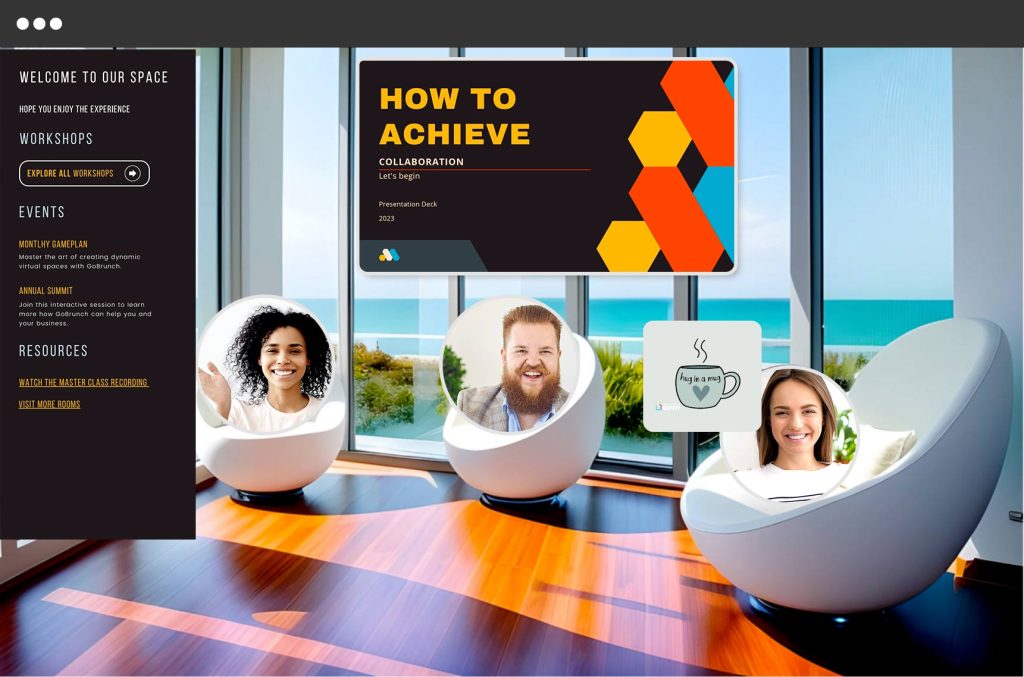
Virtual meetings have become a staple in our daily lives, making effective tools essential. GoBrunch offers a unique experience that sets it apart from typical webinar platforms.
Imagine hosting virtual events that feel like in-person gatherings. GoBrunch’s engaging interface and interactive features make this possible. With virtual rooms, breakout sessions, and comprehensive admin controls, it turns ordinary meetings into dynamic experiences. Whether you’re conducting webinars, online courses, or team meetings, GoBrunch has tools to enhance engagement and participation. Its customizable branding, collaboration tools, and recording options provide flexibility and control. Learn more about the exciting features of GoBrunch and how it can transform your virtual events by visiting the GoBrunch website.

Credit: www.youtube.com
Introduction To Gobrunch And Its Purpose
GoBrunch is an innovative platform designed to make online meetings more engaging and interactive. It offers a versatile interface that enhances virtual events, webinars, meetings, and online courses. The platform provides an immersive experience, mimicking in-person events, which fosters greater interaction among participants.
Overview Of Gobrunch
GoBrunch stands out with its realistic and simple interface. The platform allows users to host unlimited webinars and sessions with customizable layouts. Users can manage cameras, microphones, screens, and chat through comprehensive admin controls. Additionally, GoBrunch supports multiple simultaneous sessions with different facilitators through its breakout rooms feature.
Other interactive elements include raising hands, voting, and interacting with participants. Sessions can be recorded and downloaded, including video files and chat history. The platform also offers customizable branding, allowing users to add logos, backgrounds, and images. Collaboration tools integrate with Miro, Google Docs, Sheets, and Slides.
Importance Of Virtual Meetings In Today’s World
Virtual meetings are crucial for maintaining communication and collaboration. They help businesses, educators, and organizations connect with global audiences. Virtual meetings save time and resources, reduce travel costs, and increase productivity. Platforms like GoBrunch enhance these experiences, making virtual interactions more dynamic and engaging.
The flexibility of virtual meetings allows for public or private sessions, webinars, courses, and meetings. Customizable features enable users to tailor the virtual space to reflect their brand and event needs. The ease of use and administrative control provided by GoBrunch ensures a smooth and efficient flow of sessions.
With GoBrunch, users can choose from different pricing plans, each offering varying levels of participant capacity, storage, and customization options. The platform’s lifetime deal with a one-time payment and GDPR compliance ensures data protection and privacy. The 60-day money-back guarantee allows users to try GoBrunch risk-free.
Pricing Details
| License Tier | Price | Participants | Video Storage | Organizers | Storage for Presentations | Breakout Rooms | Presenter Cams |
|---|---|---|---|---|---|---|---|
| License Tier 1 | $79 | 200 | 40 GB | 8 | 2 GB | 15 | 5 |
| License Tier 2 | $169 | 400 | 80 GB | 16 | 5 GB | 35 | 10 |
| License Tier 3 | $239 | 600 | 120 GB | Unlimited | 10 GB | 50 | 10 |
For more details, visit the GoBrunch website.

Credit: gobrunch.com
Key Features Of Gobrunch
GoBrunch offers a range of features designed to enhance virtual events, webinars, meetings, and online courses. These features make your online meetings more fun, engaging, and interactive. Below are the key features of GoBrunch that make it stand out.
With GoBrunch, there is no need to download any software. You can access all features directly from your browser. This ease of access means quick setup and no hassle for participants.
GoBrunch provides virtual rooms that mimic in-person events. These rooms offer interactive elements, allowing participants to raise hands, vote, and engage with each other. You can host unlimited webinars and sessions in these rooms.
Customize the layout of your virtual rooms to match your brand and event needs. Add logos, backgrounds, and images. Tailor the virtual space to reflect your unique style.
Record your sessions with ease. Download video files and chat history for future reference. These recording and playback options ensure you never miss any important information.
Host multiple simultaneous sessions with different facilitators using breakout rooms. These rooms allow for focused discussions and group activities, enhancing participant engagement and interaction.
GoBrunch integrates with Miro, Google Docs, Sheets, and Slides. These collaboration tools enable participants to work together effectively. Use the whiteboard feature for brainstorming and sharing ideas in real time.
GoBrunch ensures an immersive experience that enhances interaction and engagement among participants, making it ideal for public or private sessions, webinars, courses, and meetings.
| License Tier | Participants | Video Storage | Organizers | Presenter Cams | Breakout Rooms | Sub-Accounts | Custom Subdomains |
|---|---|---|---|---|---|---|---|
| Tier 1 | 200 | 40 GB | 8 | 5 | 15 | – | – |
| Tier 2 | 400 | 80 GB | 16 | 10 | 35 | 35 | 1 |
| Tier 3 | 600 | 120 GB | Unlimited | 10 | 50 | 50 | 7 |
Choose the right license tier based on your needs and enjoy a seamless virtual meeting experience with GoBrunch.
No Download Required
One of the standout features of GoBrunch is its No Download Required functionality. This makes accessing the platform seamless and hassle-free. Participants can join virtual events and meetings without needing to install any software. This approach greatly simplifies the user experience and eliminates common technical barriers.
Ease Of Access For Participants
GoBrunch’s no-download feature ensures ease of access for all participants. Attendees can join sessions with a simple click on a link. This is especially beneficial for those who may not be tech-savvy or are using shared or public computers. The straightforward access process ensures that everyone can join the event without any complications.
Compatibility Across Devices
Another advantage of GoBrunch’s no-download feature is its compatibility across devices. Participants can join the platform using various devices such as laptops, tablets, and smartphones. Whether using a Windows PC, Mac, or mobile device, GoBrunch ensures a consistent and smooth experience across different operating systems and screen sizes.
Reduced Technical Barriers
By eliminating the need for downloads, GoBrunch significantly reduces technical barriers. Users do not have to worry about software compatibility issues or system requirements. This reduces the likelihood of technical issues during important meetings or webinars. As a result, organizers can focus on delivering engaging content without the worry of technical disruptions.
Interactive Virtual Rooms
GoBrunch offers interactive virtual rooms designed to make your online meetings more engaging and fun. These rooms provide a realistic and immersive experience, mimicking in-person events and enhancing participant interaction.
Enhanced Engagement
With GoBrunch, you can keep virtual audiences engaged using interactive features. Participants can raise their hands, vote, and interact seamlessly. This helps maintain the energy and focus of the session, ensuring everyone feels involved and connected.
Real-time Interaction
The platform supports real-time interaction, allowing participants to communicate instantly. You can manage cameras, microphones, screens, and chat, giving you full control over the session flow. This makes it easy to address questions, facilitate discussions, and create a dynamic learning environment.
Customizable Avatars
GoBrunch lets users create customizable avatars, adding a personal touch to their virtual presence. You can choose from a variety of options to reflect your personality or brand. This feature makes the virtual environment more relatable and engaging.
| Feature | Description |
|---|---|
| Interactive Elements | Raise hands, vote, and interact during sessions. |
| Real-Time Management | Control cameras, microphones, screens, and chat in real-time. |
| Customizable Avatars | Create avatars to personalize your virtual presence. |
These features make GoBrunch a versatile tool for hosting engaging and interactive online events, webinars, and meetings.
“Productivity in a virtual meeting isn’t measured by time, but by how effectively you stay on topic with 12 tabs open.”
– Inspired by Tim Ferriss
Customizable Layouts
GoBrunch offers a versatile range of features that make online meetings more engaging and interactive. One of its standout features is the ability to customize layouts. This feature allows users to tailor their virtual meeting spaces to suit various needs and preferences.
Tailoring The Meeting Environment
With GoBrunch, you can easily tailor the meeting environment to match the specific requirements of your session. You have control over the arrangement of virtual rooms, the placement of interactive elements, and the overall look and feel of the meeting space.
- Arrange virtual rooms to suit different session types
- Place interactive elements like polls and Q&A strategically
- Adjust the ambiance with custom backgrounds and themes
Creating A Unique Brand Experience
GoBrunch allows you to create a unique brand experience by customizing your virtual space to reflect your brand identity. You can add logos, select color schemes, and use branded backgrounds to make your meetings visually cohesive with your brand.
| Customization Option | Description |
|---|---|
| Logos | Add your company logo to the virtual space |
| Color Schemes | Select colors that match your brand’s palette |
| Backgrounds | Use branded backgrounds for a cohesive look |
Flexibility For Different Meeting Types
GoBrunch provides flexibility for different meeting types, making it suitable for webinars, courses, private sessions, and public events. You can customize the layout to fit the nature of the meeting, whether it’s a collaborative workshop or a formal presentation.
- Webinars: Use a formal layout with presenter cams and slides
- Courses: Arrange breakout rooms for group activities
- Private Sessions: Customize for one-on-one interactions
With GoBrunch, every meeting can be uniquely tailored to enhance engagement and interaction, ensuring a productive and enjoyable virtual experience.
Recording And Playback Options
Credit: youtube.com
GoBrunch offers comprehensive recording and playback options to enhance your virtual meetings and webinars. These features ensure that every crucial moment is captured and accessible whenever needed. Below, we explore the various benefits of GoBrunch’s recording capabilities.
Archiving Meetings For Future Reference
With GoBrunch, you can record your meetings and store them for future reference. This feature allows you to revisit important discussions and decisions.
Key Benefits:
- Easy access to past meetings
- Retention of critical information
- Compliance with documentation policies
Accessibility For Absentees
Not everyone can attend every meeting. GoBrunch’s recording feature ensures that absentees can catch up on what they missed.
Advantages:
- Ensures everyone stays informed
- Reduces information gaps
- Facilitates seamless workflow
Creating Training Materials
GoBrunch allows you to create training materials by recording sessions. This is especially useful for onboarding new employees or conducting educational webinars.
| Purpose | Benefit |
|---|---|
| Onboarding | Smooth integration of new hires |
| Education | Efficient knowledge transfer |
| Reference | Easy access to training content |
These powerful features make GoBrunch an ideal choice for anyone looking to enhance their virtual meetings and webinars.
Breakout Rooms
Breakout rooms in GoBrunch are a powerful feature that enhances virtual meetings, webinars, and online courses. These virtual rooms are designed to facilitate smaller, more intimate discussions while maintaining the overall structure of the main event. This feature is perfect for fostering engagement, collaboration, and efficient management of large groups.
Facilitating Small Group Discussions
With breakout rooms, you can easily split participants into smaller groups for focused discussions. This mimics the experience of in-person meetings, where attendees can gather in smaller circles to share ideas and insights. Breakout rooms enable participants to have more meaningful interactions, ensuring everyone’s voice is heard.
- Host multiple simultaneous sessions
- Different facilitators for each room
- Interactive elements like raising hands and voting
These features help in creating a more engaging and interactive environment, making virtual meetings more productive and enjoyable.
Encouraging Team Collaboration
GoBrunch’s breakout rooms are ideal for team collaboration. They provide a space where team members can work together on projects or brainstorm ideas. This promotes a sense of unity and teamwork, even in a virtual setting.
- Integration with collaboration tools like Miro and Google Docs
- Customizable layouts to suit team needs
- Seamless transition between main sessions and breakout rooms
These elements ensure that teams can work effectively, share resources, and collaborate in real-time.
Managing Large Meetings Efficiently
For larger meetings, breakout rooms in GoBrunch offer an efficient way to manage participants. By dividing the audience into smaller groups, you can ensure that discussions remain focused and organized.
- Up to 50 breakout rooms per event (depending on the license tier)
- Full control over participant interactions
- Customizable branding for each room
This allows event organizers to maintain a high level of engagement and control, ensuring that the meeting objectives are met.
Breakout rooms are a versatile tool in GoBrunch, making it easier to facilitate discussions, encourage collaboration, and manage large meetings effectively.
Whiteboard And Collaboration Tools

Credit: appsumo.com
GoBrunch offers powerful whiteboard and collaboration tools to make your online meetings more interactive. These tools help visualize ideas, brainstorm, and collaborate effectively. Below, we break down the features that enhance your virtual meetings.
Visualizing Ideas In Real-time
With GoBrunch’s whiteboard feature, you can visualize ideas in real-time. This tool allows participants to see thoughts and concepts as they are drawn. It is perfect for explaining complex topics, planning projects, or brainstorming new ideas. The real-time aspect ensures everyone stays on the same page.
Interactive Brainstorming Sessions
GoBrunch enables interactive brainstorming sessions with its collaborative tools. Participants can easily share their ideas, vote on them, and provide instant feedback. This interaction boosts creativity and engagement, making virtual meetings feel more productive and lively.
Enhanced Collaboration With Drawing Tools
The platform’s drawing tools enhance collaboration by allowing users to draw directly on the whiteboard. These tools are intuitive and easy to use. They support various drawing options like shapes, lines, and text. This feature makes it simple to annotate documents, highlight key points, and visually communicate ideas.
These whiteboard and collaboration tools make GoBrunch a powerful platform for engaging virtual meetings. They ensure that every participant can contribute, visualize, and interact effectively.
Pricing And Affordability

Credit: appsumo.com
GoBrunch offers several pricing plans that cater to different needs and budgets. The platform ensures you get the best value for your investment, making it affordable for various users, from small teams to large organizations.
Overview Of Pricing Plans
GoBrunch has three main pricing tiers, each with a one-time payment. These plans offer different levels of features to match your requirements:
| License Tier | Price | Participants | Video Storage | Organizers | Presentation Storage | Breakout Rooms | Presenter Cams | Sub-Accounts | Custom Subdomains | Attendance Report |
|---|---|---|---|---|---|---|---|---|---|---|
| License Tier 1 | $79 | 200 | 40 GB | 8 | 2 GB | 15 | 5 | 0 | 0 | No |
| License Tier 2 | $169 | 400 | 80 GB | 16 | 5 GB | 35 | 10 | 35 | 1 | Yes |
| License Tier 3 | $239 | 600 | 120 GB | Unlimited | 10 GB | 50 | 10 | 50 | 7 | Yes |
Cost-benefit Analysis
Each pricing tier offers a comprehensive set of features. License Tier 1 is ideal for smaller teams, while License Tier 2 and License Tier 3 cater to larger groups with additional needs.
- License Tier 1: Best for small teams with a limited budget.
- License Tier 2: Suitable for medium-sized teams needing more storage and breakout rooms.
- License Tier 3: Perfect for large organizations requiring unlimited organizers and more customization.
Given the one-time payment model, these plans provide significant savings over time compared to monthly subscription models.
Value For Money
GoBrunch offers a 60-day money-back guarantee, allowing users to try the platform risk-free. Lifetime access ensures you won’t face recurring costs, making it a cost-effective solution for long-term use.
Customizable branding and comprehensive admin controls add further value, allowing you to tailor the platform to your specific needs.
With features like interactive elements, virtual rooms, and breakout sessions, GoBrunch ensures your virtual events are engaging and effective, providing excellent value for money.
Pros And Cons Based On Real-world Usage
GoBrunch offers a variety of features to make online meetings more engaging and interactive. Let’s explore the pros and cons based on real-world usage.
User Experience Highlights
Many users appreciate GoBrunch for its realistic and simple interface. It mimics in-person events with interactive elements, creating an immersive experience. The platform does not require installation, making it easy to set up virtual classrooms and events.
Some key features that stand out include:
- Virtual Rooms: Host unlimited webinars and sessions with customizable layouts.
- Breakout Rooms: Manage multiple sessions simultaneously with different facilitators.
- Interactive Elements: Allow participants to raise hands, vote, and interact.
- Collaboration Tools: Integrate with Miro, Google Docs, Sheets, and Slides.
Common Challenges And Limitations
GoBrunch has numerous benefits, but users have noted some challenges and limitations:
| Challenge | Details |
|---|---|
| Video Quality | Some users experience inconsistent video quality, especially with large participant numbers. |
| Learning Curve | New users may find the interface slightly challenging initially, despite its simplicity. |
| Customization Limitations | While customizable, some users desire more advanced branding options. |
Overall Satisfaction
Users are satisfied with GoBrunch due to its engagement features and ease of use. The platform’s ability to facilitate interactive and collaborative virtual events is highly valued.
Key satisfaction points include:
- Enhanced Engagement: Interactive features keep virtual audiences engaged.
- Administrative Control: Full control over participant interactions and session flow.
- Flexibility: Suitable for various types of sessions, from webinars to meetings.
The 60-day money-back guarantee adds to user confidence, ensuring satisfaction or a full refund.

Ideal Users And Scenarios
GoBrunch is a versatile webinar platform designed to enhance virtual events. It offers an immersive experience, making it ideal for various users and scenarios. Below, we explore the best use cases, industries, and scenarios where GoBrunch excels.
Best Use Cases For Gobrunch
- Virtual Events: GoBrunch is perfect for hosting large-scale virtual events. Its realistic interface and interactive elements engage participants effectively.
- Webinars: With the ability to host unlimited webinars, GoBrunch provides a seamless experience for both hosts and attendees.
- Online Courses: Educators can use GoBrunch to create engaging and interactive online classes, complete with breakout rooms and collaboration tools.
- Team Meetings: Companies can use GoBrunch for internal meetings, benefiting from its comprehensive admin controls and customizable branding.
Industries And Professions That Benefit Most
| Industry | Profession |
|---|---|
| Education | Teachers, Trainers, eLearning Developers |
| Corporate | HR Managers, Team Leaders, Project Managers |
| Events | Event Planners, Coordinators, Hosts |
| Marketing | Marketing Managers, Content Creators, Brand Managers |
Scenarios Where Gobrunch Excels
- Interactive Workshops: Utilize virtual rooms and interactive elements to create hands-on learning experiences.
- Large Conferences: Host up to 600 participants with multiple breakout rooms and customizable layouts for a seamless conference experience.
- Team Collaboration: Integrate with tools like Miro and Google Docs for real-time collaboration during meetings.
- Branding Events: Customize virtual spaces with logos, backgrounds, and images to reflect your brand’s identity.
GoBrunch’s features make it a versatile tool for various users and scenarios. Its engaging interface and flexibility cater to different industries and professions, enhancing virtual interactions and events.

Credit: www.youtube.com
Frequently Asked Questions
What Are Gobrunch’s Key Features?
Gobrunch offers virtual event hosting, interactive webinars, and breakout rooms. It also includes screen sharing, whiteboards, and recording options. The platform is user-friendly.
How Does Gobrunch Handle Virtual Events?
Gobrunch makes virtual events simple with customizable rooms. It supports live streaming, Q&A sessions, and audience engagement tools. It’s easy to set up.
Can Gobrunch Support Large Audiences?
Yes, Gobrunch can support large audiences. It handles thousands of participants smoothly. It ensures high-quality video and audio streaming without issues.
Is Gobrunch Suitable For Educational Purposes?
Gobrunch is ideal for educational purposes. It has features like virtual classrooms, interactive whiteboards, and breakout sessions. It enhances learning experiences.
Conclusion
Explore GoBrunch to elevate your online meetings with ease. Its interactive features create engaging experiences. Customize your virtual space and manage sessions effortlessly. The platform’s versatility suits webinars, courses, and more. Enjoy lifetime access with one-time payments. Don’t miss out on enhancing virtual events. For more details, visit the GoBrunch page.
