

Navigating the world of email marketing can be daunting. Tools like Gumbamail aim to simplify the process.
This review explores how Gumbamail enhances mass email campaigns through Gmail. Gumbamail is a Chrome extension designed for effortless email marketing. It integrates seamlessly with Gmail, allowing users to schedule and send mass emails with ease. With its mail merge feature, users can personalize and dispatch emails swiftly. Over 250 templates offer creative freedom without needing HTML skills. Importing subscriber lists is straightforward, and real-time analytics provide insights into campaign performance. What sets Gumbamail apart is its ability to send unlimited emails, bypassing Gmail’s limits. This makes it a valuable asset for businesses seeking efficient email marketing solutions. Discover more about Gumbamail’s capabilities by visiting the official site.

Credit: www.youtube.com
Introduction To Gumbamail
Gumbamail offers a unique solution for email marketing within Gmail. This tool streamlines the process, making it efficient and user-friendly. Businesses and individuals can effortlessly manage and send mass emails directly from their Gmail accounts. Let’s dive deeper into what Gumbamail is all about.
What Is Gumbamail?
Gumbamail is a Chrome extension designed for email marketing. It integrates seamlessly with Gmail to manage and send mass email campaigns. Users can access and utilize its features directly from their Gmail interface. With Gumbamail, email marketing becomes a simplified task.
Purpose And Target Audience
The main purpose of Gumbamail is to facilitate email marketing efforts. It targets small to medium-sized businesses and individual marketers. These users benefit from the ability to personalize and send bulk emails effortlessly. The tool is perfect for those who want to enhance their marketing strategies without leaving Gmail.
- Personalization: Mail merge functionality allows quick personalization.
- Professional Design: Offers over 250 customizable email templates.
- Unlimited Sending: No limits on the number of emails sent.
- Subscriber Management: Import lists from various sources easily.
- Analytics: Provides real-time performance tracking.
- GDPR Compliance: Ensures data protection and privacy.
The product’s features are tailored to address the needs of those seeking a comprehensive email marketing tool. With affordable pricing plans and robust functionalities, Gumbamail stands out as an accessible choice for improving email campaigns.
| Plan | Price | Emails/Month | Features |
|---|---|---|---|
| Standard | $29 | 100,000 | Lifetime access, 10 template rows, no logo in footers |
| Premium | $58 | 500,000 | Lifetime access, 50 template rows, all Standard features |
Gumbamail also offers a 60-day money-back guarantee. This policy allows users to test the product risk-free. If unsatisfied, they can request a refund within two months.
Credit: appsumo.com
Key Features Of Gumbamail
Gumbamail is a versatile tool designed for efficient email marketing. It integrates seamlessly with Gmail, offering a range of features that simplify the process of sending mass emails. From its intuitive interface to powerful analytics, Gumbamail is tailored to meet the needs of businesses and individuals alike.
User-friendly Interface: Simplifying Email Campaigns
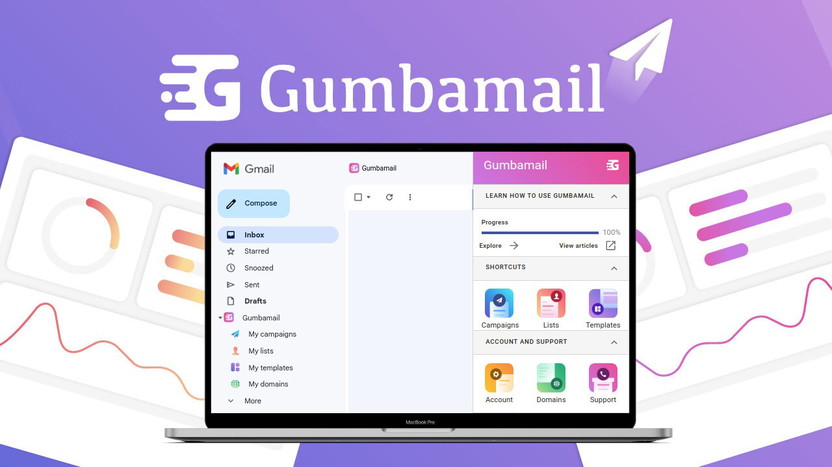
Gumbamail boasts a user-friendly interface that allows users to easily navigate its features. The integration with Gmail makes it convenient for users to manage campaigns directly from their inbox. This simplicity ensures that even those new to email marketing can quickly adapt and optimize their strategies.
Template Library: Designing With Ease
With access to over 250 customizable templates, Gumbamail makes designing emails effortless. These templates are professional and responsive, eliminating the need for HTML knowledge. Users can select and modify designs to align with their branding and messaging, ensuring each email is impactful.
Advanced Analytics: Measuring Campaign Success
Understanding campaign performance is crucial. Gumbamail offers real-time analytics to track email engagement. Users can monitor open rates, click-through rates, and other vital metrics. This data-driven approach helps in refining strategies and improving future campaigns.
Automation Tools: Enhancing Efficiency
Efficiency is key in email marketing. Gumbamail’s automation tools allow users to schedule campaigns for optimal timing. This feature ensures messages reach audiences when they’re most likely to engage. Automating routine tasks frees up time, enabling users to focus on crafting compelling content.
Pricing And Affordability
Gumbamail offers a compelling pricing structure that emphasizes affordability and value. Users can access powerful email marketing tools at a fraction of the usual cost. Let’s explore the details of Gumbamail’s pricing tiers and compare its value with other competitors in the market.
Breakdown Of Pricing Tiers
| Plan | One-Time Payment | Emails per Month | Reusable Template Rows | Features |
|---|---|---|---|---|
| Standard Plan | $29 (originally $192) | 100,000 | 10 | No logo in footers, lifetime access |
| Premium Plan | $58 (originally $384) | 500,000 | 50 | All Standard Plan features, lifetime access |
Both plans offer lifetime access, removing the hassle of monthly payments. Users can send an impressive number of emails each month, making it suitable for various scales of operations.
Value For Money: Comparing With Competitors
When evaluating Gumbamail’s pricing, its one-time payment structure stands out. Competitors often charge monthly fees, which can accumulate to higher costs over time. Gumbamail’s plans eliminate recurring charges, offering substantial savings.
- Unlimited Email Sending: Unlike many competitors, Gumbamail allows sending without daily limits.
- Extensive Template Options: Access to over 250 templates enhances email design flexibility.
- Real-Time Analytics: Provides insights into campaign performance without extra charges.
These features, combined with the affordable pricing, make Gumbamail a strategic choice for businesses. Users benefit from comprehensive tools without overspending.

Credit: gumbamail.com
Pros And Cons Based On Real-world Usage
Gumbamail is a popular tool for email marketing within Gmail. Users find it useful, but like any tool, it has its strengths and weaknesses. Let’s explore the key advantages and areas where it could improve.
Advantages: What Users Love
- Mail Merge Functionality: Users appreciate the ability to send personalized mass emails quickly. This feature saves time and enhances communication efficiency.
- Template Design: With access to over 250 customizable templates, users can create professional emails effortlessly. No HTML knowledge is required, making it accessible to everyone.
- No Email Sending Limit: The tool allows unlimited email sends, overcoming Gmail’s usual limits. This is especially useful for large-scale campaigns.
- Subscriber Management: Importing subscriber lists is easy. Users can use .csv files, Google Drive spreadsheets, or Google Contacts.
- Real-Time Analytics: Users can track email performance with real-time analytics. This feature helps in making data-driven decisions for future campaigns.
- GDPR-Compliant: Ensures that data protection and privacy are maintained, which is crucial for businesses.
Limitations: Areas For Improvement
- Integration Limitations: Some users find it challenging to integrate with other platforms. Enhancing integration options could improve functionality.
- Template Customization: Although there are many templates, some users desire more customization options. More flexibility could enhance user satisfaction.
- Learning Curve: Despite its user-friendly interface, some users experience a learning curve. Simplifying the onboarding process could help new users.
Gumbamail provides a comprehensive solution for email marketing within Gmail. Users appreciate its functionality but also note some areas for potential improvement.
Recommendations For Ideal Users
Gumbamail stands out as a powerful tool for email marketing. Its seamless integration with Gmail makes it accessible for various users. Understanding who benefits most can optimize its use.
Best Scenarios For Using Gumbamail
Gumbamail is perfect for businesses aiming to streamline email marketing. It’s ideal for those seeking to reach a wide audience quickly.
With unlimited email sending, businesses can bypass Gmail’s limits. This feature is crucial for large campaigns.
Another scenario is for marketers wanting real-time analytics. Gumbamail’s analytics help track performance and refine strategies.
Template design options suit users who need professional emails without HTML expertise. Over 250 customizable templates ensure diverse design choices.
Who Will Benefit Most?
- Small Businesses: With affordable pricing, small businesses can leverage email marketing without breaking the bank.
- Freelancers: Freelancers benefit from the ability to manage campaigns independently within Gmail.
- Startups: Startups can use Gumbamail to reach potential investors and customers efficiently.
- Marketing Teams: Teams can collaborate using subscriber management and campaign scheduling features.
For those who prioritize GDPR compliance, Gumbamail ensures data protection and privacy. It’s an essential feature for users dealing with sensitive information.
The lifetime access plans offer great value, making it appealing for long-term users. Both standard and premium plans cater to different needs, based on email volume requirements.
Frequently Asked Questions
What Does The User Review Say About Gmail?
Users praise Gmail for its intuitive interface and reliable performance. They appreciate its powerful spam filter, efficient organization, and robust security features. The integration with Google services enhances productivity. Users value its customizable features and seamless synchronization across devices, making it a preferred choice for email communication.
What Is Gumbamail Used For?
Gumbamail is used for creating and managing email marketing campaigns. It offers tools for designing, sending, and tracking emails. Users can reach their audience effectively and analyze campaign performance. It integrates with Gmail, making it convenient for businesses to streamline their email marketing efforts.
How Does Gumbamail Integrate With Gmail?
Gumbamail integrates with Gmail through a browser extension. This allows users to manage email campaigns directly from their Gmail account. The integration simplifies the process of sending bulk emails and provides analytics. It enhances Gmail’s functionality by adding email marketing features.
Is Gumbamail Easy To Use For Beginners?
Yes, Gumbamail is easy to use for beginners. Its user-friendly interface simplifies the process of creating email campaigns. The platform provides templates and guides to assist users. Even without prior experience, users can efficiently manage their email marketing efforts.
Conclusion
Gumbamail offers a simple way to boost your email marketing. Its integration with Gmail makes sending mass emails easy. Choose from over 250 templates to suit your style. Enjoy unlimited emails and manage subscribers effortlessly. Real-time analytics help track your campaigns’ success. Plus, it’s GDPR-compliant, ensuring privacy. With affordable pricing options, Gumbamail fits various needs. Try it risk-free with a 60-day money-back guarantee. For more details, visit the Gumbamail page. Give your email marketing a boost today!
