

Selling on Shopify can seem daunting at first. But it’s simpler than you think.
Shopify is a popular platform for starting an online store. It offers tools to help you sell products with ease. If you’re new, don’t worry. This guide will walk you through the basics. You’ll learn how to set up your store, add products, and start selling.
Whether you have a small business or a new idea, Shopify is a great place to begin. It’s user-friendly and designed for beginners. Ready to dive in? Let’s explore the steps to get you started on Shopify.
Credit: printify.com
Getting Started
Getting started with selling on Shopify can seem daunting. But it’s actually simple and easy to navigate. This guide will help you set up your store quickly and efficiently.
Creating An Account
First, visit the Shopify website and click on the “Start free trial” button. You’ll need to enter your email address, create a password, and choose a store name. Make sure your store name is unique and reflects your brand.
Once you’ve filled out this information, click on the “Create your store” button. Shopify will then ask a few questions about your business. Answer these to tailor your experience.
After completing the sign-up process, you’ll be taken to your Shopify dashboard. This is where you will manage all aspects of your online store.
Choosing A Plan
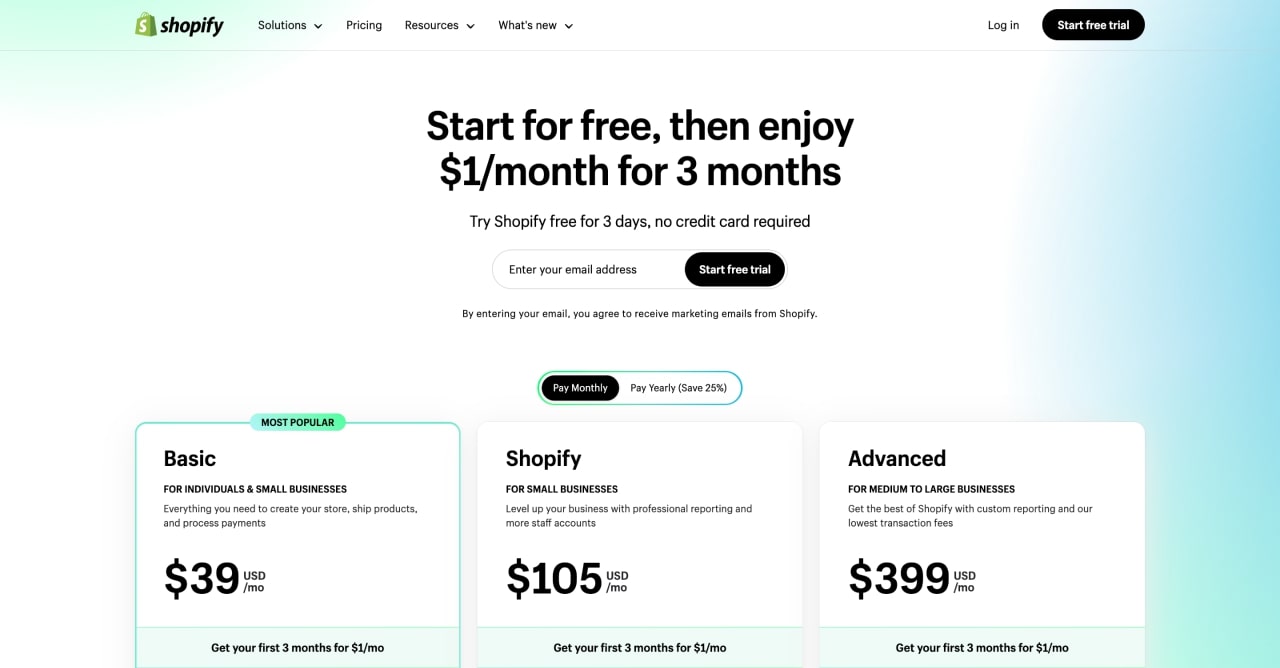
Shopify offers several plans to suit different business needs. Here’s a quick look at the available options:
| Plan | Monthly Cost | Features |
|---|---|---|
| Basic Shopify | $29 | Best for new businesses. Includes all basic features. |
| Shopify | $79 | Ideal for growing businesses. Includes professional reports. |
| Advanced Shopify | $299 | For large-scale businesses. Includes advanced reporting. |
To choose a plan, navigate to your dashboard and click on “Select a plan.” Compare the features and costs of each plan. Choose one that fits your business needs and budget.
Once you select a plan, enter your payment information. Shopify accepts credit cards and other popular payment methods. Confirm your plan choice and proceed to the next step.
Remember, you can always upgrade or downgrade your plan later. So, start with a plan that suits your current needs.
Setting Up Your Store
Setting up your store on Shopify is an exciting first step. It involves choosing a theme, customizing it, and making it your own. This is where your store starts to come to life. Let’s break it down into easy steps.
Selecting A Theme
Shopify offers many themes. Some are free, and some are paid. Choose a theme that fits your brand. Think about your products and how you want them to look. A good theme makes navigation easy for your customers. Look at the theme’s features. Ensure it supports your needs, like mobile compatibility and easy customization.
Customizing Your Theme
Once you’ve chosen a theme, it’s time to customize it. This step makes your store unique. Start with your logo. Add it to the header. Choose colors that match your brand. You can change the fonts too. Make sure they are easy to read. Next, add your product images. High-quality images attract customers. Write clear, simple product descriptions. This helps buyers understand what you sell.
Finally, set up your homepage. This is the first thing visitors see. Make it inviting. Add banners or slideshows to showcase your best products. Keep the design clean. Avoid too much text or clutter. A simple layout keeps visitors focused. Customize your theme to reflect your brand. This makes your store stand out.
Adding Products
Adding products to your Shopify store is simple. Click “Products” in your dashboard, then select “Add product. ” Enter details like title, description, and price to list your item.
Adding products to your Shopify store is a critical step. It makes your store come alive. It’s where you showcase what you’re selling. Let’s explore how to add products effectively.Product Descriptions
Product descriptions matter a lot. They tell your customers about the product. Keep them short and clear. Use simple language. Highlight the main features. Mention the benefits. Make sure it’s easy to read. Use bullet points for key points. This helps in quick understanding. Avoid jargon and complex words. Think from a buyer’s perspective. What would they want to know?Uploading Images
Images are the first thing buyers notice. Use high-quality images. Ensure they are clear and well-lit. Show the product from different angles. Include close-up shots. This helps customers see details. Name the image files properly. Use descriptive names. It helps with SEO. Ensure the images load quickly. Compress them if needed. But don’t compromise on quality. Good images build trust and attract buyers.
Credit: bsscommerce.com
Organizing Your Products
Organizing your products on Shopify is vital for a seamless customer experience. Proper organization helps customers find what they need quickly. This reduces bounce rates and increases sales. Let’s explore how to organize your products effectively.
Creating Collections
Creating collections groups similar products together. This makes browsing easier for customers. Collections can be based on various criteria, such as:
- Product type
- Season
- Sale items
For example, if you sell clothing, you can create collections for:
- Men’s Wear
- Women’s Wear
- Children’s Clothing
To create a collection in Shopify:
- Go to the Products section in your Shopify admin.
- Click on Collections.
- Click Create collection.
- Add a title and description.
- Select Manual or Automated collection type.
- Save the collection.
Manual collections need you to add products individually. Automated collections use conditions to include products automatically.
Using Tags
Using tags helps in further organizing products. Tags act like keywords. They provide additional ways to filter and find products. You can add tags to each product in the product details page.
For instance, a red T-shirt can have tags such as:
- Red
- T-shirt
- Summer Wear
To add tags to a product:
- Go to the Products section in your Shopify admin.
- Select the product you want to tag.
- Scroll to the Tags section.
- Enter relevant tags separated by commas.
- Click Save.
Tags help in search functionality and improve product visibility. Customers can filter products based on these tags, making their shopping experience smoother.
By creating collections and using tags, your Shopify store will be well-organized. This leads to a better shopping experience and higher sales.
Setting Up Payments
Setting up payments on Shopify is a crucial step for beginners. It ensures you get paid for your products. This guide will help you navigate the process. We’ll cover choosing payment gateways and setting up taxes.
Choosing Payment Gateways
Payment gateways allow you to accept payments online. Shopify supports many options. Popular choices include PayPal, Stripe, and Shopify Payments. Each gateway has its own fees and features. Consider your needs and compare fees before choosing.
Shopify Payments is a good option for beginners. It’s easy to set up. Plus, it integrates seamlessly with your store. It also has lower transaction fees. If you choose another gateway, check its compatibility with Shopify. Also, make sure it supports your country.
Setting Up Taxes
Setting up taxes correctly is important. It ensures compliance with local laws. In your Shopify admin, go to the Taxes section. Here, you can set tax rates based on your location. Shopify can automatically calculate taxes for many regions.
You can also set up tax overrides. These are for specific products or locations. Make sure to check your local tax laws. Some products may be tax-exempt. Others might have special tax rates. Double-check everything before launching your store.
Shipping And Delivery
Set up your shipping zones in Shopify to define where you will ship. Choose shipping rates to cover costs. Offer tracking numbers for customer satisfaction.
Shipping and delivery are crucial aspects of any online store. Effective shipping methods can enhance customer satisfaction. Efficient delivery ensures customers receive their orders on time. Let’s explore how to set up shipping rates and manage orders on Shopify.Setting Shipping Rates
Setting shipping rates is essential. It affects your customer’s buying decision. Shopify offers flexible options. Flat rates and weight-based rates are popular choices. You can also offer free shipping. This can attract more customers. To set shipping rates, go to your Shopify admin panel. Select “Settings,” then “Shipping and delivery.” You can define rates based on location. Different rates for different regions are possible. This ensures you cover shipping costs.Managing Orders
Managing orders is easy with Shopify. Start by accessing the “Orders” section in your admin panel. Here, you can view all incoming orders. Each order provides customer details. You can see what items were purchased. Shopify allows you to print shipping labels. This saves time and reduces errors. You can also set up automatic notifications. Inform customers when their order is shipped. Tracking information can be added. This keeps customers informed. Efficient order management leads to happy customers.Marketing Your Store
Marketing your store is key to driving traffic and increasing sales. As a beginner, understanding the basics of marketing can make a huge difference. Here’s how you can get started with marketing your Shopify store.
Seo Basics
Search Engine Optimization (SEO) helps your store appear in search engine results. Start with keyword research. Use tools like Google Keyword Planner to find relevant keywords. Include these keywords in your product titles, descriptions, and meta tags.
Optimize your images by using descriptive file names and alt text. This helps search engines understand your content. Ensure your website loads fast. Slow websites rank lower. You can use tools like Google PageSpeed Insights to check your site speed.
Create valuable content. Write blog posts related to your products. This can drive organic traffic. Internal linking is also important. Link your blog posts to your product pages. This helps both users and search engines navigate your site better.
Using Social Media
Social media platforms are great for promoting your store. Start with Facebook, Instagram, and Twitter. These platforms have millions of users. Share engaging content regularly. Post high-quality images of your products. Write short and catchy descriptions.
Use stories and live videos to show your products in action. Engage with your audience. Reply to comments and messages quickly. This builds trust and loyalty. Run ads to reach a larger audience. Facebook Ads and Instagram Ads can target specific demographics.
Collaborate with influencers. Influencers can help you reach their followers. This can increase your brand visibility. Track your social media performance. Use tools like Google Analytics and Facebook Insights. This helps you understand what works and what doesn’t.
Analyzing Performance
Analyzing the performance of your Shopify store is crucial for growth. It helps you understand what’s working and what needs improvement. You can use various tools and reports to measure your store’s success. Let’s delve into how to do this effectively.
Using Analytics Tools
Shopify offers built-in analytics tools that provide valuable insights. These tools help track visitor behavior on your site. You can see how many people visit your store. You can also see where they come from. This data helps you identify popular products. It also helps in understanding customer preferences.
Google Analytics is another powerful tool. It complements Shopify’s built-in features. You can set it up to track detailed metrics. These metrics include bounce rates and session durations. They also include conversion rates. By analyzing this data, you can make informed decisions. You can improve your store’s performance based on real data.
Understanding Sales Reports
Sales reports are vital for tracking your store’s financial health. Shopify provides several types of sales reports. These reports show revenue, sales by product, and sales over time. You can see which products are performing well. You can also see which ones need attention.
These reports help in managing inventory. They also assist in planning marketing strategies. For instance, if a product is popular, you might want to promote it more. If sales decline, you can investigate why. Understanding these reports ensures you stay on top of your business finances.

Credit: www.youtube.com
Frequently Asked Questions
How Do I Start Selling On Shopify?
To start selling on Shopify, sign up for an account. Customize your store using themes. Add products with descriptions and images. Set up payment gateways and shipping options. Launch your store and start promoting it.
What Products Can I Sell On Shopify?
You can sell a variety of products on Shopify. These include physical goods, digital products, services, and subscriptions. Ensure your products comply with Shopify’s policies.
How Much Does Shopify Cost?
Shopify offers various pricing plans. The Basic plan starts at $29 per month. Advanced plans offer more features and scalability.
How To Promote My Shopify Store?
Promote your Shopify store using social media, SEO, and email marketing. Utilize Shopify’s built-in marketing tools and consider paid advertising for faster results.
Conclusion
Starting on Shopify is simple with the right steps. Set up your store. List your products. Pick a clean design. Market your store. Provide excellent customer service. Keep learning and adapting. Shopify offers helpful tools and resources. Use them to grow your business.
Remember, every expert was once a beginner. Start today and see your progress. Selling on Shopify can be your path to success. Stay dedicated and watch your efforts pay off.
