

Sending emails with GetResponse is straightforward. First, log in to your account.
Then, navigate to the email marketing section. GetResponse is a powerful tool for businesses seeking to enhance their marketing efforts. It combines email marketing, automation, and content monetization in one platform. Whether you’re aiming to boost engagement or streamline communication, GetResponse offers features designed to simplify these tasks.
With its user-friendly interface, even beginners can efficiently manage email campaigns and connect with their audience. From creating autoresponders to designing newsletters, GetResponse equips you with everything needed to succeed in digital marketing. Dive into this guide to learn the step-by-step process of sending emails using GetResponse, and discover how it can help you grow your business effectively.
Introduction To Getresponse
GetResponse is a powerful all-in-one marketing software. It helps businesses grow by integrating email marketing, automation, online courses, and paid newsletters into a single platform. It’s designed to boost revenue and enhance audience engagement. The platform is easy to use and affordable, making it a popular choice for businesses of all sizes.
Overview Of Getresponse As An Email Marketing Tool
GetResponse has been an industry leader in email marketing since 1998. It offers a range of tools for creating effective email campaigns. Features include autoresponders and AI-generated content. Users can schedule emails and personalize customer journeys with advanced workflows. The platform also provides real-time analytics to track email performance and subscriber engagement.
| Main Features | Description |
|---|---|
| Email Marketing | Tools for campaigns, autoresponders, and AI content generation. |
| Automation | Personalize journeys with scheduled emails and segmentation. |
| Content Monetization | Create courses, quizzes, and premium newsletters. |
| Engagement Tools | Forms, popups, landing pages, and integrations. |
| Analytics | Insights on email performance and engagement. |
| Ecommerce Support | Campaigns, promo codes, and cart recovery. |
Purpose Of Sending Emails Through Getresponse
Sending emails through GetResponse serves multiple purposes. It’s an effective way to engage and grow your audience. The platform supports content monetization, allowing you to create and sell online courses. It also helps boost revenue through ecommerce campaigns and promo codes.
With GetResponse, businesses can streamline their marketing efforts. The platform integrates with over 100 tools to enhance customer experience. Its high deliverability rate ensures that your emails reach your audience. Trusted by more than 350,000 customers, GetResponse empowers businesses worldwide.
- Affordable and easy-to-use platform.
- Empowers audience growth across channels.
- Facilitates content creation and monetization.
- Offers tailored solutions with premium support.

Credit: www.getresponse.com
Setting Up Your Getresponse Account
Setting up your GetResponse account is the first step to enhance your marketing efforts. This platform brings email marketing, automation, and content monetization into one place. It is designed to grow businesses through effective audience engagement. With a user-friendly interface, it supports you in creating impactful campaigns.
Creating A Getresponse Account
To start, visit the GetResponse website and click on the “Sign Up” button. You can try their 30-day free trial, which requires no credit card. After filling in your basic details, such as email and password, you will receive a confirmation email. Click the link in the email to verify your account. This simple step initiates your journey towards effective marketing.
Once verified, you can choose from various pricing plans based on your needs:
| Plan | Price | Features |
|---|---|---|
| Starter | From $15/month | Unlimited newsletters, landing pages, AI campaign generator, and more |
| Marketer | From $48/month | Includes Starter features plus advanced automation and ecommerce campaigns |
| Creator | From $56/month | Includes Marketer features plus AI Course Creator and premium newsletters |
| Enterprise | Custom pricing | All features plus premium support and dedicated IP |
Navigating The Dashboard For Email Management
After setting up your account, the GetResponse dashboard becomes your control center. It offers a clear layout, allowing easy access to all features. The dashboard helps you manage email campaigns, create newsletters, and track performance.
Use the menu on the left to explore different sections such as:
- Email Marketing: Create and manage your email campaigns.
- Automation: Set up workflows to automate customer journeys.
- Analytics: Get real-time insights on email performance and subscriber engagement.
- Contacts: Manage your contact lists effectively.
Each section provides tools to enhance your marketing strategies. The dashboard is intuitive, making it easy even for beginners to manage complex tasks.
Creating An Email List
Building a targeted email list is crucial for effective marketing. It allows businesses to connect with interested individuals, leading to better engagement and higher conversion rates. With GetResponse, you can easily create and manage your email lists, ensuring your messages reach the right audience.
Importance Of Having A Targeted Email List
A targeted email list enhances communication. It helps send relevant content to subscribers who are genuinely interested. This increases open rates and reduces unsubscribe rates. Having a precise list ensures that your marketing efforts are efficient and impactful.
- Better Engagement: Subscribers receive content they care about.
- Higher Conversion Rates: Targeted messages lead to more sales.
- Reduced Costs: Focus on quality rather than quantity.
Step-by-step Guide To Building Your Email List
Follow these steps to build your email list using GetResponse:
- Sign Up: Begin by creating an account on GetResponse. Use the official website for registration.
- Create Signup Forms: Use tools like popups and landing pages to collect emails. These forms are customizable to match your brand.
- Promote Offers: Incentivize subscriptions with exclusive content or discounts. This attracts more sign-ups.
- Integrate Platforms: Connect GetResponse with other platforms. This allows seamless data collection across channels.
- Segment Your Audience: Divide your email list into smaller groups. This enables personalized communication.
- Monitor Performance: Use analytics to track subscriber engagement. Adjust strategies based on insights.
Creating an email list with GetResponse is straightforward. It provides tools to easily manage and grow your audience.

Credit: www.getresponse.com
Designing Your Email Campaign
Creating an effective email campaign in GetResponse involves several key steps. The design of your email is crucial for capturing your audience’s attention. A well-crafted email campaign can enhance engagement and boost conversions. Below, we explore important aspects of designing your email campaign.
Choosing The Right Template For Your Audience
Selecting the appropriate template is vital for resonating with your audience. GetResponse offers a diverse range of templates. Each is designed to cater to different business needs and aesthetics. Consider your audience’s preferences and the message you want to convey. Are you promoting a new product or sharing a company update? Choose a template that aligns with your campaign’s goal.
- Simple and Clean: Ideal for straightforward messages.
- Bold and Colorful: Perfect for grabbing attention with visuals.
- Professional and Sleek: Best for business updates and formal announcements.
Customizing Email Content For Maximum Engagement
Customization is key to maximizing engagement with your emails. Tailor your content to address your audience’s specific interests and needs. With GetResponse, you can personalize content using dynamic fields. This includes using the recipient’s name or other personal details. Such personalization can significantly increase open and click rates.
Organize your content with clear headers and bullet points. This makes your message easy to read and digest. Incorporate engaging visuals like images or videos to enhance your email’s appeal.
- Start with a Strong Subject Line: A compelling subject line can increase open rates.
- Use Dynamic Content: Personalize emails for different segments of your audience.
- Include a Clear Call to Action: Direct recipients to the next step, such as visiting your site.
Remember to keep your message concise and to the point. Long emails can lose the reader’s interest. Test different versions of your email to see what resonates best with your audience.
Scheduling And Sending Your Email
Scheduling emails in GetResponse is vital for effective communication. Sending emails at the right time boosts engagement and response rates. This guide outlines the steps to schedule and send your email campaigns using GetResponse’s robust features.
Setting The Optimal Time For Email Delivery
Selecting the optimal time is crucial. GetResponse offers tools to identify the best times for your audience. Utilize real-time analytics to understand subscriber behavior. This helps in choosing peak times for email delivery.
- Analyze previous campaign data for engagement patterns.
- Use GetResponse’s predictive sending feature for automated timing suggestions.
- Consider time zones if your audience is global.
- Experiment with different times to find what works best.
| Feature | Benefit |
|---|---|
| Predictive Sending | Automates timing based on user interaction history. |
| Analytics | Provides insights for choosing peak delivery times. |
Finalizing And Sending Your Email Campaign
Once the timing is set, it’s time to finalize your campaign. Ensure your email content is engaging and tailored to your audience. Use GetResponse’s AI-generated content to enhance your message quality.
- Review your email content for clarity and engagement.
- Check links and images for functionality.
- Use segmentation to target specific audience groups.
- Preview the email on different devices to ensure compatibility.
- Schedule your email for the chosen optimal time.
- Monitor delivery and engagement through GetResponse’s analytics.
GetResponse’s intuitive platform makes scheduling and sending emails straightforward. Leverage its features to optimize your email campaigns for success.
Analyzing Email Campaign Performance
Understanding the success of your email campaigns is crucial in optimizing your marketing strategy. GetResponse offers robust analytics tools to help you evaluate and improve your campaigns. By analyzing performance, you can enhance audience engagement and drive better results.
Understanding Email Analytics And Metrics
In GetResponse, email analytics provide insights into various metrics. These include open rates, click-through rates, and conversion rates. Understanding these metrics helps identify what resonates with your audience. Open rates indicate the percentage of recipients who opened your email. Click-through rates show the percentage who clicked on links within your email. Conversion rates track how many took the desired action after opening your email.
| Metric | Description |
|---|---|
| Open Rate | Percentage of recipients who open the email. |
| Click-through Rate | Percentage of recipients who click links in the email. |
| Conversion Rate | Percentage who complete the desired action. |
Real-time insights from GetResponse provide a snapshot of how your emails perform. This data informs your strategy and helps refine your approach.
Using Insights To Improve Future Campaigns
Analyzing past campaigns gives valuable insights for future improvements. Focus on high-performing emails to understand what worked. Use this knowledge to craft future emails. Consider the timing, subject lines, and content that engaged your audience.
- Evaluate subject lines that led to higher open rates.
- Examine email content that encouraged clicks and conversions.
- Adjust sending times based on past engagement data.
Leverage predictive sending features in GetResponse to optimize delivery times. Refine your segmentation strategy to target specific audience groups. Utilize GetResponse’s advanced workflows to personalize customer journeys.
By continually analyzing performance, you can make informed decisions. This ensures your campaigns effectively engage and convert your audience.
Common Challenges And Troubleshooting
Sending emails using GetResponse can be seamless. Yet, like any tool, challenges arise. Understanding these common issues ensures smooth email campaigns. Let’s explore solutions to keep your email marketing on track.
Addressing Common Issues In Email Sending
GetResponse offers robust email marketing features. However, users may face some issues during email sending:
- Email Bounces: Ensure recipient addresses are correct. Regularly update your contact list to remove invalid emails.
- Spam Filters: Avoid spammy words in email content. Use a reputable domain to enhance deliverability.
- Formatting Errors: Preview emails before sending. Use GetResponse’s preview tool to check appearance on various devices.
Tips For Ensuring Email Delivery Success
Enhance your email delivery success with these practical tips:
- Segment Your Audience: Tailor messages to specific groups using GetResponse’s segmentation tools.
- Optimize Send Times: Utilize predictive sending for optimal delivery times. This increases open rates.
- Utilize Automation: Automate follow-ups and reminders. GetResponse’s workflows help maintain engagement.
- Monitor Performance: Use analytics to track email performance. Adjust strategies based on subscriber engagement metrics.
These strategies not only resolve challenges but also enhance your overall email marketing efforts.
Recommendations For Ideal Users
GetResponse is a versatile platform that caters to various user needs. It integrates email marketing, automation, and content monetization, making it ideal for diverse businesses. Below, we explore who can benefit most from using GetResponse and scenarios where it truly excels.
Who Can Benefit Most From Using Getresponse?
Entrepreneurs and small business owners will find GetResponse invaluable. It offers affordable solutions to manage marketing campaigns. Content creators, like online educators, can monetize their work through paid newsletters and online courses. E-commerce businesses benefit from tools like abandoned cart recovery and promo codes. Enterprises needing tailored solutions can use premium features for advanced automation and engagement.
- Entrepreneurs: Ideal for starting and managing campaigns.
- Content Creators: Monetize courses and newsletters easily.
- E-commerce Businesses: Enhance sales with specific features.
- Enterprises: Utilize premium support and customization.
Scenarios Where Getresponse Excels
GetResponse shines in scenarios requiring seamless integration of marketing tools. The platform offers real-time analytics to track campaign performance. It’s perfect for businesses aiming to grow their audience through engagement tools like signup forms and landing pages. GetResponse’s automation workflows personalize customer journeys, enhancing user experience.
- Real-time Analytics: Monitor and improve campaigns instantly.
- Audience Growth: Use forms and pages to capture leads.
- Personalized Journeys: Automate customer interactions efficiently.
- Payment Processing: Simplifies transactions with PayPal and Stripe.
GetResponse is a trusted choice for businesses seeking an all-in-one marketing solution. With 24/7 support and extensive resources, it empowers users to maximize their marketing efforts.
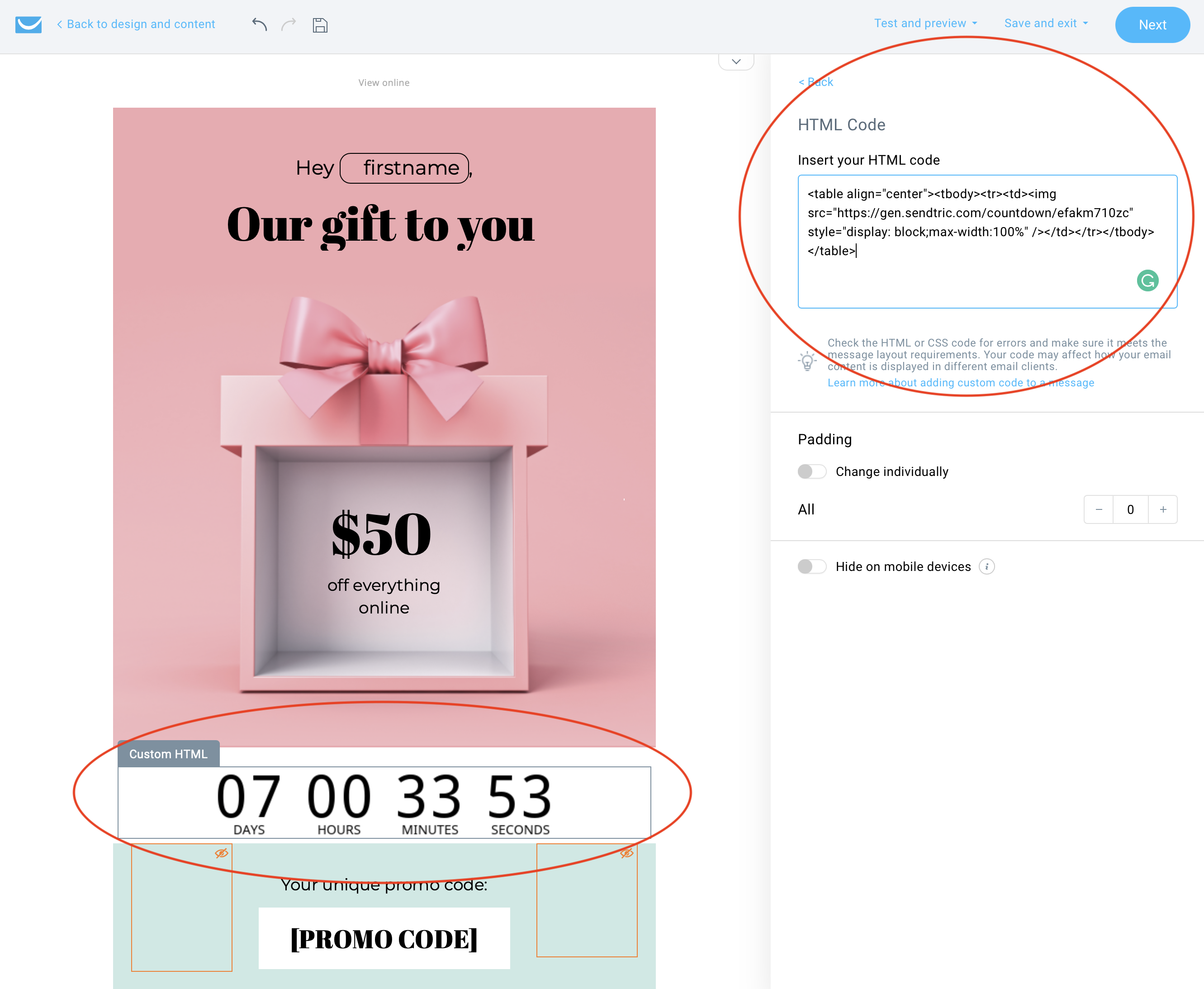
Credit: www.sendtric.com
Frequently Asked Questions
How To Create An Email In Getresponse?
To create an email in GetResponse, log in and click “Create Email” under the “Email Marketing” tab. Choose your template, customize the design, and add content. Preview your email, check settings, and click “Send” or “Schedule” to finalize.
How To Send An Email Step By Step?
Open your email app or website. Click “Compose” to start a new email. Enter the recipient’s email address. Add a subject line. Type your message in the body. Attach any necessary files. Click “Send” to deliver your email.
How Can I Send An Email To Someone?
Open your email app or website. Click “Compose” or “New Email. ” Enter the recipient’s email address. Add a subject line and message. Click “Send. “
Is Getresponse Good For Email Marketing?
GetResponse is effective for email marketing. It offers user-friendly tools, automation features, and analytics. Businesses can create professional campaigns easily. Its pricing is competitive, making it suitable for various budgets. GetResponse supports list management and A/B testing, enhancing marketing strategies.
Overall, it is a reliable choice for email marketing.
Conclusion
Mastering email sending with GetResponse is straightforward and effective. The platform simplifies marketing efforts by combining key tools in one place. Users can easily automate, monetize, and engage audiences. Real-time insights and integrations enhance the marketing experience. GetResponse supports both beginners and advanced marketers with affordable plans.
Its high deliverability rate ensures messages reach the intended audience. A 30-day free trial allows users to explore features without commitment. Embrace the power of GetResponse to grow your business and boost revenue. Start your journey today and see results.
