

Using Moz for keyword research can be a game-changer. It helps you find the best keywords for your website.
Moz is a powerful tool in the SEO world. It offers many features, and keyword research is one of its strengths. This tool helps you discover which words people use to search for content like yours. With Moz, you can find high-value keywords and understand your competition.
This makes it easier to create content that ranks well. If you’re new to SEO or looking to improve your skills, knowing how to use Moz for keyword research is essential. Keep reading to learn how to make the most out of this tool and boost your website’s visibility.
Setting Up Your Moz Account
Getting started with Moz is simple. Setting up your Moz account is the first step in leveraging this tool for keyword research. Follow these steps to create and set up your account correctly.
Creating An Account
To begin, visit the Moz website. Click on the “Sign Up” button.
- Enter your email address and create a password.
- Fill in your details, such as your name and company.
- Agree to the terms and conditions.
After completing these steps, you will receive a confirmation email. Click on the link in the email to verify your account.
Choosing A Subscription Plan
Moz offers several subscription plans tailored to different needs. Here is a breakdown of the available plans:
| Plan | Features | Cost |
|---|---|---|
| Standard | Basic SEO tools, 5 campaigns | $99/month |
| Medium | Advanced SEO tools, 10 campaigns | $179/month |
| Large | Professional SEO tools, 25 campaigns | $249/month |
| Premium | Comprehensive SEO tools, 50 campaigns | $599/month |
Select a plan that suits your needs and budget. Click on the “Choose Plan” button and enter your payment details.
After subscribing, you will have access to all the features of your chosen plan. Start exploring Moz’s keyword research tools to improve your SEO strategy.

Credit: moz.com
Navigating The Moz Interface
Navigating the Moz interface for keyword research is straightforward. Start by entering your target keyword into the search bar. Analyze the results to find search volume, difficulty, and related keywords.
Navigating the Moz interface can seem daunting at first. It offers many powerful tools for keyword research. Let’s break down the interface so you can use it with ease.
Dashboard Overview
The Moz dashboard is your starting point. It provides a summary of your SEO metrics. You can see your site’s domain authority and backlink profile. There’s also an overview of your top-performing pages. This helps you understand where your traffic comes from.
The dashboard also shows recent alerts. These keep you updated on important changes. You can quickly see if there are any issues to address. The layout is simple and easy to navigate. Everything is just a click away.
Key Tools And Features
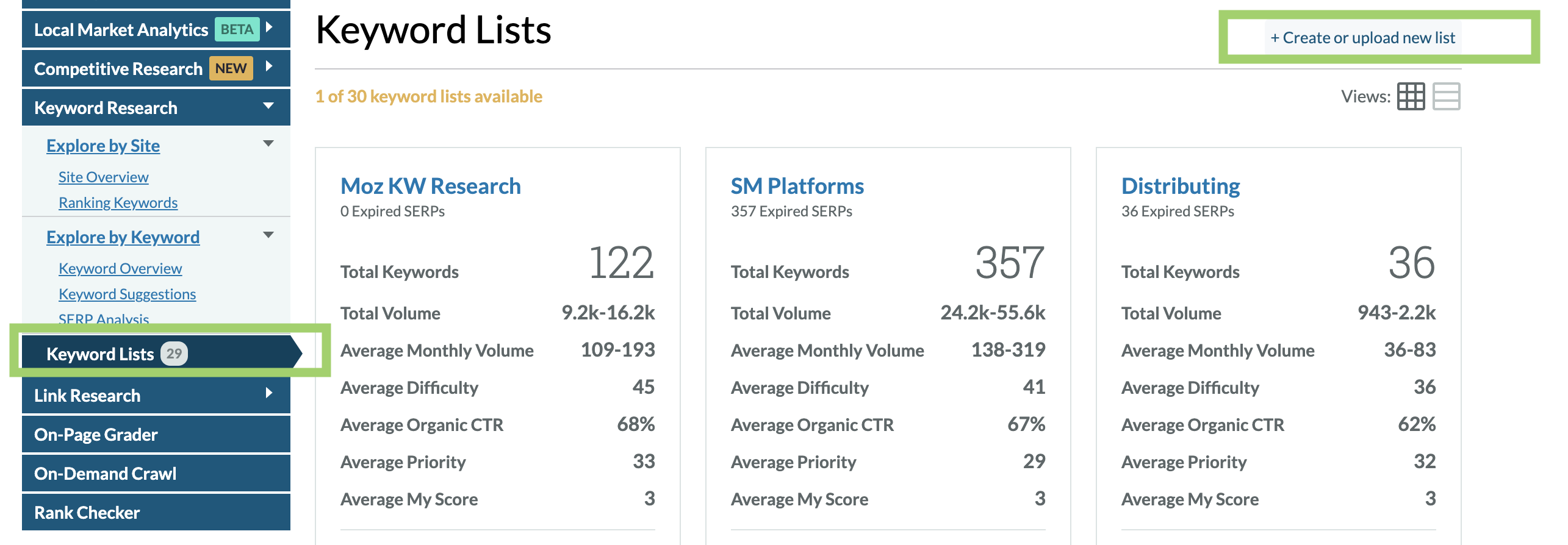
Moz offers several key tools. The Keyword Explorer is one of the most important. It helps you find relevant keywords. You can see the search volume and difficulty for each keyword. This helps you decide which keywords to target.
The Link Explorer is another essential tool. It helps you analyze your backlink profile. You can see who links to your site. This is important for building a strong SEO strategy.
The Site Crawl feature identifies technical issues. It scans your site for errors. Fixing these issues can improve your site’s performance. Each tool is designed to provide valuable insights.
Navigating these tools is straightforward. Moz’s interface is user-friendly. You can easily switch between different features. This makes your keyword research more efficient.
Conducting Keyword Research
Keyword research is the backbone of any successful SEO strategy. It helps you understand what terms your audience uses when searching for products or services. Knowing the right keywords can improve your website’s visibility. Let’s explore how to conduct keyword research using Moz.
Using Keyword Explorer
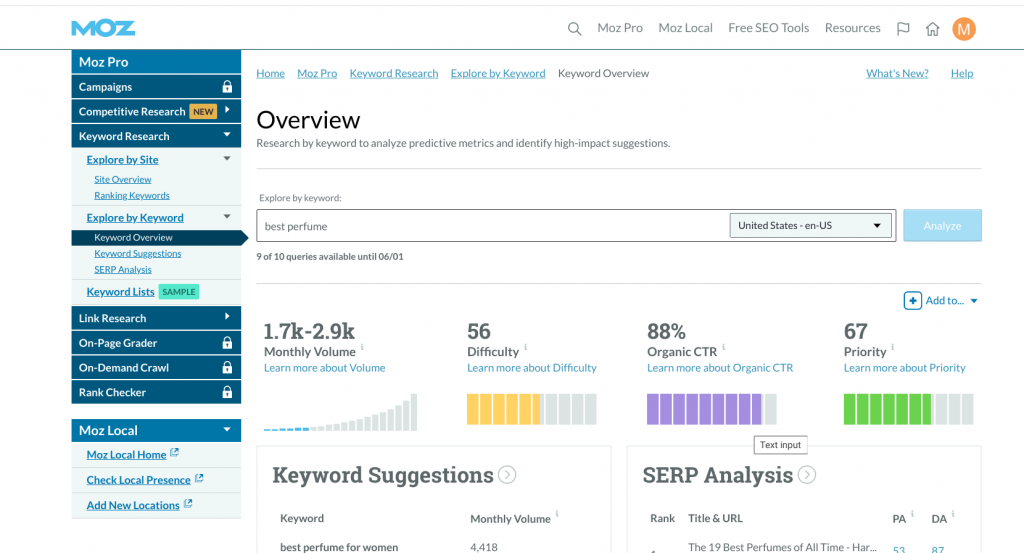
First, log in to your Moz account and go to the Keyword Explorer tool. Enter a keyword related to your business. Click on the “Analyze” button. Moz will show you a list of related keywords. These keywords are based on search volume and relevance.
Look through the suggestions. Choose keywords that match your content goals. Note the search volume and difficulty score. This helps you understand how hard it is to rank for each keyword.
Analyzing Keyword Metrics
In Keyword Explorer, each keyword has metrics. These include search volume, difficulty, and organic CTR. Search volume shows how many people search for that keyword. Higher search volume means more potential traffic.
Difficulty score tells you how hard it is to rank. A lower score means easier ranking. Organic CTR shows the click-through rate for organic results. Higher CTR means more users click on the search results.
Use these metrics to choose the best keywords for your content. Balance between high search volume and low difficulty. This ensures better chances of ranking well and attracting traffic.
Credit: www.brafton.com
Identifying Keyword Opportunities
Finding the right keywords can boost your site’s visibility. Using Moz for keyword research can help you discover untapped opportunities. Let’s explore how to find these keywords effectively.
Finding Long-tail Keywords
Long-tail keywords are key phrases with three or more words. They often have lower search volume but higher conversion rates. To find them using Moz:
- Log in to your Moz account.
- Navigate to the Keyword Explorer.
- Enter a broad keyword related to your niche.
- Review the suggested long-tail keywords.
For example, if your broad keyword is “shoes,” you might find long-tail keywords like “best running shoes for women” or “comfortable office shoes.”
Assessing Competition
Assessing competition is vital for keyword success. Moz provides tools to evaluate keyword difficulty:
| Keyword Metric | Description |
|---|---|
| Difficulty Score | Shows how hard it is to rank for a keyword. Lower scores mean less competition. |
| Organic CTR | Estimates the click-through rate for organic results. Higher CTR means more potential traffic. |
| Priority | Combines difficulty, volume, and CTR to suggest keyword priority. |
By analyzing these metrics, you can choose keywords with the right balance of volume and competition. This ensures your content targets achievable opportunities.
Tracking Keyword Performance
Tracking keyword performance is crucial for understanding the success of your SEO efforts. Moz provides tools to monitor how well your keywords are performing. This helps in refining your strategy and improving your rankings over time.
Using Rank Tracker
Moz’s Rank Tracker is an effective tool for monitoring your keyword positions. Follow these steps to get started:
- Log in to your Moz account.
- Navigate to the Rank Tracker tool.
- Enter the keywords you want to track.
- Select your target location and search engine.
- Click on Add Keywords to start tracking.
The Rank Tracker updates regularly. You can see how your keywords are moving up or down in the search results.
Interpreting Tracking Data
Interpreting the tracking data is key to making informed decisions. Moz provides a detailed view of your keyword performance:
| Metric | Description |
|---|---|
| Rank | Your keyword’s current position in search results. |
| Search Volume | How many times the keyword is searched monthly. |
| Keyword Difficulty | How hard it is to rank for the keyword. |
Focus on keywords with high search volume and low keyword difficulty. This balance can yield better results.
Regularly check the rank to see if your strategies are working. Adjust your content and SEO tactics based on these insights.
Using Moz for keyword research and tracking helps you stay ahead of the competition. Monitor and interpret your data to achieve better search rankings.
Integrating Moz With Other Tools
Integrating Moz with other tools can supercharge your keyword research efforts. Moz offers a range of features, but combining it with other platforms can provide even deeper insights. This section will explore how to connect Moz with Google Analytics and Google Search Console for enhanced keyword research.
Connecting Google Analytics
Google Analytics is a powerful tool for tracking website performance. By connecting it with Moz, you can gain more detailed insights into your keyword data. Start by logging into your Moz account and navigate to the ‘Campaigns’ section. Here, you will find an option to connect Google Analytics. Follow the prompts to link your accounts.
Once connected, Moz will pull data from Google Analytics. You can view metrics like organic traffic, bounce rate, and session duration. This information helps in understanding which keywords drive traffic and how users interact with your site.
Using Moz With Google Search Console
Google Search Console provides valuable data on your website’s presence in Google search results. Integrating it with Moz can enhance your keyword research. To connect, go to the ‘Campaigns’ section in Moz. Look for the option to link Google Search Console and follow the instructions.
After linking, Moz will fetch data from Google Search Console. This includes search queries, impressions, and click-through rates. Analyzing this data helps you identify high-performing keywords and optimize underperforming ones.
Advanced Tips And Tricks
Using Moz for keyword research can take your SEO strategy to the next level. By mastering some advanced tips and tricks, you can uncover hidden opportunities and gain an edge over competitors. Here, we delve into some advanced features that will help you extract maximum value from Moz.
Leveraging Mozbar
The MozBar is a powerful browser extension that provides SEO insights on the go. It’s essential for advanced keyword research. With MozBar, you can quickly assess the page authority (PA) and domain authority (DA) of any webpage.
To make the most of MozBar, follow these steps:
- Download and install MozBar from the Chrome Web Store.
- Enable the extension and log in with your Moz account.
- Visit any webpage to see key SEO metrics in real-time.
Use MozBar’s highlighting feature to identify links and keywords on a page. This helps you understand the keyword density and link structure of your competitors.
Additionally, MozBar allows you to export data for deeper analysis. Click on the export button to download the metrics in a CSV file. This data can help you refine your keyword strategy.
Utilizing Custom Reports
Creating custom reports in Moz can provide detailed insights tailored to your specific needs. This feature allows you to track and analyze keywords, backlinks, and site health over time.
To create custom reports:
- Navigate to the Campaigns section in Moz.
- Select the campaign you wish to analyze.
- Click on Create Custom Report.
- Choose the metrics and data points relevant to your research.
- Save and schedule the report for regular updates.
Custom reports help you monitor keyword performance and backlink growth. Use these reports to identify trends and make data-driven decisions.
Here’s a sample table structure for a custom report:
| Keyword | Search Volume | Difficulty | Current Ranking |
|---|---|---|---|
| Example Keyword 1 | 5,000 | 30 | 5 |
| Example Keyword 2 | 3,200 | 45 | 12 |
Use the insights from custom reports to fine-tune your keyword strategy. Focus on keywords with high volume and low difficulty. Track your progress and adjust your SEO tactics accordingly.
Credit: www.articleforge.com
Frequently Asked Questions
What Is Moz?
Moz is a popular SEO tool that helps with keyword research, link building, and site audits.
How Does Moz Help With Keyword Research?
Moz provides keyword suggestions, search volume, difficulty scores, and SERP analysis to help you identify valuable keywords.
Is Moz Keyword Research Free?
Moz offers a free version with limited features. The full functionality requires a paid subscription.
Can Moz Improve My Seo Strategy?
Yes, Moz’s tools and insights can help optimize your website’s SEO strategy, improving rankings and traffic.
Conclusion
Using Moz for keyword research is simple and effective. It helps you find the right keywords for your content. Better keywords mean better search engine rankings. Start with basic tools and explore advanced features as you grow. Remember, consistency in keyword research brings better results.
Keep practicing and refining your strategy. Your website’s traffic and visibility will improve over time. Happy researching!
