

Moz is a powerful SEO tool. It helps improve your website’s search engine rankings.
In this guide, you will learn how to use Moz step by step. Whether you are new to SEO or looking to refine your skills, Moz offers a range of features to suit your needs. From keyword research to backlink analysis, Moz simplifies complex SEO tasks.
This guide will walk you through each feature. By the end, you will understand how to leverage Moz for your SEO efforts. Let’s get started and uncover the potential of this tool.
Credit: www.brafton.com.au
Setting Up Moz Account
Setting up a Moz account is the first step to improving your SEO. Moz offers tools that help you track keywords, analyze your site, and more.
In this guide, you’ll learn how to create an account and choose the right plan for your needs. Let’s get started.
Creating An Account
First, visit the Moz website. Click on the “Sign Up” button at the top right corner. You’ll be directed to a registration page.
Enter your email address and create a password. Confirm your password to ensure it matches. Next, fill in your first and last name.
Agree to the terms and conditions. Then, click “Create My Account.” You will receive a verification email shortly after. Open the email and click the verification link.
Congratulations! You’ve created your Moz account. Now, let’s choose the right plan.
Choosing The Right Plan
Moz offers several plans to fit different needs. Start with the free trial to explore Moz’s features. This trial lasts 30 days and gives you access to most tools.
After the trial, you can choose between the Standard, Medium, Large, or Premium plans. The Standard plan is good for small businesses and beginners.
The Medium and Large plans offer more features and are suitable for growing businesses. The Premium plan is best for large enterprises with extensive needs.
Compare the features of each plan on the pricing page. Select the one that fits your goals and budget. Once selected, input your payment details and confirm your choice.
Now you are ready to start using Moz to improve your SEO efforts.

Credit: moz.com
Navigating The Dashboard
Mastering Moz’s dashboard is essential for leveraging its powerful SEO tools. Understanding each section and customizing it to your needs will streamline your workflow. Let’s dive into the dashboard and see how to make the most of it.
Overview Of Dashboard
Upon logging into Moz, the dashboard is your starting point. You will see an array of tools and data. This includes site audits, keyword rankings, and backlink analyses. Everything you need to enhance your SEO strategy is here.
The dashboard is divided into sections. Each section offers different insights. The top bar has quick access links. These links lead to campaigns, links, and keywords. Below, you find widgets with summaries of your site’s performance. These widgets help you stay updated on the latest metrics.
Customizing Your Dashboard
Personalizing your dashboard can enhance your user experience. To customize, click on the gear icon. This icon is usually at the top right of each widget. You can choose what data to display or hide. Rearrange widgets to prioritize important metrics. This helps you focus on what matters most.
Consider adding widgets that reflect your goals. For example, if you focus on backlinks, ensure the backlinks widget is prominent. Regularly updating your dashboard layout keeps your insights relevant. It also ensures you’re always looking at the most critical data.
Keyword Research
Keyword research is essential for effective SEO. Finding the right keywords can lead to higher search engine rankings and more traffic. Moz offers tools to help with this process. Here’s how to use Moz for keyword research.
Using Keyword Explorer
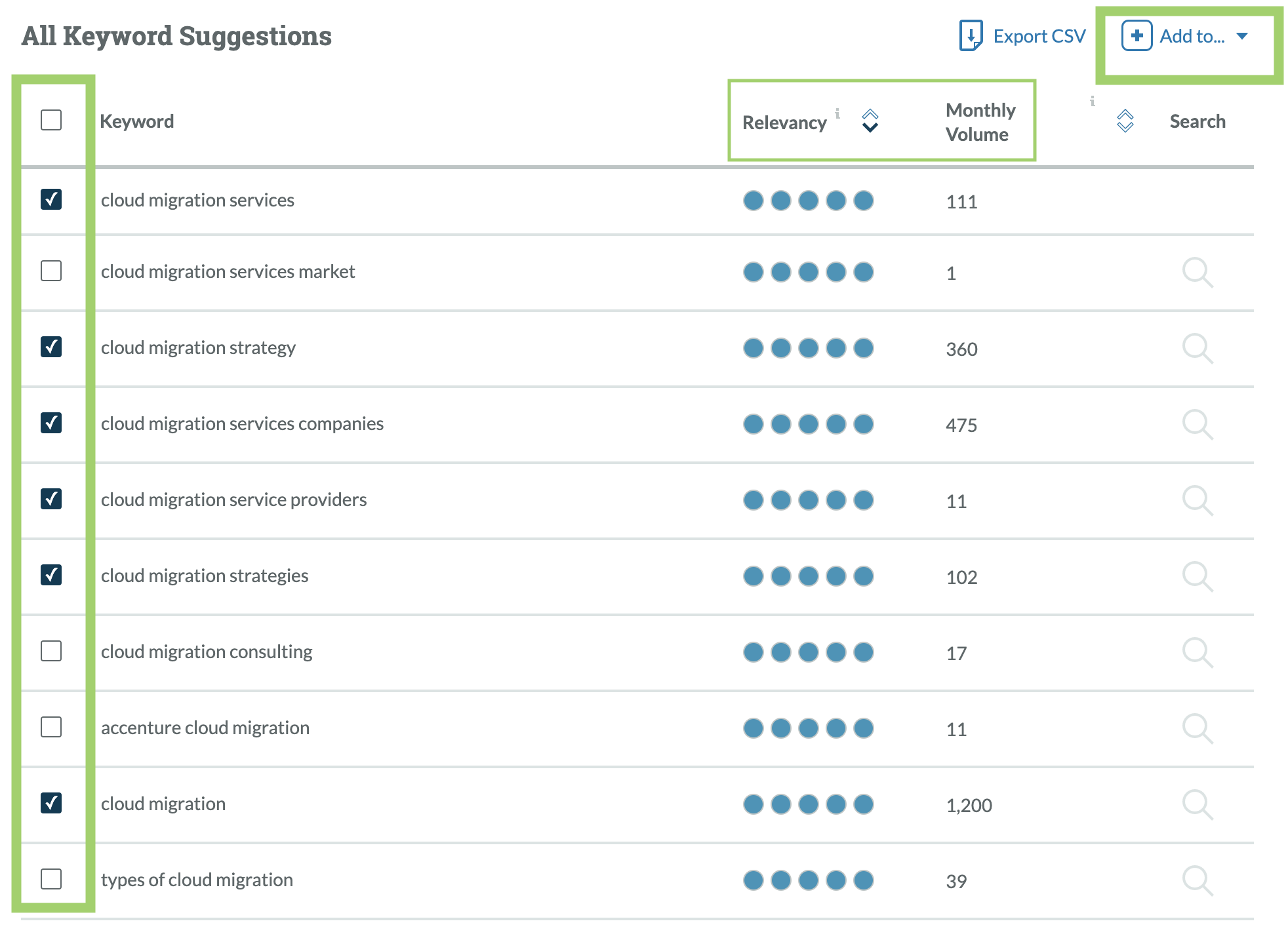
Moz’s Keyword Explorer helps find valuable keywords. First, go to the Keyword Explorer tool on Moz. Enter a keyword related to your topic. Click “Analyze”. Moz will provide data on your keyword.
You will see the keyword’s search volume. This shows how often people search for it. Look for keywords with a high search volume. These will bring more visitors to your site.
Analyzing Keyword Data
Next, analyze the keyword data provided by Moz. Keyword Explorer shows metrics like Difficulty, Organic CTR, and Priority. Difficulty indicates how hard it is to rank for that keyword. Lower difficulty means better chances of ranking higher.
Organic CTR shows the click-through rate. Higher CTR means more people click on search results. Priority combines all metrics to suggest the best keywords. Focus on keywords with high priority.
Use this data to choose the best keywords for your content. Adding these keywords to your website will improve your SEO. Remember, keyword research is an ongoing process. Regularly update your keywords to stay competitive.

Credit: moz.com
Site Audits
Site audits help identify issues on your website that affect its performance. Moz offers a comprehensive tool for this purpose. It finds and fixes problems that could be harming your site’s SEO.
Running A Site Crawl
To begin, log in to your Moz account. Go to the Site Crawl section. Click on “Start Crawl” to run a new audit. Moz will then scan your entire website. This process may take some time based on your site’s size.
Once the crawl is complete, you’ll see a report. The report lists all the issues Moz found during the crawl. These issues include broken links, missing metadata, and duplicate content. Review these results carefully.
Interpreting Audit Results
After the crawl, Moz displays your site’s health score. This score reflects the overall condition of your site. A higher score means fewer issues. Pay attention to the most critical errors first.
Moz categorizes issues into three groups:
- Critical Issues: These are high-priority problems. Fix these to improve your site’s SEO quickly.
- Warnings: These are medium-priority issues. Address them to prevent potential SEO damage.
- Notices: These are low-priority issues. Fix them if you have extra time.
Each issue comes with a detailed explanation. Moz provides suggestions on how to fix them. Follow these suggestions to improve your site’s health score.
For example, if Moz finds broken links, it will list the URLs. You can then fix or remove these links. This improves user experience and SEO.
Moz also identifies pages with missing or duplicate meta descriptions. Update these meta descriptions to make them unique and relevant.
Regular site audits help keep your website in good shape. Use Moz’s site audit tool to maintain and improve your site’s SEO.
On-page Optimization
On-page optimization is a crucial part of SEO. It involves improving individual web pages to rank higher in search engines. Moz offers tools and insights to help with this. Let’s explore some key steps.
Optimizing Page Content
Start by analyzing your content. Use Moz’s keyword explorer to find relevant keywords. These keywords should match what users search for. Place these keywords naturally in your text.
Ensure your content is clear and valuable. Answer common questions your audience may have. Break up text with subheadings and bullet points. This makes it easier to read.
Next, check for duplicate content. Moz’s crawler tool can help identify this. Unique content performs better in search results. Also, add internal links to other pages on your site. This helps with navigation and SEO.
Improving Meta Tags
Meta tags are snippets of text that describe a page’s content. They don’t appear on the page itself but in the page’s code. Moz can help you optimize these.
First, focus on the title tag. This is one of the most important on-page SEO factors. It should include your main keyword. Keep it under 60 characters. Make it compelling to encourage clicks.
Next, update the meta description. This should also include your main keyword. Summarize the page content in a few sentences. Aim for 150-160 characters. This is what users see in search results.
Use Moz to check for missing or duplicate meta tags. Fix these issues to improve your site’s SEO. Well-optimized meta tags help search engines understand your content better.
Link Building
Link building is a vital part of any SEO strategy. It helps improve your website’s authority and search engine rankings. Moz is a powerful tool that can simplify the link-building process. This guide will walk you through using Moz for effective link-building.
Finding Link Opportunities
Finding link opportunities is the first step in link building. Moz makes this easy with its Link Explorer tool. Follow these steps:
- Go to Moz’s Link Explorer.
- Enter your website’s URL in the search bar.
- Click the “Search” button.
Moz will display a list of potential link opportunities. You can filter these results by domain authority, anchor text, and more. Look for high-authority websites relevant to your niche. Aim to get links from these sites to improve your SEO.
Tracking Backlinks
Tracking backlinks is crucial to monitor your link-building efforts. Moz helps you keep track of all your backlinks. Here’s how:
- Open Moz’s Link Explorer.
- Enter your website’s URL in the search bar.
- Click the “Search” button.
- Navigate to the “Inbound Links” tab.
You’ll see a list of all the backlinks pointing to your site. Moz provides details like the linking page, anchor text, and domain authority. Use this information to assess your link-building progress. Ensure you maintain high-quality backlinks and disavow any harmful links.
Tracking And Reporting
Tracking and reporting are crucial for understanding your SEO progress. With Moz, you can easily set up campaigns and generate insightful reports. Let’s dive into the step-by-step process.
Setting Up Campaigns
To start tracking your website’s performance, you need to set up a campaign in Moz. Follow these steps:
- Log in to your Moz account.
- Click on “Campaigns” in the top navigation bar.
- Select “Add New Campaign”.
- Enter your website’s URL and campaign name.
- Choose the location you want to track.
- Click “Next” to configure additional settings, such as keywords and competitors.
- Review your settings and click “Create Campaign”.
Once your campaign is set up, Moz will start collecting data. You’ll be able to monitor your website’s performance over time.
Generating Reports
Generating reports in Moz is simple and provides valuable insights. Here’s how:
- Navigate to the “Reports” section in your campaign dashboard.
- Click on “Create New Report”.
- Select the type of report you want to generate (e.g., keyword rankings, site audit).
- Choose the date range for your report.
- Customize the report by selecting the metrics you want to include.
- Click “Generate Report”.
Once the report is generated, you can view it directly in Moz or export it as a PDF or CSV file.
Here are some key metrics you might want to include in your reports:
- Keyword Rankings: Track how your keywords are performing in search results.
- Site Audits: Identify technical issues that could be affecting your SEO.
- Backlink Analysis: Monitor the quality and quantity of your backlinks.
- Traffic Data: Understand the amount of traffic coming to your site.
Regularly generating and reviewing these reports helps you stay on top of your SEO efforts. This ensures that you can make informed decisions to improve your website’s performance.
Advanced Features
Advanced features in Moz can elevate your SEO strategy. These features offer deeper insights and more control. Let’s explore two key tools: MozBar and Moz Pro Tools.
Using Mozbar
MozBar is a browser extension that provides SEO metrics on the go. Install MozBar from the Moz website. Once installed, it appears as a toolbar in your browser. This tool helps you analyze any webpage you visit.
Here are some key features of MozBar:
- Page Authority (PA): Measures the ranking strength of a single page.
- Domain Authority (DA): Predicts the ranking potential of the entire domain.
- Link Metrics: Shows the number of inbound links to the page.
Activate MozBar by clicking on its icon. Analyze the metrics displayed on the toolbar. Use this data to understand the SEO health of a webpage.
Exploring Moz Pro Tools
Moz Pro Tools offers comprehensive solutions for SEO analysis. These tools help in keyword research, site audits, and rank tracking. Access Moz Pro Tools from the Moz dashboard.
Here are some key features of Moz Pro Tools:
| Tool | Function |
|---|---|
| Keyword Explorer | Find relevant keywords for your content. |
| Site Crawl | Identifies technical issues on your site. |
| Rank Tracker | Monitors your keyword rankings over time. |
Here’s a step-by-step guide to using these tools:
- Keyword Explorer: Enter a keyword in the search bar. Review the analysis results. Use the suggestions to create content.
- Site Crawl: Run a site audit. Review the issues found. Fix the problems to improve your site’s health.
- Rank Tracker: Add your keywords. Check the ranking reports. Adjust your strategy based on the results.
Using these advanced features can optimize your SEO efforts. Regularly check the metrics and reports to stay ahead.
Tips And Best Practices
Using Moz effectively can significantly improve your SEO strategies. By following some tips and best practices, you can harness Moz’s full potential. This section will guide you through avoiding common mistakes and maximizing Moz efficiency.
Common Mistakes To Avoid
Even seasoned professionals can make mistakes while using Moz. Here are some common pitfalls to watch out for:
- Ignoring Keyword Difficulty: Always consider keyword difficulty before targeting new keywords. High-difficulty keywords can be tough to rank for.
- Overlooking Local SEO: Use Moz’s local SEO tools to optimize for local searches. Neglecting this can limit your reach.
- Not Tracking Competitors: Always monitor your competitors. Use Moz’s competitor analysis tools to stay ahead.
- Skipping Regular Audits: Regular site audits help identify and fix issues. Don’t skip them.
Maximizing Moz Efficiency
To get the most out of Moz, follow these best practices:
- Use Keyword Explorer: Moz’s Keyword Explorer tool is powerful. Use it to find relevant keywords and analyze their potential.
- Leverage Link Explorer: This tool helps you find and analyze backlinks. Quality backlinks can boost your site’s authority.
- Set Up Custom Reports: Create custom reports to track your SEO progress. Regular reports help you stay informed.
- Optimize On-Page Elements: Use Moz’s On-Page Grader to optimize your site’s pages. This can improve your search engine rankings.
Here is a table summarizing some key actions you should take:
| Action | Tool | Benefit |
|---|---|---|
| Keyword Research | Keyword Explorer | Find high-potential keywords |
| Backlink Analysis | Link Explorer | Improve site authority |
| Site Audits | Site Crawl | Identify and fix issues |
| On-Page Optimization | On-Page Grader | Improve page rankings |
Following these tips and best practices can help you effectively use Moz. Avoid common mistakes and maximize your efficiency with Moz’s tools.
Frequently Asked Questions
What Is Moz Used For?
Moz is a tool for SEO analysis. It helps improve your website’s search engine ranking. Moz offers keyword research, link building, and site audits.
How Do I Start Using Moz?
To start using Moz, create an account on their website. Then, explore the various tools and resources they offer. You can begin with a free trial.
Can Moz Help With Keyword Research?
Yes, Moz’s Keyword Explorer helps you find relevant keywords. It provides data on keyword volume, difficulty, and potential. This tool helps optimize your content.
Is Moz Suitable For Beginners?
Moz is user-friendly and suitable for beginners. It offers educational resources, tutorials, and a supportive community. These help you understand and use the platform effectively.
Conclusion
Using Moz can enhance your SEO strategy effectively. Follow each step carefully. Track keyword rankings regularly. Analyze backlinks and optimize your content. Moz offers valuable insights to improve your website’s performance. Consistency and patience are key. Experiment with different features and tools.
Watch your site grow over time. Moz makes SEO tasks manageable and straightforward. Take advantage of this powerful tool. Happy optimizing!
