

Choosing the right live streaming platform can be challenging. Two popular options are Onestream Live and Streamyard.
Both offer unique features and benefits. Comparing Onestream Live and Streamyard helps you decide which fits your needs best. Onestream Live allows streaming to multiple platforms at once. Streamyard makes it easy to create professional-looking broadcasts. Understanding their differences can save you time and frustration.
This guide highlights key aspects of each, so you can make an informed decision. Whether you’re a content creator, marketer, or hobbyist, this comparison will help you choose the right tool for your live streaming goals. Let’s dive in and see what each platform has to offer.
Credit: www.getapp.com
Introduction To Live Streaming Platforms
Live streaming has become a popular way to connect with audiences. Many content creators, businesses, and educators use live streaming to share information. Choosing the right platform is crucial for a successful live stream. In this post, we compare two popular platforms: Onestream Live and Streamyard.
Growing Popularity
Live streaming is growing fast. More people are choosing live streams over traditional videos. This trend is visible on social media and online events. Platforms like Onestream Live and Streamyard make live streaming easy. They offer tools to engage viewers and improve the streaming experience.
Importance Of Choosing The Right Platform
Selecting the right platform is vital. It affects the quality of your live stream. Onestream Live and Streamyard each have unique features. Some important factors to consider include:
- Ease of use: How easy is it to set up and stream?
- Features: Does the platform offer the tools you need?
- Cost: Is the platform within your budget?
- Support: Is customer support available when needed?
Onestream Live offers pre-recorded streaming. This allows you to schedule streams ahead of time. Streamyard focuses on live interactions. It provides tools to engage with your audience in real-time.
Below is a comparison table of key features:
| Feature | Onestream Live | Streamyard |
|---|---|---|
| Pre-recorded Streaming | Yes | No |
| Real-time Engagement | Limited | Yes |
| Ease of Use | Moderate | High |
| Multi-streaming | Yes | Yes |
| Price | Varies | Varies |
Choosing between Onestream Live and Streamyard depends on your needs. Both platforms offer strong tools for live streaming. Consider your goals and pick the one that fits best.
Credit: onestream.live
Onestream Live Overview
Onestream Live is a robust live streaming platform. It helps users stream content to multiple platforms at the same time. This overview will explore its key features, user interface, and pricing plans.
Key Features
Onestream Live offers a range of features designed to enhance your streaming experience. These features are tailored to both beginners and professionals.
- Multistreaming: Stream to over 40 social media platforms at once.
- Pre-recorded Streaming: Schedule and stream pre-recorded videos.
- Cloud Storage: Store and manage your videos in the cloud.
- Custom RTMP: Stream to any platform using custom RTMP.
- Analytics: Monitor your stream performance with detailed analytics.
User Interface
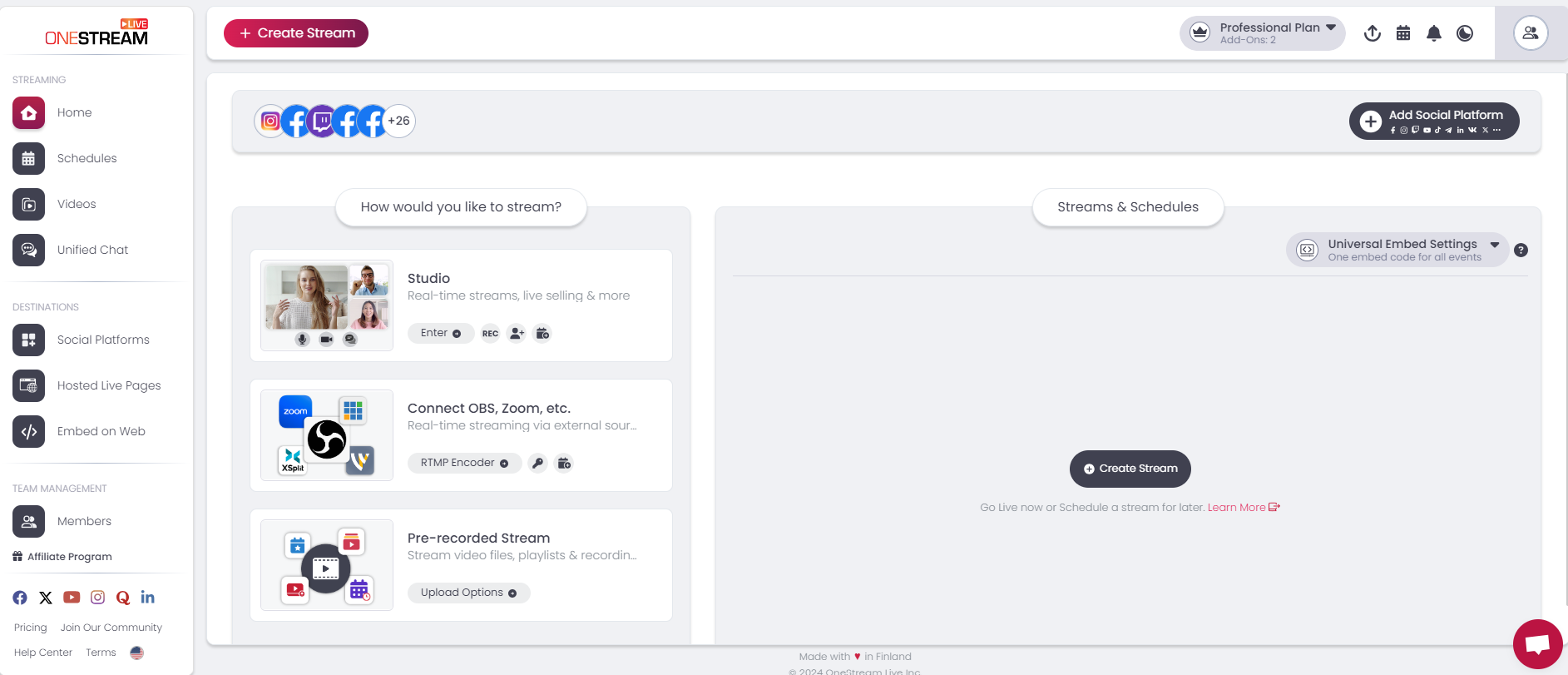
Onestream Live boasts an intuitive and user-friendly interface. The dashboard is clean and easy to navigate.
Users can quickly set up streams and manage their content. The drag-and-drop feature simplifies video uploads. Real-time notifications help users stay on top of their streams.
The platform supports multiple languages, making it accessible to a global audience. Users can also customize their streaming settings with ease.
Pricing Plans
Onestream Live offers flexible pricing plans to suit different needs and budgets. Here is a breakdown of the available plans:
| Plan | Price (Per Month) | Features |
|---|---|---|
| Basic | $10 | 1 Social Account, 5 Streams per Month, Standard Support |
| Standard | $25 | 5 Social Accounts, Unlimited Streams, Priority Support |
| Professional | $55 | 20 Social Accounts, Unlimited Streams, Premium Support |
Each plan offers a 7-day free trial. Users can test the features before committing to a subscription.
Streamyard Overview
Streamyard is a popular live streaming platform for content creators. It provides user-friendly tools for broadcasting live videos to multiple social platforms. Here’s a closer look at its key features, user interface, and pricing plans.
Key Features
Streamyard offers a range of features designed to enhance your live streaming experience:
- Multi-streaming: Broadcast to multiple platforms like Facebook, YouTube, and LinkedIn simultaneously.
- Customization: Add logos, overlays, and backgrounds to personalize your stream.
- Guest Invitations: Easily invite up to ten guests to join your live stream.
- Screen Sharing: Share your screen with viewers for presentations or tutorials.
- Comments Integration: Display viewer comments on-screen to engage with your audience.
- Recording: Record your streams for later use or repurposing.
User Interface
Streamyard’s user interface is intuitive and easy to navigate:
- Drag-and-Drop Layout: Easily arrange elements on your screen.
- Dashboard: Simple dashboard for controlling your live stream.
- Real-time Comments: View and highlight live comments without leaving the interface.
- Minimal Setup: Start streaming with minimal setup and configuration.
The straightforward design ensures you focus on content creation rather than technical details.
Pricing Plans
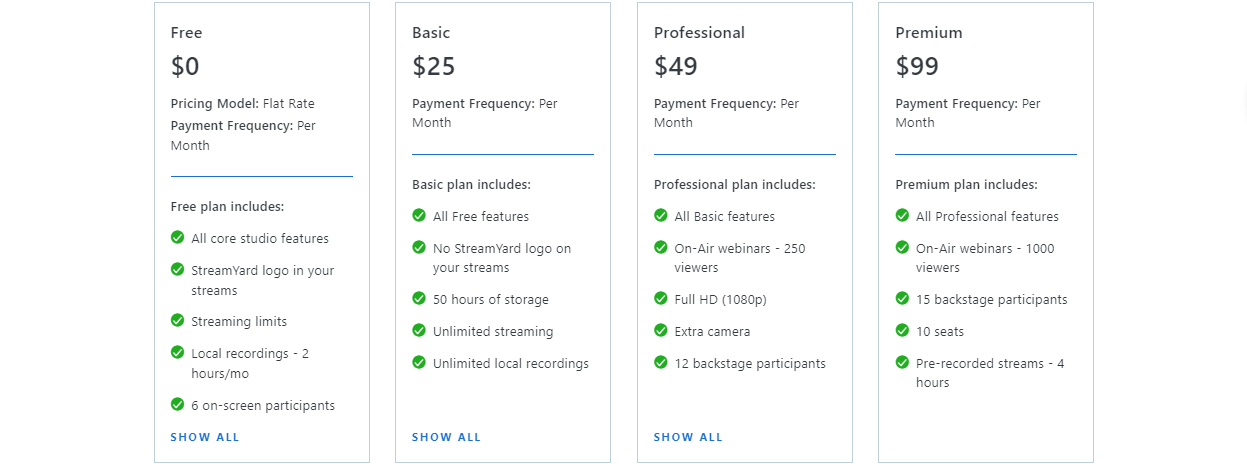
Streamyard offers several pricing plans to suit different needs:
| Plan | Monthly Cost | Features |
|---|---|---|
| Free | $0 |
|
| Basic | $20 |
|
| Professional | $39 |
|
Each plan caters to different streaming needs, from beginners to professionals.

Credit: www.youtube.com
Ease Of Use
When choosing between Onestream Live and Streamyard, ease of use is crucial. You want a platform that is simple to set up, intuitive to navigate, and offers reliable customer support.
Setup Process
Onestream Live has a straightforward setup process. Create an account, link your social media, and start streaming. You don’t need technical skills to get started.
Streamyard also offers an easy setup. Sign up, connect your platforms, and you are ready to go live. Both platforms provide easy-to-follow guides for beginners.
User Experience
Onestream Live offers a clean and user-friendly interface. Everything is well-organized, making it easy to find features. You can schedule streams, manage recordings, and track analytics with ease.
Streamyard is known for its simplicity. The dashboard is intuitive, with easy access to all tools. It supports multiple guests, screen sharing, and real-time comments, making the experience smooth for everyone.
Customer Support
Onestream Live provides responsive customer support. You can reach them via email or live chat. They also offer a detailed help center with tutorials and FAQs.
Streamyard offers excellent customer service. You can contact them through live chat or email. Their help center is comprehensive, with a range of resources to assist users.
Customization Options
Choosing the right live streaming platform often boils down to customization options. Both Onestream Live and Streamyard offer various features that help tailor your broadcast. Let’s explore their branding features, layout customization, and interactive elements.
Branding Features
Branding is crucial for any live stream. Onestream Live allows you to add custom logos, overlays, and backgrounds. This ensures your stream looks professional. Streamyard also offers similar branding features. You can upload logos, change colors, and add overlays. Both platforms help you maintain brand consistency.
Layout Customization
Layout customization enhances the viewer experience. Onestream Live provides multiple layout options. You can switch between layouts during the stream. Streamyard offers drag-and-drop layout customization. This makes it easy to arrange elements on the screen. Both platforms give you control over the visual presentation.
Interactive Elements
Interactive elements make streams engaging. Onestream Live offers features like polls and Q&A sessions. These tools help you interact with your audience. Streamyard also has interactive features. You can highlight comments and invite guests. Both platforms enhance viewer participation.
Integration Capabilities
Choosing the right live streaming platform can be a challenge. Integration capabilities play a crucial role in making this decision. Below, we compare the integration features of Onestream Live and Streamyard.
Social Media Integration
Both Onestream Live and Streamyard offer robust social media integration. They support major platforms like Facebook, YouTube, and LinkedIn. This allows users to stream content simultaneously across multiple channels, ensuring a wider reach.
Onestream Live provides additional support for platforms such as Instagram and Twitch. This makes it a more versatile choice for users wanting to target diverse audiences.
Streamyard focuses on offering seamless connectivity with Facebook Groups and LinkedIn Events. This feature is particularly useful for community-based streaming.
Third-party Tools
Integration with third-party tools can significantly enhance streaming experiences. Both platforms offer impressive capabilities in this area.
Onestream Live supports tools like Zapier, enabling users to automate workflows. This can save time and ensure seamless operations.
Streamyard integrates well with Restream, providing additional multi-streaming options. It also supports tools like Google Analytics for tracking stream performance.
| Platform | Key Third-party Integrations |
|---|---|
| Onestream Live | Zapier, Slack, Google Calendar |
| Streamyard | Restream, Google Analytics, HubSpot |
Api Access
API access allows developers to customize and extend platform functionality.
Onestream Live offers comprehensive API documentation. This enables developers to integrate custom applications and enhance the platform’s capabilities.
Streamyard provides limited API access. It focuses on ease of use with fewer customization options. This makes it suitable for users who prefer a straightforward, plug-and-play experience.
Both platforms offer valuable integration capabilities. The choice depends on your specific needs and technical expertise.
Performance And Reliability
Performance and reliability are key factors in choosing a streaming platform. Both Onestream Live and Streamyard offer solid services, but each has unique strengths. Let’s dive into their performance and reliability features.
Streaming Quality
Onestream Live provides high-definition streaming up to 1080p. This ensures clear and crisp video quality. Users can expect minimal buffering and smooth playback. Streamyard also offers 1080p streaming. Its adaptive bitrate streaming helps maintain quality during network fluctuations.
Platform Stability
Onestream Live boasts strong server infrastructure. This ensures consistent performance even during high traffic. The platform rarely experiences downtimes. Streamyard is built on cloud servers. It offers reliable uptime and stable performance. Both platforms invest heavily in server technology.
User Feedback
Onestream Live users appreciate its reliable streaming and minimal downtime. Many praise its easy-to-use interface. Streamyard users highlight its stability and user-friendly design. Both platforms receive positive feedback for performance and reliability. Users feel confident with their streaming quality.
Conclusion And Recommendation
Choosing between Onestream Live and Streamyard can be tough. Both platforms have unique features tailored to different needs. This section will help you decide which one suits your requirements best.
Best Use Cases For Onestream Live
Onestream Live shines in multi-platform streaming. It’s perfect for users who need to stream to multiple social media channels simultaneously. This feature saves time and maximizes reach.
Here are some ideal scenarios for Onestream Live:
- Business webinars: Stream your content to Facebook, YouTube, and LinkedIn at the same time.
- Product launches: Reach a larger audience across various platforms.
- Non-profit events: Engage with supporters on different social media networks.
Best Use Cases For Streamyard
Streamyard excels in ease of use and guest management. It’s great for users who need a simple, intuitive interface. Also, it’s perfect for hosting guest interviews.
Consider Streamyard in these situations:
- Live interviews: Easily invite guests and manage them during the broadcast.
- Panel discussions: Engage with multiple speakers seamlessly.
- Q&A sessions: Interact with your audience in real-time.
Final Thoughts
Both Onestream Live and Streamyard offer valuable features. Your choice depends on your specific needs. For multi-platform streaming, go with Onestream Live. For ease of use and guest management, choose Streamyard.
Evaluate your goals and select the platform that aligns with your priorities.
Frequently Asked Questions
What Is Onestream Live?
Onestream Live is a cloud-based streaming platform. It allows users to broadcast pre-recorded videos as live streams. It supports various social media channels.
What Is Streamyard?
Streamyard is a live streaming studio. It enables users to broadcast directly to social media platforms. It offers real-time interaction features.
How Do Onestream Live And Streamyard Differ?
Onestream Live focuses on broadcasting pre-recorded videos. Streamyard excels in live, interactive streaming. Both offer unique features for different needs.
Which Platform Is Easier To Use?
Streamyard is known for its user-friendly interface. Onestream Live also offers a straightforward experience. Both are designed for easy use.
Conclusion
Choosing between Onestream Live and Streamyard depends on your specific needs. Both platforms offer great features. Onestream Live is excellent for pre-recorded streams. Streamyard shines with live broadcasts. Consider your budget, goals, and audience. Test both to see which fits best.
Each has unique strengths. Make an informed choice. Enjoy streaming!
