

Securing your digital life is crucial. 1Password simplifies this task.
It’s a powerful tool that manages passwords, secures access, and protects sensitive information. But how do you use it effectively? 1Password stands out as a top choice for safeguarding digital access. Trusted by Oracle Red Bull Racing, it ensures secure sign-ins and device trust.
With features like password management, two-factor authentication, and autofill, it offers a robust security framework. But mastering its features is key to maximizing its benefits. This guide will walk you through using 1Password to enhance your online security. You’ll learn how to store passwords securely, share them safely, and manage access across devices. Whether you’re new to password managers or looking to refine your skills, this post will help you navigate 1Password with ease.

Credit: www.youtube.com
Introduction To 1password And Its Purpose
In today’s digital world, security is a top priority. 1Password serves as a crucial tool for safeguarding digital access and information across various platforms. As a leading password manager, it ensures that every sign-in is secure and every device is trusted. 1Password is trusted by organizations like Oracle Red Bull Racing, providing secure access from headquarters to the racing track.
Overview Of 1password
1Password is a comprehensive cybersecurity solution. It offers password management, secure storage for sensitive information, and ensures device trust across multiple devices. Users can manage passwords, credit cards, and sensitive details effortlessly. With Extended Access Management (XAM), secure access to apps from any device is guaranteed. This feature is perfect for SaaS-centric hybrid work environments.
1Password also facilitates password sharing, allowing secure credential sharing among team members. The two-factor authentication adds an extra layer of security, enhancing account protection. Its autofill feature simplifies login processes, making it user-friendly.
The Importance Of Password Managers In Today’s Digital Age
In the digital age, managing passwords efficiently is crucial. Password managers like 1Password enhance security and trust for organizations worldwide. They support millions of users, ensuring secure access management. With cyber threats evolving, a reliable password manager is essential.
1Password offers benefits like improved return on investment, with a 206% ROI as per Forrester Research. Users enjoy fast and transparent customer support. The product supports various pricing plans for personal and business use, accessible via the official website.
Understanding refund and return policies is vital. Users should consult 1Password’s terms of service or contact support for specific details. Explore resources like webinars and customer stories to maximize cybersecurity measures.
Credit: www.techrepublic.com
Key Features Of 1password
1Password offers a range of robust features that ensure secure digital access. Trusted by millions, it provides seamless password management and cybersecurity solutions. Let’s explore the key features that make 1Password a top choice for password security.
Secure Storage For Passwords And Sensitive Information
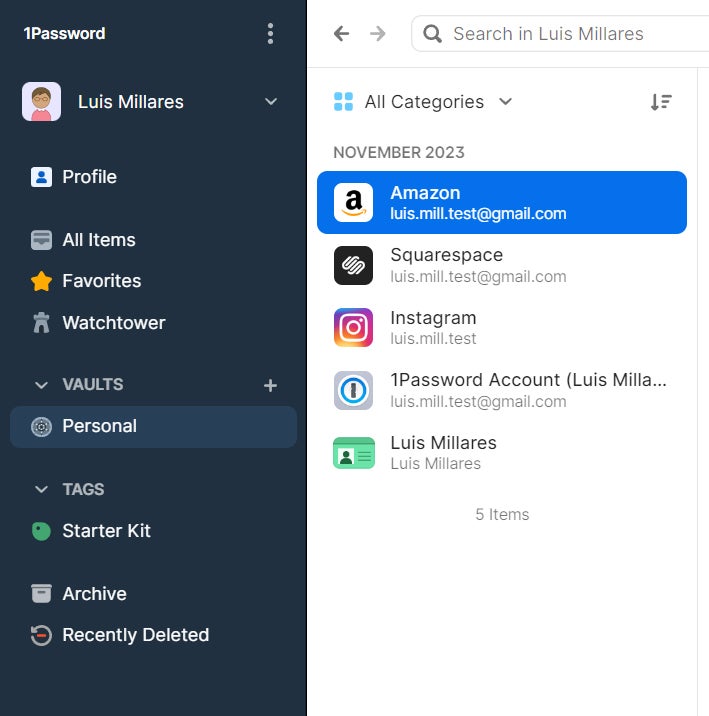
1Password provides secure storage for passwords and sensitive information. It protects passwords, credit card details, and personal data. Users can access this information from any device. This ensures that your critical data is always secure and at your fingertips.
Multi-device Syncing For Seamless Access
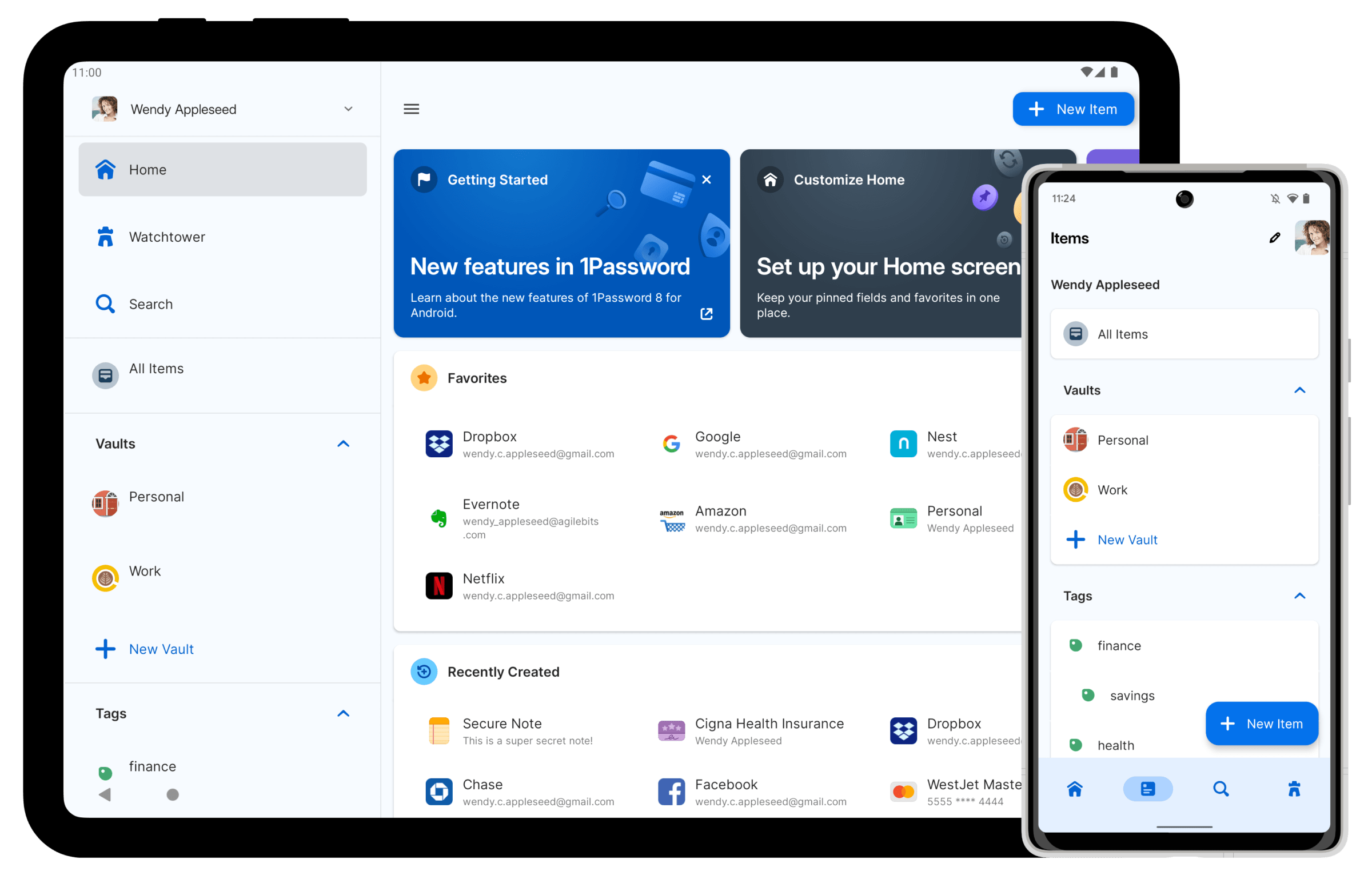
With 1Password, experience multi-device syncing for seamless access. Your passwords and data synchronize across all your devices. This ensures you can access your information wherever you are. Stay connected and secure, whether on a computer or mobile device.
Watchtower: Monitoring For Data Breaches
1Password’s Watchtower feature monitors for data breaches. It alerts users if their information is compromised. This proactive approach helps maintain the security of your digital assets. Stay informed and secure with real-time breach alerts.
Travel Mode: Protect Your Data On The Go
Travel Mode in 1Password protects your data when you travel. It hides sensitive information from your devices. Only essential data remains accessible. This feature is crucial for maintaining privacy and security on the go. Keep your data safe during your travels.
Getting Started With 1password
Starting with 1Password is straightforward and secure. This guide will help you set up and organize your account efficiently. Whether you’re an individual or part of a team, 1Password ensures your digital credentials are protected. Let’s dive into the essential steps to begin your journey with this trusted password manager.
Setting Up Your 1password Account
First, visit the official 1Password website to create your account. Choose a plan that fits your needs, whether personal or business. Once registered, download the 1Password app on your devices. Follow the on-screen instructions to set up your master password. This password is crucial for accessing all your saved information. Make sure it is strong and unique.
Importing Existing Passwords
After setting up your account, import your existing passwords. Navigate to the import section in the 1Password app. Choose from various supported formats, including CSV and other password managers. Follow the steps to upload your password file. This process saves time and keeps all your information in one secure place.
Organizing Your Vaults And Categories
Organization is key to maintaining a streamlined digital life. 1Password allows you to create multiple vaults to separate personal and professional data. Within each vault, categorize entries like passwords, credit cards, and secure notes. Use the built-in search feature to quickly locate information. Regularly update and audit your vaults to ensure everything remains current and secure.
Features and Benefits:
| Feature | Description |
|---|---|
| Password Management | Secure storage for passwords and sensitive data. |
| Extended Access Management | Secure access for SaaS-centric work environments. |
| Device Trust | Ensure all devices accessing applications are secure. |
| Password Sharing | Facilitates secure sharing of credentials. |
| Two-Factor Authentication | Extra layer of security for account access. |
| Autofill | Simplifies login processes across websites and apps. |
Using 1Password enhances security and trust. Millions of users globally benefit from its features and reliable support.
Advanced Features For Enhanced Security
1Password is not just about storing passwords. It offers advanced features to boost security. These tools make it a leading choice for cybersecurity. Below, we explore some key features for enhanced protection.
Using Two-factor Authentication
Two-Factor Authentication (2FA) adds an extra layer of security. It requires a second form of verification. This could be a text message, email, or an authenticator app. With 1Password, activating 2FA is simple.
- Go to your account settings.
- Select “Two-Factor Authentication”.
- Follow the prompts to set it up.
2FA significantly reduces the risk of unauthorized access. It ensures that only you can access your accounts.
Sharing Passwords Securely With Family And Team Members
Sharing sensitive information is often necessary. 1Password’s Password Sharing feature ensures it is done securely. You can share passwords with family or team members safely.
- Create a shared vault for the group.
- Add passwords and credentials to this vault.
- Invite members with specific permissions.
This feature ensures everyone has the access they need. And it maintains security at all times.
Generating Strong, Unique Passwords
Strong, unique passwords are essential for security. 1Password’s Password Generator helps create them effortlessly. It generates complex passwords that are hard to crack.
| Step | Action |
|---|---|
| 1 | Open the 1Password app. |
| 2 | Select “Password Generator”. |
| 3 | Set your password preferences. |
| 4 | Generate and save the password. |
This ensures every account has a unique and secure password. It minimizes risks associated with password reuse.
Pricing And Affordability Breakdown
Understanding the pricing of 1Password is crucial for potential users. It helps in determining whether this cybersecurity solution fits within budgetary constraints. Let’s delve into the pricing details and see how 1Password stands against competitors.
Overview Of Subscription Plans
1Password offers various subscription plans tailored to different needs. These plans cater to both personal and business use, providing flexibility and affordability.
- Individual Plan: Ideal for single users needing basic password management.
- Family Plan: Supports multiple users, perfect for families seeking shared security.
- Business Plan: Offers comprehensive features for teams and organizations.
- Enterprise Plan: Designed for large enterprises with advanced needs.
Each plan includes essential features like secure password storage and two-factor authentication. Business and enterprise plans offer extended features like Extended Access Management (XAM) and Device Trust.
Comparing 1password’s Value To Competitors
1Password competes with other leading password managers in the market. Its value proposition lies in enhanced security and ease of use.
| Feature | 1Password | Competitor A | Competitor B |
|---|---|---|---|
| Pricing (Individual) | $2.99/month | $3.99/month | $2.50/month |
| Password Sharing | Included | Extra Cost | Included |
| Two-Factor Authentication | Included | Included | Included |
| Device Trust | Included | Not Available | Included |
1Password’s pricing is competitive, offering more features at a similar or lower cost. It stands out with unique offerings like Device Trust and comprehensive customer support.
Considering its partnership with Oracle Red Bull Racing, 1Password ensures top-tier cybersecurity. This enhances its value proposition significantly.
Pros And Cons Of Using 1password
Choosing a password manager is crucial for digital security. 1Password offers robust solutions, but understanding its pros and cons helps make informed decisions. Explore the advantages and disadvantages of using 1Password.
Advantages: Security
1Password excels in security features. It provides two-factor authentication which adds an extra layer of security. Extended Access Management (XAM) secures access to apps, ideal for hybrid work environments. Device Trust ensures every device is secure before accessing applications. These features protect sensitive information and enhance organizational trust.
Advantages: Usability
Usability is a key strength. 1Password offers autofill to simplify logins. Password sharing facilitates secure sharing of credentials. The interface is intuitive, allowing users to manage passwords effortlessly across platforms. It supports millions globally, evidenced by high satisfaction ratings.
Advantages: Integration
1Password integrates well with various systems. It provides secure access management, enhancing security for organizations like Oracle Red Bull Racing. Users benefit from fast and transparent customer support. Integration with SaaS-centric environments is seamless, maximizing cybersecurity measures.
Disadvantages: Cost
Cost is a notable disadvantage. Pricing details vary on the official website. While the ROI is impressive, some users find the subscription cost high. It’s crucial to weigh the investment against the security benefits.
Disadvantages: Learning Curve
There’s a learning curve involved. New users may face challenges initially. While the interface is user-friendly, understanding all features takes time. Resources like webinars and customer stories assist users in getting acquainted with the system.
Recommendations For Ideal Users
1Password is a robust password management tool. It’s designed to cater to both individuals and businesses. Its features enhance security and streamline access management.
Best Use Cases For Individuals
Individuals benefit from 1Password’s password management. It stores passwords securely and allows access from any device. This feature is perfect for users with multiple accounts.
1Password’s autofill simplifies logins. It reduces the hassle of remembering numerous credentials. This is ideal for daily internet users who value convenience.
The two-factor authentication adds an extra layer of security. Users who prioritize online safety will find this invaluable. It ensures that accounts are protected from unauthorized access.
Scenarios Where 1password Excels For Businesses
Businesses thrive with 1Password’s Extended Access Management (XAM). It offers secure access across all apps from any device. This suits SaaS-centric hybrid work environments.
Device Trust ensures every device accessing applications is secure. This is crucial for organizations like Oracle Red Bull Racing. It guarantees all sign-ins are from trusted devices.
1Password enhances password sharing among team members. It facilitates secure sharing of credentials. This is essential for teams handling shared resources.
Companies benefit from 1Password’s customer support. It is known for its reliability and transparency. Fast support helps businesses maintain seamless operations.
The investment in 1Password can lead to a 206% ROI. This makes it a cost-effective choice for businesses. It supports millions of satisfied users globally.
| Feature | Benefit |
|---|---|
| Password Management | Secure storage and access across devices |
| Autofill | Simplifies login processes |
| Two-Factor Authentication | Adds extra security layer |
| Extended Access Management | Secure app access for hybrid work |
| Device Trust | Ensures security of accessing devices |
| Password Sharing | Facilitates secure credential sharing |
| Customer Support | Reliable and transparent assistance |
| ROI | 206% return on investment |
Credit: support.1password.com
Frequently Asked Questions
How Do I Start Using 1password?
Download 1Password from the official website or app store. Create an account and set a strong master password. Install the browser extension for easy access. Add and organize passwords, notes, and personal information securely. Use the 1Password app to autofill login details across devices.
What Are The Cons To 1password?
1Password can be expensive for some users. It lacks free tier options. The interface may seem complex initially. Users need to trust cloud storage for data security. Limited customer support options can be frustrating. Integration with certain third-party apps may not be seamless.
How Do I Enter A Password In 1password?
Open 1Password and click on “New Item. ” Choose “Login” type, enter the website name and your username. Add your password in the designated field, then save. Your password is now securely stored in 1Password for easy access.
Is It Hard To Use 1password?
Using 1Password is straightforward and user-friendly. Its intuitive design ensures easy navigation for all users. Setup is quick, requiring minimal effort. The interface is clean, making password management simple. Helpful guides and support are available. It’s designed for efficiency, catering to both beginners and advanced users.
Conclusion
Using 1Password simplifies managing digital access securely. Its features protect data across devices, ensuring privacy. Password sharing and two-factor authentication enhance security. Organizations, like Oracle Red Bull Racing, trust 1Password for their cybersecurity needs. Its user-friendly interface makes it accessible for everyone.
Explore options on their website for personal and business use. Maximize security with reliable support from 1Password. Feel confident knowing your digital information is protected. Keep your passwords safe, and simplify your online experience with 1Password. Choose a plan that fits your needs and start securing your data today.
