

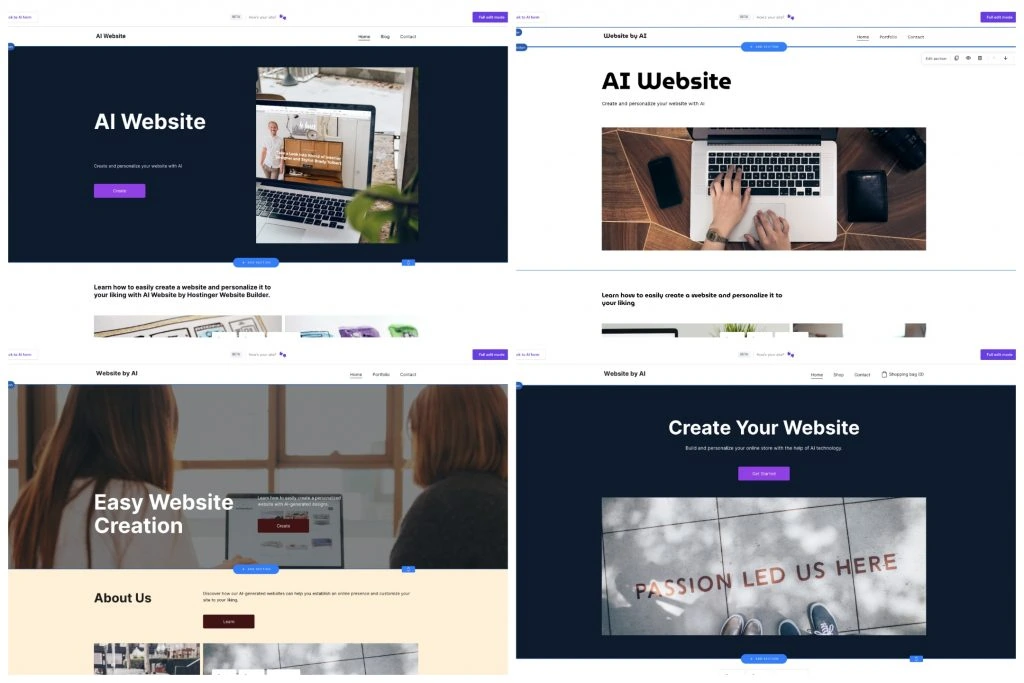
Want to create a website quickly? Hostinger AI Website Builder is your solution.
This tool simplifies the process for everyone. Building a website can seem tough, especially if you lack technical skills. Hostinger’s AI Website Builder changes that. It guides you step-by-step, making it easy for beginners. This tool uses artificial intelligence to simplify complex tasks.
You can create a professional website without coding knowledge. Whether you’re starting a blog or an online store, this builder has you covered. The intuitive interface lets you customize your site with ease. Ready to learn more? Let’s dive into how you can use Hostinger AI Website Builder to create a stunning website in no time.
Credit: www.hostinger.com
Introduction To Hostinger Ai Website Builder
Creating a website from scratch can seem daunting. Thankfully, Hostinger AI Website Builder simplifies this process. This tool allows anyone to create a professional website, even without coding knowledge. Let’s explore how this builder can help you create your dream website.
What Is Hostinger Ai?
Hostinger AI is an advanced tool designed to assist in website creation. It uses artificial intelligence to make the process fast and straightforward. With Hostinger AI, you can build a website that matches your vision.
Key Features
Hostinger AI Website Builder offers several standout features. These features help users design and launch their sites effortlessly.
Drag-and-Drop Editor: You can easily place elements on your page. No coding skills are needed. This makes the design process simple and intuitive.
Customizable Templates: Choose from a variety of templates. Each template is fully customizable. Tailor them to fit your brand and style.
Responsive Design: Your website will look great on any device. Hostinger AI ensures your site is mobile-friendly.
SEO Tools: Improve your site’s visibility on search engines. Hostinger AI includes built-in SEO tools to help you rank higher.
Fast Loading Speed: Websites created with Hostinger AI load quickly. This ensures a better user experience and lower bounce rates.
24/7 Support: Get help whenever you need it. Hostinger provides round-the-clock customer support to assist with any issues.
These key features make Hostinger AI Website Builder a great choice for anyone. Whether you’re new to website creation or looking to simplify the process, Hostinger AI offers an easy and effective solution.
Getting Started
Starting with Hostinger Ai Website Builder is easy. Follow these steps to create your website efficiently. First, you will need to create an account. Then, choose a plan that suits your needs. Let’s dive into each step.
Creating An Account
Visit the Hostinger website. Click on the “Sign Up” button. Enter your email address and create a password. Confirm your email address through the link sent to your inbox. Your account is now ready to use.
Choosing A Plan
Log in to your Hostinger account. Navigate to the pricing plans section. Review the available plans. Choose the one that fits your needs and budget. Complete the payment process. Your chosen plan is now active.
With your account set up and plan selected, you are ready to build your website. Enjoy the journey of creating your online presence with Hostinger Ai Website Builder.
Setting Up Your Website
Setting up your website with Hostinger AI Website Builder is straightforward. This tool helps you create a website quickly. You don’t need to know how to code. Follow these steps to get started.
Selecting A Template
First, choose a template for your site. Hostinger AI Website Builder offers many templates. They are designed for different types of websites. You can find templates for blogs, businesses, and portfolios. Select one that fits your needs. This is the starting point for your design.
Customizing Your Design
Next, customize the design to match your style. Change the colors to fit your brand. Adjust the fonts to make the text readable. Add your logo to give it a personal touch. Use the drag-and-drop feature to arrange elements. This makes it easy to create a unique layout.
Upload your images and videos to the site. High-quality visuals make your site look professional. Edit text to include important information. Ensure it is clear and concise. Adding contact details helps visitors reach you. Check all links to make sure they work.
Preview your site before publishing. This lets you see how it looks live. Make any final adjustments if needed. When you are happy with the design, publish your site. Now, it is ready for the world to see.
Adding Content
Adding content to your website is essential to make it engaging and informative. Hostinger’s AI Website Builder makes this easy and intuitive. Whether you want to add text, images, or multimedia, this guide will help you understand the process.
Text And Images
To add text, click on the area you want to edit. A text box will appear. Type your content directly into the box. You can format your text using the toolbar. Options include bold, italics, and alignment.
For images, click the image icon in the toolbar. You can upload an image from your computer. You can also choose from a library of free images. Once uploaded, you can resize and move the image to fit your layout.
Multimedia Integration
Adding videos and other multimedia is also simple. Click the multimedia icon in the toolbar. Choose the type of media you want to add. Options include video, audio, and slideshows.
For videos, you can upload your file or embed a link from YouTube. Drag and drop the video to position it. Adjust the size and settings as needed. This adds a dynamic element to your content, making it more engaging for visitors.
Optimizing For Seo
Understanding how to optimize your website for SEO is crucial. SEO helps you rank higher in search engine results. This attracts more visitors to your site. Using Hostinger AI Website Builder, you can easily optimize your site.
Keyword Research
Keyword research is the first step in optimizing your website. Use tools like Google Keyword Planner. Find relevant keywords that your audience searches for.
Here are some steps:
- Identify your target audience.
- Use keyword tools to find related terms.
- Analyze the competition for these keywords.
- Choose long-tail keywords for better targeting.
Long-tail keywords are longer and more specific. They help you attract more targeted traffic.
Meta Tags And Descriptions
Meta tags and descriptions play a key role in SEO. They provide search engines with information about your content.
Here are some tips:
- Keep the title tag under 60 characters.
- Include your main keyword in the title tag.
- Write a meta description under 160 characters.
- Include your main keyword in the meta description.
Here is an example:
| Element | Example |
|---|---|
| Title Tag | Best Coffee Shops in New York |
| Meta Description | Discover the best coffee shops in New York for a perfect brew. |
Title tags and meta descriptions should be unique for each page. This helps search engines understand each page better.
Credit: www.youtube.com
Enhancing User Experience
Enhancing user experience on your website is crucial for keeping visitors engaged and satisfied. The Hostinger AI Website Builder makes it easy to create a website that is not only visually appealing but also user-friendly. Let’s explore some ways to enhance user experience through responsive design, and navigation and usability.
Responsive Design
A responsive design ensures your website looks great on all devices. Whether your visitors are using a desktop, tablet, or smartphone, your site should adapt seamlessly. The Hostinger AI Website Builder automatically optimizes your site for different screen sizes, making it easy for users to navigate and interact with your content.
Here are some key aspects of responsive design:
- Fluid grids: Layouts that adjust based on screen size.
- Flexible images: Images that resize within their container.
- Media queries: CSS techniques to apply different styles based on device.
Navigation And Usability
Good navigation and usability are essential for a positive user experience. Clear and intuitive navigation helps users find what they need quickly. The Hostinger AI Website Builder offers tools to create menus and navigation bars that are easy to use.
Consider the following tips for effective navigation:
- Simple menu structure: Keep menus simple and organized.
- Consistent layout: Maintain a consistent layout across pages.
- Search functionality: Provide a search bar for quick access to content.
By focusing on these elements, your website will be more user-friendly, leading to higher engagement and satisfaction.
Publishing Your Website
Publishing your website with the Hostinger AI Website Builder is simple and quick. It involves two main steps: setting up your domain and launching your site. Let’s dive into each step to ensure your site goes live smoothly.
Domain Setup
Your domain is your website’s address on the internet. It’s crucial for your site’s identity. Follow these steps to set up your domain:
- Choose a Domain Name: Pick a name that is easy to remember and relevant to your content.
- Register the Domain: Use Hostinger’s domain registration service. Enter your chosen name and check its availability.
- Connect the Domain to Your Site: In the Hostinger dashboard, find the domain settings. Link it to your website. This usually involves updating DNS records.
Hostinger provides a user-friendly interface to make this process easy. If you face any issues, their support team is always ready to help.
Launching Your Site
Once your domain is set up, you are ready to launch your site. Here’s how:
- Preview Your Site: Before going live, preview your site. Ensure everything looks perfect.
- Optimize for Speed: Check your site’s load time. Use tools provided by Hostinger to improve performance.
- Go Live: In the Hostinger dashboard, find the publish option. Click it to make your site live.
Congratulations! Your website is now live for the world to see.
Maintaining Your Website
Maintaining your website is crucial for its success. A well-maintained website ensures a smooth user experience and high search engine rankings. With Hostinger’s AI Website Builder, you can simplify many tasks. Let’s discuss some key aspects of website maintenance.
Regular Updates
Regular updates keep your website secure and functional. Update your website’s content frequently. Fresh content attracts visitors and improves search engine rankings. Use Hostinger’s AI tools to help update your content quickly.
Check for software updates. This includes themes, plugins, and the Hostinger platform itself. Regular updates fix security issues and improve performance. Enable auto-updates where possible. This ensures you never miss a critical update.
Monitoring Performance
Monitoring performance helps you understand how your website is doing. Use Hostinger’s built-in analytics tools. Track key metrics like page load speed, user behavior, and traffic sources. This data helps you make informed decisions.
Identify and fix performance issues quickly. Slow-loading pages can drive visitors away. Regularly check your site’s speed. Optimize images and use caching to improve load times. A fast website keeps visitors happy and boosts search engine rankings.
Set up alerts for downtime. Downtime can hurt your reputation and affect SEO. Use Hostinger’s monitoring tools to get instant alerts if your website goes down. Quick action can minimize the impact of downtime.

Credit: www.youtube.com
Frequently Asked Questions
What Is Hostinger Ai Website Builder?
Hostinger AI Website Builder is a tool that helps you create websites. It uses artificial intelligence to simplify the process. You can build a professional website without coding skills. The AI guides you through design and content choices.
How To Start With Hostinger Ai Website Builder?
To start, sign up on Hostinger’s website. Choose the AI Website Builder option. Follow the prompts to customize your site. The AI will guide you through each step. It’s user-friendly and efficient.
Does Hostinger Ai Website Builder Support E-commerce?
Yes, it supports e-commerce. You can set up an online store easily. The AI helps with product listings and payment options. It makes managing your store straightforward.
Can I Customize My Website Design?
Yes, you can customize your website design. Hostinger AI Website Builder offers various templates. You can edit colors, fonts, and layouts. The AI provides suggestions to enhance your design.
Conclusion
Building a website with Hostinger AI is straightforward and efficient. Anyone can do it. The step-by-step guide makes it easy. No technical skills? No problem. You can create a stunning site quickly. Save time. Focus on your content. With Hostinger AI, your website will be live in no time.
Ready to share with the world. Start today and see the results. Your online journey begins here.
