

Starting with Shopify is simple and user-friendly. You can create an online store in no time.
Shopify is a popular platform for e-commerce. It helps you build and manage your online store easily. With Shopify, you can sell products, track inventory, and process payments all in one place. This guide will walk you through each step of using Shopify.
Whether you’re a beginner or have some experience, you’ll find these steps easy to follow. By the end, you’ll have a fully functioning online store. So, let’s dive into the details and get your e-commerce journey started.
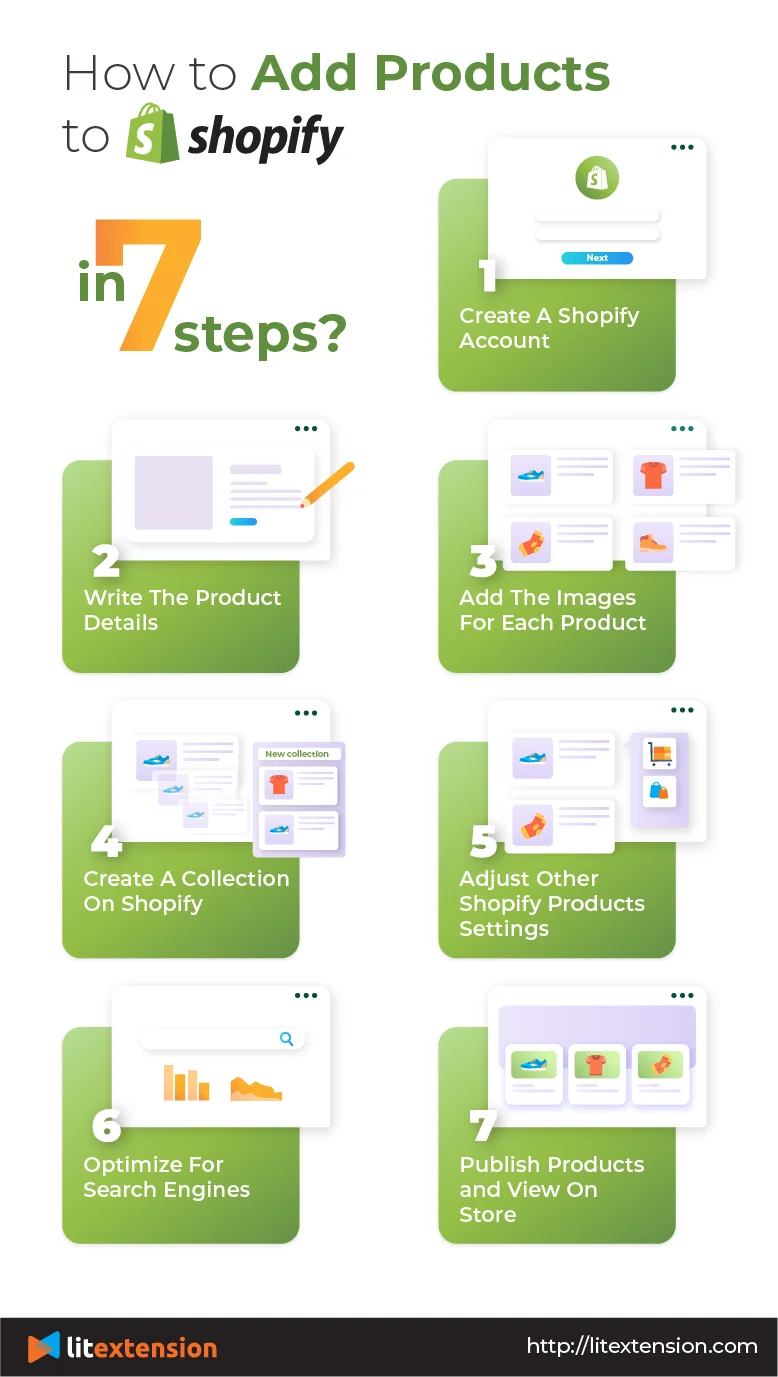
Credit: litextension.com
Introduction To Shopify
Starting an online store can be a big step. Shopify makes this easier. This guide will help you understand how to use Shopify, step by step.
What Is Shopify?
Shopify is a platform for building online stores. It helps you sell products. You can use it without knowing much about coding. Shopify handles many parts of running an online store. These parts include payment processing and inventory management.
Benefits Of Using Shopify
One big benefit is ease of use. Shopify is user-friendly. Many tasks are automated. This saves time. Another benefit is the wide range of features. You can customize your store to fit your needs. There are many themes and plugins available. These can help improve your store’s functionality and appearance.
Shopify also offers good customer support. If you face issues, help is available. Their support team is accessible 24/7. This ensures your store runs smoothly. Lastly, Shopify scales with your business. As your store grows, Shopify can handle more traffic and sales.
Creating A Shopify Account
Creating a Shopify account is the first step to start your online store. This process is straightforward and user-friendly, even for beginners. Follow these steps to set up your account and get your store running.
Signing Up
Visit the Shopify website and click on the “Start free trial” button. You will need to enter your email address, password, and store name. Ensure your store name is unique and reflects your brand. Once you fill in these details, click the “Create your store” button. Shopify will guide you through the rest of the setup process.
Choosing A Plan
After signing up, you need to choose a plan that fits your needs. Shopify offers several plans with different features and pricing. Start with the basic plan if you are new to e-commerce. As your store grows, you can upgrade to a higher plan. Each plan offers a free trial, allowing you to test the features before committing. Remember, picking the right plan is crucial for your store’s success.
Setting Up Your Store
Creating your Shopify store is an exciting journey. It’s where your online business begins. This guide will walk you through the key steps. Let’s start with the basics.
Store Name And Domain
Your store name is crucial. It represents your brand. Choose a name that is easy to remember. Make sure it reflects your business. Once you have a name, you need a domain. A domain is your store’s web address. It should be simple and relevant. You can buy a domain directly from Shopify. Or you can use an existing one. Connect your domain to Shopify to make your store live.
Design And Themes
The design of your store matters. It’s the first thing customers see. Shopify offers many free and paid themes. Choose a theme that fits your brand. Customize your theme to make it unique. Add your logo, change colors, and adjust fonts. Make sure your store looks professional. A well-designed store builds trust. It encourages customers to buy from you.
Remember, you can always change your theme later. So, don’t stress too much at the start. Focus on creating a clean and attractive store. Good design can make a big difference.
Adding Products
Adding products to your Shopify store is an essential step. It helps you showcase what you sell. This guide will walk you through each part of this process. You will learn how to write product descriptions, set prices, and manage inventory.
Product Descriptions
Good product descriptions attract customers. They should be clear and engaging. Describe what makes your product special. Mention key features. Use bullet points for easy reading. Think about what your customers want to know. Answer their questions in your description. Avoid jargon. Keep it simple and direct.
Setting Prices
Setting the right price is crucial. You want to be competitive. But you also need to cover your costs. Research your market. See what similar products cost. Factor in shipping and handling. Think about your profit margin. Use Shopify’s pricing tools. They can help you find the sweet spot. Adjust prices as needed. Test to see what works best.
Managing Inventory
Managing inventory keeps your store running smoothly. Shopify has tools to help. Add your stock levels for each product. Set up alerts for low stock. This helps prevent overselling. Track which items sell best. Adjust your stock levels based on sales. Keep your products organized. Use categories and tags. This makes it easier to find and manage items. Regularly update your inventory. This keeps your store accurate and your customers happy.
Configuring Payment Options
Setting up payment options on Shopify is crucial for your store. It ensures smooth transactions for your customers. Let’s break down the process step by step.
Payment Gateways
First, choose a payment gateway to handle transactions. Shopify supports many gateways like PayPal, Stripe, and Shopify Payments.
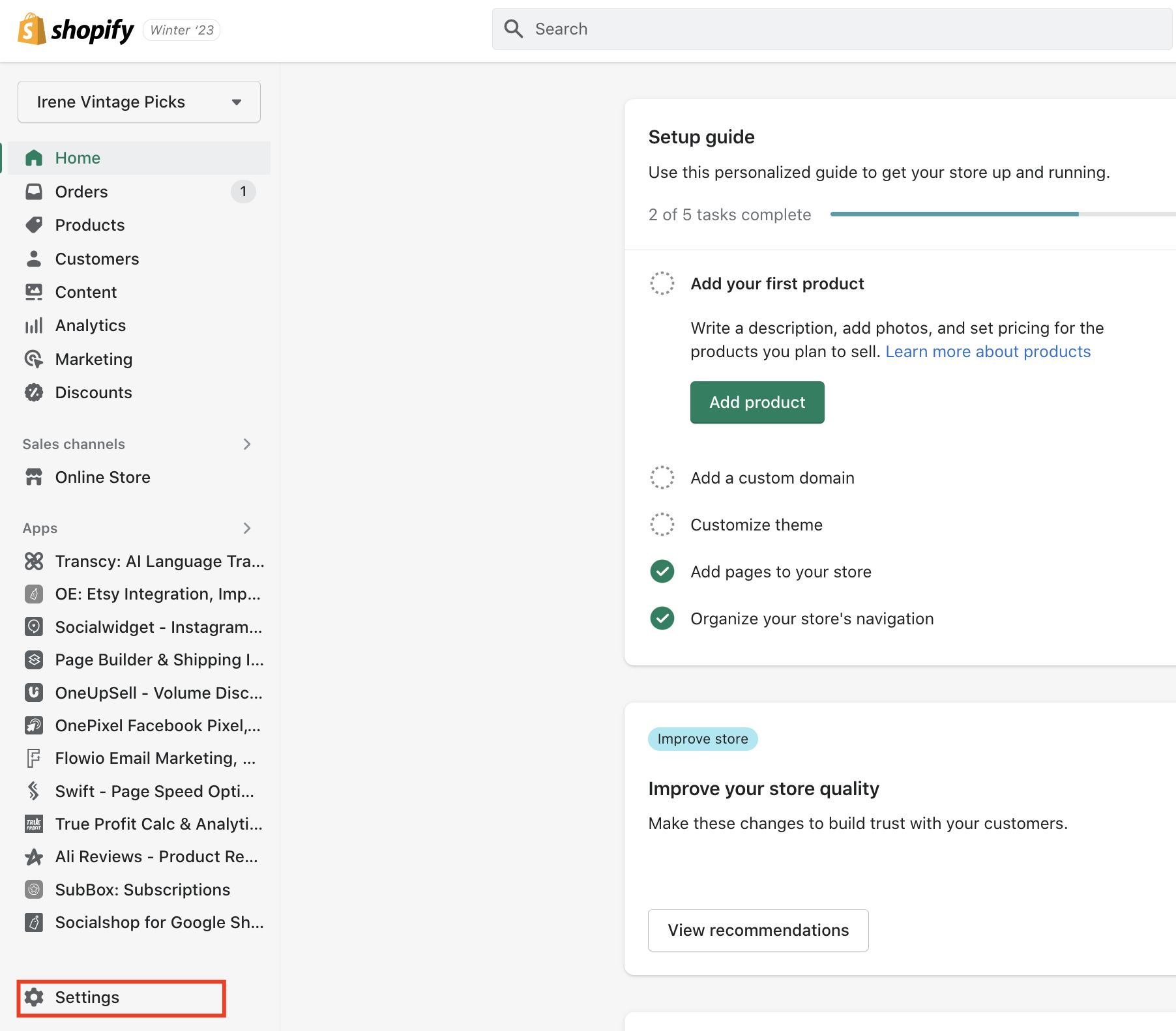
- Go to your Shopify admin panel.
- Click on Settings in the bottom left corner.
- Select Payments.
- Choose your preferred payment gateway.
- Click Activate and follow the setup instructions.
Ensure the gateway supports your country and currency. Also, check the transaction fees. Lower fees mean more profit for you.
Setting Up Taxes
Accurate tax settings are vital for compliance. Shopify simplifies this with automated tax calculations.
- In the Shopify admin panel, go to Settings.
- Click on Taxes.
- Check the box for All prices include tax if applicable.
- Set your Tax Rates based on your location.
- Click Save to apply the settings.
You can also set up tax overrides. This is useful for specific products or regions.
| Region | Tax Rate |
|---|---|
| California | 7.25% |
| New York | 8.875% |
Review your tax settings regularly. Tax laws can change, affecting your rates.
Shipping And Delivery
Shipping and delivery are crucial for your Shopify store. They can make or break the customer experience. Let’s explore how to set up these features step by step.
Shipping Rates
Shipping rates are what your customers pay for delivery. To set these up:
- Go to your Shopify admin.
- Click Settings at the bottom left.
- Select Shipping and delivery.
- Next to your shipping zone, click Manage rates.
- Choose Add rate to create a new rate.
There are different types of shipping rates:
- Free Shipping: Offer free delivery to attract more buyers.
- Flat Rate: Charge a fixed amount for all orders.
- Price-Based Rate: Rate varies based on the order price.
- Weight-Based Rate: Rate varies based on the order weight.
Delivery Methods
Delivery methods determine how you get products to customers. To set these up:
- Go to Settings in your Shopify admin.
- Select Shipping and delivery.
- Click Manage rates next to your shipping zone.
- Scroll to Delivery methods.
- Click Add delivery method.
Common delivery methods include:
- Standard Shipping: Regular delivery service.
- Express Shipping: Faster delivery for an extra fee.
- Local Delivery: Deliver orders locally yourself.
- In-Store Pickup: Customers pick up orders at your store.
Each method can have its own shipping rate. Choose methods that fit your business and customers.
| Delivery Method | Best For |
|---|---|
| Standard Shipping | General orders |
| Express Shipping | Urgent orders |
| Local Delivery | Nearby customers |
| In-Store Pickup | Local customers |
Launching Your Store
Launching your Shopify store is a thrilling step. It’s the moment your online business becomes real. But before you start selling, you need to ensure everything is set up correctly. This section will guide you through reviewing your store settings and going live.
Reviewing Store Settings
Before launching, review your store settings carefully. This step ensures everything is configured correctly. Here’s what to check:
- General Settings: Double-check your store name, email, and business address.
- Payment Providers: Ensure payment methods are active. Verify PayPal, credit cards, or other options.
- Checkout Settings: Configure customer accounts and order processing. Decide if accounts are optional, required, or disabled.
- Shipping Settings: Set your shipping zones and rates. Ensure you cover all regions you plan to ship to.
- Taxes: Configure tax rates. Ensure compliance with local laws.
- Notifications: Customize email notifications for orders, shipping updates, and more.
These settings ensure a smooth experience for both you and your customers.
Going Live
Now, it’s time to make your store live. Follow these steps:
- Choose a Shopify Plan: Select a plan that fits your business size and budget.
- Remove Password Protection: Go to
Online Store > Preferencesand disable the password protection. Your store is now visible to the public. - Test Your Store: Place a test order. Ensure the checkout process is smooth.
- Announce Your Store: Share the launch on social media and other channels. Let everyone know your store is open.
Following these steps ensures your store is ready for customers. Happy selling!
Marketing Your Store
Marketing your Shopify store is crucial for attracting customers. You need to optimize your store for search engines and use social media effectively. These strategies will help you reach a wider audience and increase sales.
Seo Best Practices
Optimize your product titles with relevant keywords. Use clear and concise descriptions that include important keywords. Ensure your images have descriptive alt text. This helps with image search results. Improve your site’s loading speed. A fast site enhances user experience and boosts SEO rankings. Use internal links to guide users to related products or blog posts.
Social Media Integration
Connect your store with your social media accounts. Share your products on platforms like Facebook, Instagram, and Twitter. Use social media buttons on your product pages. This allows users to share products with their followers. Post engaging content regularly. This keeps your audience interested and informed. Use paid ads to target specific demographics. Social media ads can drive traffic to your store.
Managing Orders
Managing orders efficiently is crucial to running a successful Shopify store. This section will guide you through the process of handling orders, ensuring that you can streamline your workflow and keep customers happy.
Order Processing
Once a customer places an order, you need to process it quickly. Here’s how:
- Access Orders: Go to your Shopify admin and click on Orders.
- Review Order Details: Check the order’s items, shipping details, and payment status.
- Fulfill Order: Click Mark as fulfilled once you’ve shipped the items. This will notify the customer that their order is on the way.
- Print Shipping Labels: Use Shopify’s built-in features to print labels directly from the admin panel.
Processing orders promptly keeps customers satisfied and reduces the risk of disputes.
Handling Returns
Returns are part of any eCommerce business. Managing them well can enhance customer trust. Follow these steps to handle returns:
- Access the Return Request: Go to Orders in your Shopify admin.
- Review the Return: Check the reason for the return and the condition of the items.
- Issue a Refund: If the return is valid, click Refund and select the items to refund.
- Update Inventory: Add the returned items back to your inventory if they are resalable.
Handling returns efficiently helps maintain customer satisfaction and loyalty.

Credit: www.tidio.com
Analyzing Performance
Analyzing performance is essential for running a successful Shopify store. It helps you understand your business better. By analyzing data, you can make informed decisions. This leads to better sales and customer satisfaction.
Using Analytics
Shopify offers built-in analytics tools. These tools give you insights into your store’s performance. You can track sales, customer behavior, and other key metrics. Access these tools from your Shopify dashboard.
Start by examining your store’s overall performance. Look at total sales, average order value, and conversion rates. Identify trends and patterns. This helps you understand what works and what needs improvement.
Use the reports section to get detailed information. View data on customer demographics, sales by product, and more. Customize reports to focus on specific aspects of your business. This gives you a clearer picture of your store’s strengths and weaknesses.
Improving Sales
Analyzing performance helps improve sales. Identify your best-selling products. Focus on promoting these items. Adjust your marketing strategies based on customer behavior data. This ensures your efforts are targeted and effective.
Look at your store’s traffic sources. Determine which channels drive the most sales. Allocate your marketing budget to these channels. Optimize your website for better user experience. Ensure your site is easy to navigate and mobile-friendly.
Review customer feedback and reviews. Understand their needs and preferences. Offer products and services that meet their expectations. Implement changes based on their feedback. This leads to higher customer satisfaction and repeat sales.
Credit: onecommerce.io
Frequently Asked Questions
What Is Shopify?
Shopify is an e-commerce platform. It allows you to create an online store. You can sell products and manage your business operations.
How To Set Up Shopify Store?
Sign up on Shopify. Choose a theme for your store. Add products and set up payment methods. Launch your store.
How To Add Products On Shopify?
Go to the Products section. Click ‘Add product’. Enter product details like title, description, and price. Save the product.
How To Customize Shopify Themes?
Navigate to Online Store > Themes. Click ‘Customize’. Use the theme editor to modify layout, colors, and fonts. Save changes.
Conclusion
Setting up a Shopify store is straightforward with these steps. Start by creating an account. Customize your store theme and add products. Set up payment options and configure shipping settings. Test your store to ensure everything works. Launch your store and begin selling.
Regularly update your products and track your sales. Shopify makes online selling easy and efficient. With practice, you will become more confident. Now, go ahead and build your dream online store. Happy selling!
