

Canceling fulfillment on Shopify can have several impacts. It affects your orders, inventory, and potentially your customers’ satisfaction.
Running an online store on Shopify involves managing orders efficiently. Sometimes, you might need to cancel fulfillment for various reasons. Understanding the consequences is crucial to avoid disruptions. When you cancel fulfillment, it affects your order status, inventory levels, and possibly your relationship with customers.
It’s important to know what happens next. This knowledge will help you manage your store better and maintain customer trust. In this post, we’ll explore what happens when you cancel fulfillment on Shopify and how to handle it smoothly.
Impact On Orders
Canceling fulfillment on Shopify can have various impacts on your orders. Understanding these impacts can help manage customer expectations and maintain smooth operations. Here’s a closer look at what happens to pending and completed orders.
Pending Orders
When you cancel fulfillment for pending orders, the order status changes back to unfulfilled. This means the order is still open and waiting for fulfillment. Customers will not receive their products until you reinitiate the fulfillment process.
This action can cause delays. To manage this, inform customers about the delay and provide an updated timeline. Clear communication helps maintain trust and customer satisfaction.
Completed Orders
For completed orders, canceling fulfillment is more complex. If the order was already shipped, you can’t cancel it. You need to manage returns or exchanges separately.
If the order is marked as completed but not shipped, you can cancel fulfillment. The order status will revert to unfulfilled. Communicate with the customer to explain the situation and provide options.

Credit: redstagfulfillment.com
Inventory Adjustments
Canceling fulfillment on Shopify updates your inventory automatically. The system returns the canceled items to available stock. This ensures accurate inventory levels.
Cancelling a fulfillment on Shopify can impact your inventory levels. Understanding these changes is crucial for maintaining accurate stock records. Let’s explore how cancelling a fulfillment affects your inventory.Stock Levels
Cancelling a fulfillment will return the items to your stock. This ensures you have accurate inventory counts. If you don’t adjust the stock, you might oversell.Inventory Tracking
Shopify automatically updates your inventory. This helps in keeping accurate records. You can view these changes in the inventory tracking section. It shows the adjustments made after cancellation. This transparency aids in managing stock effectively. “`Customer Notifications
Customer notifications play a crucial role when you cancel fulfillment on Shopify. Keeping your customers informed helps maintain trust and transparency. This section will explore how Shopify manages these notifications effectively.
Email Updates
Shopify sends email updates to customers for every major action on their order. When you cancel fulfillment, they receive an email notification immediately. This email explains the reason for the cancellation. It also provides any next steps they need to take. Clear and direct communication helps prevent confusion. It also minimizes customer dissatisfaction.
Order Status
The order status on your Shopify store updates in real-time. When you cancel fulfillment, the status changes instantly. Customers can see this update by logging into their account. The new status reflects the cancellation and any other updates. This feature ensures customers always have the latest information.
Real-time updates on order status help manage customer expectations. It also reduces the need for additional customer service interactions. Clear order status updates contribute to a better shopping experience.
Refund Process
When you cancel fulfillment on Shopify, the refund process is an essential step. Understanding how refunds work helps maintain customer trust and ensures a smooth experience. Below, we’ll explore the process for partial refunds and full refunds.
Partial Refunds
Sometimes, customers return only part of their order. This is where partial refunds come into play. You can issue a refund for specific items while keeping the rest of the order intact.
- Go to the order in your Shopify admin.
- Click on the “Refund” button.
- Select the items for a partial refund.
- Enter the amount to refund.
- Click “Refund” to complete the process.
Partial refunds are useful for handling damaged items or customer errors. This flexibility can improve customer satisfaction and boost loyalty.
Full Refunds
If a customer returns their entire order, you’ll need to issue a full refund. This process is straightforward and ensures the customer gets all their money back.
- Navigate to the order in your Shopify admin.
- Click on the “Refund” button.
- Ensure all items are selected for a refund.
- Verify the total refund amount.
- Click “Refund” to finalize.
Full refunds are typically necessary for major issues. This can include incorrect orders, or when the product does not meet expectations.
Issuing refunds promptly can help maintain a positive reputation. Happy customers are more likely to return and recommend your store to others.
Shipping Implications
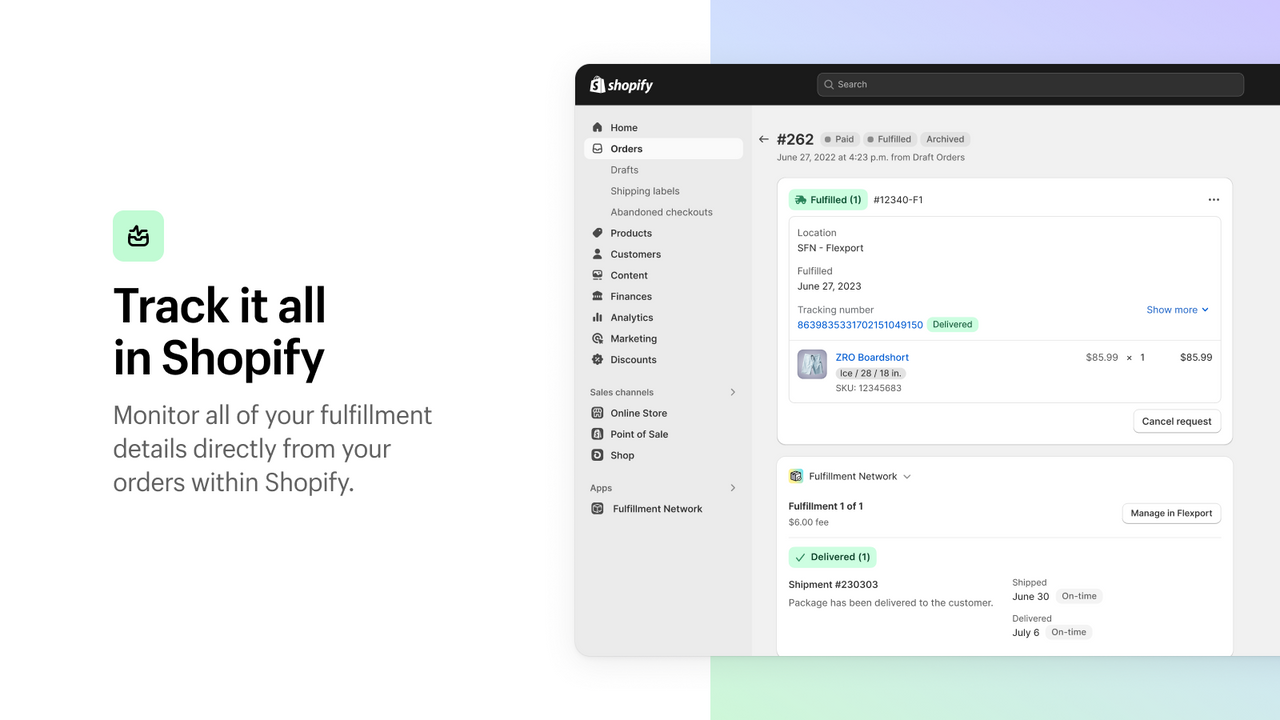
Canceling fulfillment on Shopify affects your shipping process. Understanding these implications is vital. It helps you manage customer expectations better. You also need to handle logistics with care.
This section covers what happens after cancellation. It includes carrier notifications and shipping costs.
Carrier Notifications
When you cancel fulfillment, carriers must be notified. This step is crucial. It prevents the shipment from being sent out. You need to act fast to inform them.
Most carriers offer online cancellation. Log in to their portal. Cancel the shipping request directly. This ensures the carrier knows your plans have changed.
Failure to notify can result in unintended shipping. It creates confusion and extra costs. Always confirm the cancellation with the carrier.
Shipping Costs
Canceling fulfillment affects shipping costs too. You might face cancellation fees. Carriers often charge for last-minute changes.
If the item has shipped, you incur return shipping costs. These charges impact your profit margins. Plan carefully before canceling.
Refunding shipping fees to customers is another concern. Clear communication with your customers is key. Inform them about any changes in shipping status.
Keeping track of these costs helps you stay profitable. It also ensures your customers remain satisfied.
Credit: apps.shopify.com
Financial Reconciliation
Financial reconciliation is crucial when managing your Shopify store. Canceling fulfillment can impact your accounting records and transaction fees. Understanding these changes helps maintain accurate financial records.
Accounting Records
Cancelling fulfillment updates your accounting records. It reverses the inventory deduction. This ensures your stock levels remain accurate. Your revenue records also adjust. The sale no longer counts as completed. This helps prevent revenue overstatements. Always review your accounting software after cancellations. This ensures all records sync properly.
Transaction Fees
Transaction fees may change after canceling fulfillment. Shopify often refunds these fees. This depends on your payment gateway. Check your payment provider’s policy. Some gateways may keep a small portion. This is for processing the initial transaction. Understanding these fees helps manage costs effectively. Always review your fee statements after cancellations.
Effects On Analytics
Canceling fulfillment on Shopify can impact your analytics significantly. It may cause discrepancies in sales data and order tracking. This can lead to inaccurate performance reports and misinformed business decisions.
Cancelling fulfillment on Shopify can impact your analytics. This action affects both sales data and performance metrics. Understanding these effects helps you make better decisions. Let’s explore how each area is impacted.Sales Data
Cancelling an order changes your sales data. The sale no longer counts in your totals. This affects your revenue numbers. It also changes your average order value. Your sales reports will show less income. This can be confusing without proper tracking. Always keep records of cancelled orders.Performance Metrics
Your store’s performance metrics also change. Metrics like conversion rates and customer satisfaction can be affected. Cancelled orders might lower your conversion rate. Customer satisfaction may drop if orders are cancelled often. Track these metrics to understand the impact. Make adjustments to improve your store’s performance. Cancelling fulfillment has clear effects. Understanding these changes helps maintain accurate analytics. “`
Credit: magecomp.com
Best Practices
Best practices for canceling fulfillment on Shopify help maintain smooth operations and positive customer relations. Adhering to these practices ensures minimal disruption to your business and keeps your customers satisfied.
Customer Communication
Clear communication with customers is crucial when canceling fulfillment. Inform them promptly about the change. Use simple, straightforward language. Explain the reason for the cancellation. Offer alternatives if possible. This builds trust and shows you value their time and business.
Always follow up with a detailed email. Include information on refunds or alternative solutions. Provide a timeline for the next steps. Ensure the customer knows what to expect. This keeps them informed and reduces frustration.
Order Management
Effective order management is vital in canceling fulfillment. Update your order system immediately. Remove or flag the canceled order to avoid confusion. This prevents the order from being processed accidentally.
Review your inventory levels. Adjust them if necessary. Ensure accurate stock levels for future orders. This helps maintain an efficient workflow and prevents overselling.
Document the cancellation process. Keep detailed records of all communications and actions taken. This helps in resolving any disputes and provides a clear history of the transaction.
Frequently Asked Questions
What Happens If I Cancel A Fulfillment?
Canceling a fulfillment stops the shipping process. The order will not be sent. You can then restock the item.
Can I Restock Items After Canceling Fulfillment?
Yes, after canceling fulfillment, you can restock items. This ensures your inventory remains accurate. Restocking helps manage future orders.
Does Canceling Fulfillment Affect My Shopify Store?
Canceling fulfillment does not affect your store’s overall function. It only stops the specific order’s shipping process. Your store remains operational.
Will Customers Be Notified When I Cancel Fulfillment?
Customers are not automatically notified when you cancel fulfillment. You should manually inform them about the order status. Clear communication helps maintain trust.
Conclusion
Canceling fulfillment on Shopify impacts your business operations. Orders must be managed carefully. It can affect customer satisfaction and inventory levels. Always communicate with customers promptly. Consider the reasons for cancellation. Ensure your team understands the process. This helps maintain smooth operations.
Review Shopify’s policies thoroughly. Stay informed and ready to handle such situations. Proper management reduces negative impacts. Keep your business running efficiently.
