

Creating a Moz account is simple and quick. You can start accessing valuable SEO tools in just a few steps.
Moz offers a range of features to help you improve your website’s visibility on search engines. From tracking keyword rankings to analyzing backlinks, a Moz account provides essential tools for SEO. In this guide, you will learn how to create your Moz account easily.
Whether you are a beginner or an experienced marketer, setting up your Moz account will be a breeze. Let’s dive in and get your Moz account ready to use.

Credit: www.youtube.com
Introduction To Moz Account
Creating a Moz account is simple and beneficial for anyone involved in digital marketing. Moz offers tools that can help optimize your website and improve search engine rankings. This guide will help you understand why a Moz account is important and the benefits it brings.
Importance Of Moz Account
A Moz account is vital for several reasons:
- SEO Insights: Gain access to valuable data and insights on your website’s SEO performance.
- Keyword Research: Find the best keywords to target for your content strategy.
- Competitive Analysis: Understand what your competitors are doing and how you can outperform them.
Benefits Of Having A Moz Account
Here are some of the key benefits of having a Moz account:
| Feature | Benefit |
|---|---|
| Site Audits | Identify and fix issues to improve your site’s health. |
| Link Explorer | Analyze your backlink profile and discover new opportunities. |
| Rank Tracking | Monitor your keyword rankings and track changes over time. |
| On-Page Optimization | Receive suggestions to optimize your content for better rankings. |
Moz, you can make data-driven decisions to enhance your online presence. The tools are user-friendly and designed to help you succeed in your SEO efforts.
Getting Started
Getting started with creating a Moz account is simple. Moz offers tools that help with SEO. Follow these steps to create your account.
Accessing The Moz Website
First, open your web browser. Type “moz.com” in the address bar. Press Enter to visit the Moz website. The Moz homepage will appear. You will see various options and menus.
Navigating To The Sign-up Page
Look at the top-right corner of the homepage. Find the “Login” button. Next to it, there is a “Sign Up” link. Click on the “Sign Up” link. This will take you to the registration page. Here, you can create your new Moz account.
Creating Your Account
Creating a Moz account is simple and quick. Follow these steps to get started on your journey to better SEO insights and tools.
Entering Personal Information
To begin, visit the Moz website and click on the “Sign Up” button. You’ll be prompted to enter your personal information. Fill out the required fields:
- First Name
- Last Name
- Email Address
Ensure that your email address is valid. Moz will send a confirmation email to this address.
Setting A Secure Password
Next, create a secure password. Use a combination of:
- Uppercase letters
- Lowercase letters
- Numbers
- Special characters
A strong password helps protect your account from unauthorized access. Aim for at least 8 characters.
| Good Password Example | Bad Password Example |
|---|---|
| My$3cureP@ss | password123 |
After setting your password, click on the “Create Account” button. You will receive a confirmation email shortly.
Open the confirmation email and click the verification link. This step verifies your email and activates your Moz account.

Credit: moz.com
Verification Process
The verification process is crucial to ensure the security and authenticity of your Moz account. It confirms that you are the rightful owner of the email address used to register. This step-by-step guide will walk you through the verification process, ensuring a seamless experience.
Email Verification
First, check your email inbox for a verification message from Moz. Open the email and find the verification link inside. Click on the link to confirm your email address. If you do not see the email, look in your spam or junk folder. Sometimes, emails get filtered there. Still can’t find it? Request another verification email from Moz.
Account Activation
After verifying your email, your account is almost ready. Log in to your Moz account using your credentials. You might be asked to complete your profile. Fill in any required details to activate your account. Once done, you can access all Moz features. Welcome to your new Moz account!
Exploring Moz Features
Creating a Moz account opens up a world of SEO tools and insights. These features help you understand and improve your website’s performance. Below, we will explore some key features of Moz.
Dashboard Overview
Once you log in, you are greeted with the Moz Dashboard. This is your central hub. Here, you can see a summary of your website’s health. Key metrics include domain authority, backlinks, and top-performing pages.
The dashboard is user-friendly. It provides quick links to detailed reports. You can easily navigate to different sections. This helps you monitor and manage your SEO activities efficiently.
Key Tools And Services
Moz offers a variety of tools and services. Each tool is designed to assist with different aspects of SEO. Below are some of the most important ones:
- Keyword Explorer: This tool helps you find the best keywords. You can see search volume, difficulty, and opportunity scores.
- Link Explorer: Use this to analyze your backlinks. Understand who links to your site and your link quality.
- Site Crawl: This service identifies technical issues on your site. It highlights problems that can affect your search engine ranking.
- Rank Tracker: Track your keyword rankings over time. See how your positions change and identify trends.
- On-Page Grader: This tool evaluates individual pages. Get suggestions for improving your content’s SEO.
These tools are essential for improving your website’s visibility. They provide actionable insights and detailed reports. This allows you to make informed decisions.
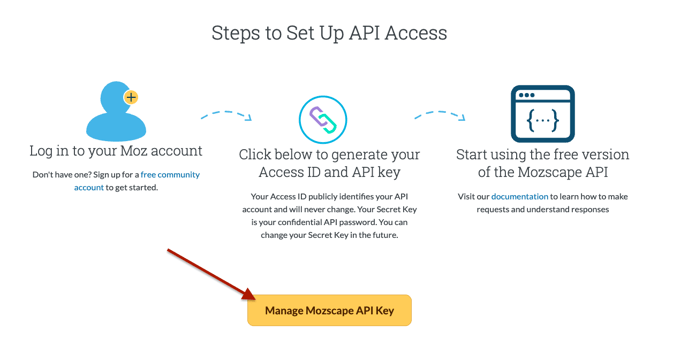
Credit: help.dashthis.com
Optimizing Your Profile
Optimizing your Moz profile is essential for maximizing your presence and credibility. A well-optimized profile enhances your visibility and helps build trust with your audience. Here’s how to make the most out of your Moz account by optimizing your profile effectively.
Adding Profile Details
Ensure your profile details are complete and accurate. Start with your full name. A real name adds authenticity to your profile. Include a professional photo. A clear headshot works best. Add a brief bio. Highlight your expertise and interests. This helps others understand your background. Fill in your contact information. Make it easy for others to reach you.
Customizing Settings
Customize your profile settings to suit your preferences. Go to the settings section. Adjust your privacy settings. Choose what information you want to share. Set your email notifications. Control how often you receive updates. Link your social media accounts. This integrates your online presence. Customize your notification preferences. Decide how you receive alerts and messages.
Utilizing Moz Tools
Utilizing Moz Tools can elevate your SEO strategies. Moz offers various tools that help you optimize your website, analyze competitors, and improve search engine rankings. Here, we’ll focus on two essential tools: Keyword Explorer and Site Audit.
Keyword Explorer
Keyword Explorer helps you find the best keywords for your content. Enter a keyword, and the tool provides data like search volume, difficulty, and potential. This helps you choose keywords that can drive traffic to your site.
Keyword Explorer also shows related keywords. These can give you more ideas for your content. Use these suggestions to create more targeted and relevant content. This can improve your search engine rankings.
Site Audit
Site Audit helps you check your website for technical issues. It scans your site and identifies problems that can affect your rankings. These issues can include broken links, missing tags, or slow loading pages.
Fixing these issues can improve your site’s performance. It can also make your site more user-friendly. A better user experience can lead to higher search engine rankings.
Site Audit also provides recommendations. Follow these to optimize your site further. This can help you stay ahead of your competitors.
Troubleshooting
Creating a Moz account is usually straightforward. But sometimes, users encounter issues during the process. This section will help you troubleshoot common problems and provide guidance on contacting support if needed.
Common Issues
Some users face problems with their email verification. Double-check the email address you entered. Ensure it is correct and that you have access to it. Also, check your spam folder for the verification email.
Another frequent issue is password creation. Make sure your password meets Moz’s security requirements. Use a mix of letters, numbers, and special characters. Avoid common passwords and those used on other sites.
Contacting Support
If you cannot resolve the issue on your own, contact Moz support. Visit the Moz Help Center and submit a support ticket. Provide as much detail as possible about your issue. This will help the support team assist you faster.
You can also reach out to Moz support via their social media channels. They are active on Twitter and Facebook. Sometimes, social media can offer quicker responses.
Frequently Asked Questions
What Is Moz Account?
A Moz account is a membership on Moz. com. It provides access to SEO tools, resources, and insights.
How To Create A Moz Account?
Visit Moz. com, click “Sign Up,” and fill out the required information. Verify your email to complete registration.
Is Moz Account Free?
Moz offers a free account with limited features. For full access, consider their paid subscriptions.
What Are Benefits Of Moz Account?
A Moz account provides SEO tools, keyword research, site audits, and rank tracking. It helps improve your site’s SEO.
Conclusion
Creating a Moz account is simple and beneficial. It enhances your SEO efforts. Follow the steps, and you’ll quickly set up your profile. Remember, Moz offers valuable tools for your website. Use them to boost your online presence. This guide should help you get started.
Now, dive in and explore Moz’s features. Happy optimizing!
