

Xero Accounting Software simplifies financial management for small businesses. Its features help track expenses and manage cash flow efficiently.
In today’s fast-paced business world, handling finances can be daunting. Xero offers solutions that ease this burden, providing tools for GST returns, bill payments, and e-invoicing. With seamless app integrations, it caters to various business types like retail, construction, and self-employed professionals.
This software enhances financial clarity and reduces manual tasks, allowing users to focus on growth. Whether you’re starting out or looking to streamline operations, Xero provides insights and resources for smarter financial decisions. Let’s explore how Xero can transform your business’s financial management.

Credit: www.vedamani.com
Introduction To Xero Accounting Software
Xero Accounting Software is a powerful tool designed for small businesses and sole traders. It offers a range of features to streamline financial management. With Xero, businesses can effectively manage their finances and gain valuable insights. This software is flexible, cloud-based, and integrates seamlessly with various applications.
What Is Xero?
Xero is an all-in-one accounting software that simplifies managing finances. It caters to different business types, including self-employed individuals, construction, trades, and retail. Xero facilitates financial tasks such as GST returns, bill payments, and expense claims. It also supports e-invoicing through InvoiceNow, making invoicing efficient and straightforward.
Purpose And Benefits For Businesses
The primary purpose of Xero is to enhance financial management and cash flow control. It reduces manual admin tasks, providing greater efficiency and clarity on financial numbers. Businesses benefit from customizable options tailored to their specific needs. Xero also offers resources from experts for better cash flow management.
- Enhanced Financial Management: Gain control over cash flow and financial numbers.
- Efficiency: Reduce time spent on manual tasks.
- Clarity: Access clear financial insights and reports.
- Seamless Integrations: Connect with various apps for expanded functionality.
Moreover, Xero offers a 30-day free trial with no credit card required, allowing businesses to explore its features. The software also provides 24/7 online support to assist users at any time.
Setting Up Your Xero Account
Setting up your Xero account is the first step to efficient financial management. Xero offers a user-friendly platform for small businesses and sole traders. Here’s how to get started with creating your account and navigating the interface.
Creating A Xero Account
Follow these simple steps to create your Xero account:
- Visit the Xero website.
- Click on the “Free Trial” button.
- Fill out the registration form with your details.
- Choose your desired plan: Starter, Standard, or Premium.
- Complete the setup without needing a credit card.
Enjoy a 30-day free trial with 24/7 online support. Cancel anytime during this period without charges.
Navigating The User Interface
Xero’s interface is intuitive and easy to navigate. Here are some key areas:
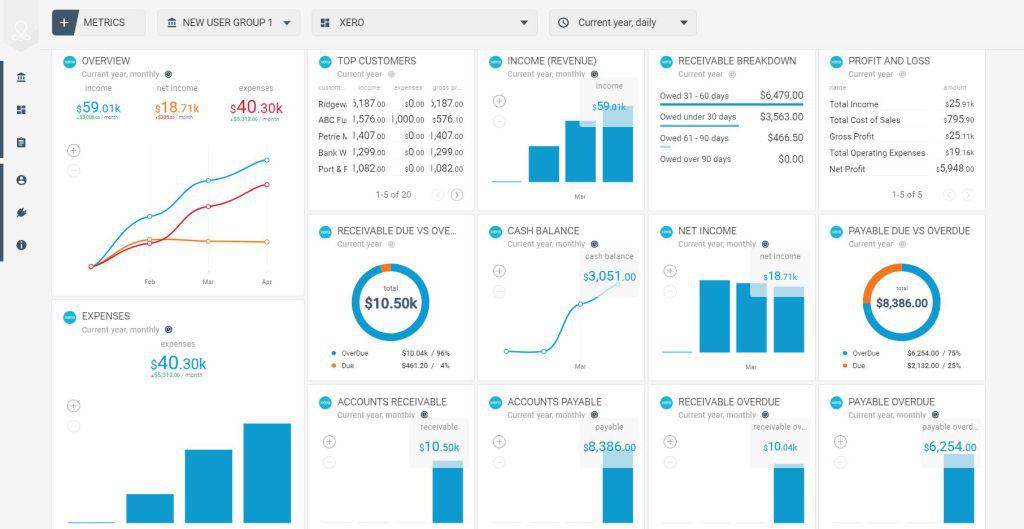
- Dashboard: View your financial summary and recent activities.
- Invoices: Create and manage your e-invoices with InvoiceNow.
- Bills: Track and manage all your bills.
- Reports: Access custom reports for smarter insights.
Use the navigation bar to switch between features. This aids in managing finances effortlessly.
For enhanced efficiency, leverage the seamless app integrations Xero offers.
Key Features Of Xero
Xero is a robust accounting software designed for small businesses and sole traders. It offers essential tools to manage finances efficiently. From invoicing to financial reporting, Xero streamlines accounting tasks and enhances financial clarity. Here, we explore the key features of Xero that make it a preferred choice for many businesses.
Invoicing And Billing
Xero simplifies invoicing and billing with its e-invoicing feature, InvoiceNow. Create and send professional invoices quickly, ensuring faster payments. Customize invoices to reflect your brand identity. Track which invoices are paid and which are due, all from one place. This helps in maintaining a steady cash flow.
Bank Reconciliation
With Xero, bank reconciliation becomes effortless. Connect your bank accounts to Xero for automatic data import. Match transactions with ease using the intuitive interface. Identify discrepancies quickly and maintain accurate financial records. This feature ensures your books are always up-to-date.
Expense Tracking
Xero offers robust expense tracking capabilities. Capture expenses on-the-go with the mobile app. Submit expense claims directly through the platform. Categorize expenses for better financial insights. This feature helps in reducing manual admin tasks, saving time and effort.
Financial Reporting
Xero provides customizable financial reports for smarter insights. Generate reports like GST returns and bill payments. Analyze your business performance with clarity. The reports are easy to understand, aiding better decision-making. Access resources from Xero experts for enhanced cash flow management.
| Feature | Benefit |
|---|---|
| Invoicing and Billing | Efficient invoicing with InvoiceNow |
| Bank Reconciliation | Accurate and up-to-date financial records |
| Expense Tracking | Reduced manual admin tasks |
| Financial Reporting | Better decision-making with smart insights |
With these features, Xero empowers businesses to manage their finances with ease and precision.
Pricing And Affordability Of Xero
Xero Accounting Software provides a versatile solution tailored for small businesses. Understanding its pricing and affordability is crucial for maximizing its benefits. This section explores the different plans and offers insights into why Xero is a cost-effective choice for financial management.
Understanding Xero’s Pricing Plans
Xero offers several pricing plans to cater to diverse business needs. Each plan is designed to provide flexibility and value:
- Starter Plan: Usually $39, now $3.90 SGD per month. Save $105.30 over 3 months.
- Standard Plan: Usually $65, now $6.50 SGD per month. Save $175.50 over 3 months.
- Premium Plan: Usually $88, now $8.80 SGD per month. Save $237.60 over 3 months.
- 30-day Free Trial: $0 SGD. Access features without a credit card, with 24/7 online support.
These plans offer substantial savings, making Xero a budget-friendly choice for small businesses looking to streamline their financial management.
Cost-benefit Analysis For Small Businesses
For small businesses, investing in Xero provides a favorable cost-benefit ratio. Consider the following advantages:
- Enhanced financial management and cash flow control.
- Greater efficiency and clarity on financial numbers.
- Reduced manual admin tasks, saving time and resources.
- Access to resources from Xero experts for better cash flow management.
- Efficient invoicing with InvoiceNow.
These benefits underscore Xero’s value, especially at the current discounted rates. The savings on offer coupled with the 30-day free trial make Xero a smart investment for businesses aiming for financial clarity.
Pros And Cons Of Using Xero
Xero Accounting Software offers a comprehensive suite of tools for small businesses. It integrates various features for effortless financial management. Like any software, it has its pros and cons. Understanding these can help users decide if Xero meets their business needs.
Advantages Of Xero For Accounting
Xero is designed to simplify accounting tasks. It enhances financial management and provides cash flow control. Users enjoy reduced manual admin tasks, thanks to seamless app integrations. The software offers customizable options for different business types, such as self-employed and retail.
- Efficient invoicing with InvoiceNow.
- Access to resources from Xero experts.
- Flexible, cloud-based financial management.
Its pricing plans are attractive, with significant discounts on starter, standard, and premium plans. Users can also benefit from a 30-day free trial without requiring a credit card.
Support is available 24/7, ensuring users get help whenever needed.
Common Challenges And Limitations
Despite its advantages, Xero has some limitations. The software might require a learning curve for new users. Some find the interface complex initially. Integration with specific apps might not be as seamless as expected.
- Potential complexity for beginners.
- Compatibility issues with certain apps.
- Limited offline functionality.
Users might experience challenges with GST returns and bill payments. Such issues can affect workflow efficiency. It’s essential to consider these potential drawbacks when choosing Xero.

Credit: www.floatapp.com
Specific Recommendations For Xero Users
Xero Accounting Software is a powerful tool for small businesses and sole traders. With its flexible, cloud-based financial management system, users can enjoy effortless expense tracking and custom reports. This section provides specific recommendations to maximize its benefits.
Best Practices For Beginners
- Start with the Free Trial: Use the 30-day free trial to explore features without any financial commitment.
- Utilize Online Support: Access 24/7 online support for guidance and troubleshooting.
- Integrate Seamlessly: Connect with apps to streamline operations and reduce manual tasks.
- Understand GST Returns: Learn the GST return feature for better tax management.
- Customize Options: Tailor the software settings to fit your business needs.
Ideal Business Scenarios For Xero
Xero is designed for various business types, offering specific tools for each scenario. The following are ideal business situations where Xero excels:
| Business Type | Features |
|---|---|
| Self-employed | Expense claims, cash flow management, e-invoicing |
| Construction & Trades | Bill payments, seamless app integrations |
| Retail | Customizable reports, enhanced financial management |
Choose Xero plans based on your business needs. The Starter, Standard, and Premium plans offer various features at discounted prices.
Maximize efficiency with Xero and enjoy reduced admin tasks. Gain clarity on financial numbers and access expert resources for better cash flow control.
Credit: projectmanagers.net
Frequently Asked Questions
Can I Learn Xero By Myself?
Yes, you can learn Xero by yourself. Use online tutorials, guides, and practice regularly. Explore Xero’s official resources for comprehensive learning. Join forums and communities for tips and support. Consistent practice will enhance your skills.
Is Xero Accounting Software Easy To Use?
Xero is user-friendly with an intuitive interface. It offers simple navigation and straightforward functionalities. Users can quickly learn to manage finances, invoices, and reports. Its cloud-based system ensures accessibility and flexibility. Xero provides helpful tutorials and support, enhancing ease of use for both beginners and experienced accountants.
Is Xero Difficult To Learn?
Xero is user-friendly and designed for easy navigation. Beginners may require some initial guidance. Online resources and tutorials are available to help users quickly learn the software. Many find it intuitive and adaptable for accounting needs. With practice, users can efficiently manage finances using Xero.
Is Xero Better Than Quickbooks?
Xero and QuickBooks both excel in accounting software. Xero offers strong integration and user-friendly features. QuickBooks provides robust reporting and scalability. Choose based on specific business needs and budget.
Conclusion
Navigating finances becomes easier with Xero Accounting Software. Manage expenses effortlessly. Simplify cash flow control and billing. Integrate apps for smoother operations. Customize settings to fit your business needs. Xero provides tools for efficient financial management. Experience improved clarity in numbers. Enjoy reduced manual tasks. Access expert resources for better insights. Try Xero’s free trial for a comprehensive understanding. Save on plans with current offers. Remember, Xero supports small businesses and sole traders effectively. Explore more at Xero’s official site. Embrace smart accounting today!
